
- Title: TWRP 3.3.1-0
- Listed: October, 2019
- Last modified: 10/12/2019 12:26 am
- Version: TWRP 3.3.1-0
You must be logged for ROM download.
9882 total views, 1 today

 Member Info
DESCRIPTION
TWRP-Version
TWRP Unoffical 3.3.1-0
Bugs
- bugless
How to flash TWRP on your Oukitel K6000Pro
1. turn your device off and don't plug usb cable on your device
2. download my twrp zip-file and also the SPFlash Tools on your PC
3. Extract the twrp-zip file and also the SPFlash Tool in C:TWRP
4. Start the SPFlash Tool and choose for "Scatter-loading file" the txt-file in extracted twrp-folder
5. now press top on "download"
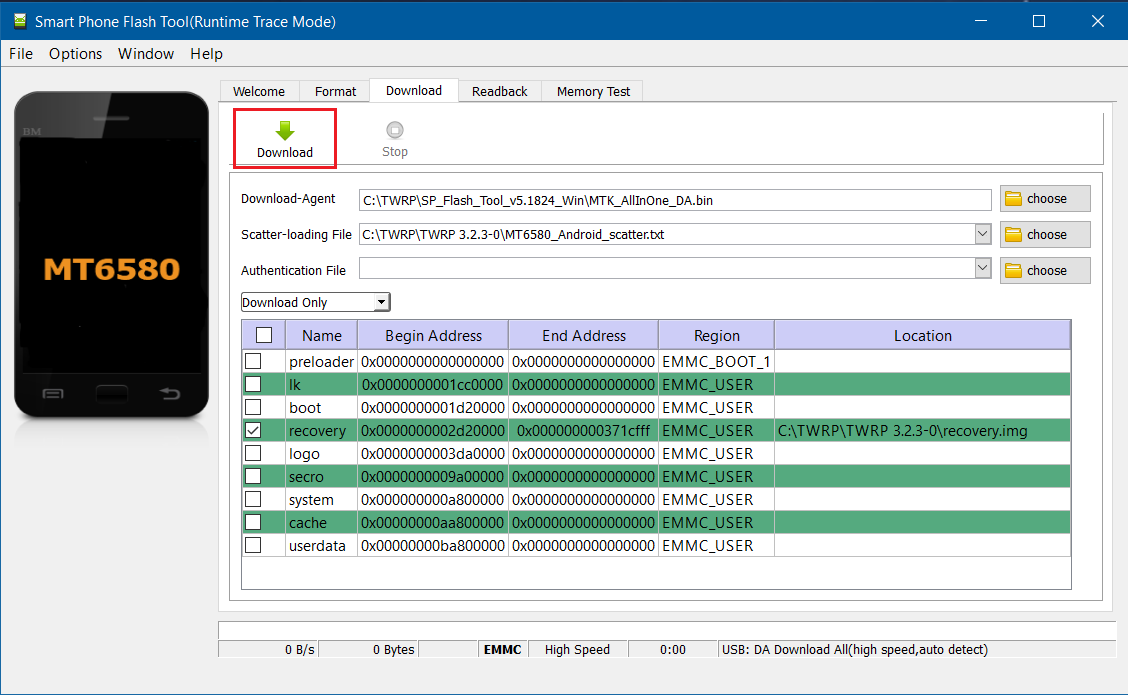
6. connect your USB Cable from Oukitel K6000Pro to your PC
7. the programm will start automatically and flash the TWRP on your recovery partition
8. when it's done (green tick), unplug the usb cable and start the device once with VOL+ and Power at the same time. Choose in the boot menu "recovery"
It's important to do this step at the first boot, otherwise the Cubot Recovery will rewrite the parition and you need to do the steps again.
If you are once in twrp successfully, it will remain on your device.
※Please make a backup of your device before installing or updating ROM
TWRP does not work, the phone does not restart. does not respond to VOL+ and Power. you must disconnect the battery so that the SP Flash Tool can see the phone.
It is not working indeed. the phone never boots to TWRP
For me it is working with different scatter file – from TWRP 3.0.3.
Twrp works. But after flashing custom rom resurection, phone stays in bootloop. Reboot twrp in fastboot mode then with fastboot ADB on pc flash recovery stock rom and I am in latest resurection for oukitel K6000 pro. Thanks