
- Title: TWRP Custom Recovery 2.8.2.0 V2
- Listed: January, 2015
- Last modified: 01/08/2015 12:19 am
- Version: Android 4.4.2
You must be logged for ROM download.
23822 total views, 2 today
5 Total favorites

 Member Info
DESCRIPTION
This is just a recovery I created using the Easy Magic TWRP Installer from Dees Troy and the Teamwin Team.
Everything seems to work OK but please use at your own risk.
recovery.img format.
To flash: save recovery.img to root of sdcard.
Connect rooted phone to PC(adb drivers installed) with USB debuggging on.
type: adb shell /system/bin/dd if=/mnt/sdcard/recovery.img of=/dev/recovery bs=4096
type: adb reboot recovery
OR use mobileuncle or similar tools.
Tested with Kingzone K1 Turbo with stock 4.4.2 KitKat
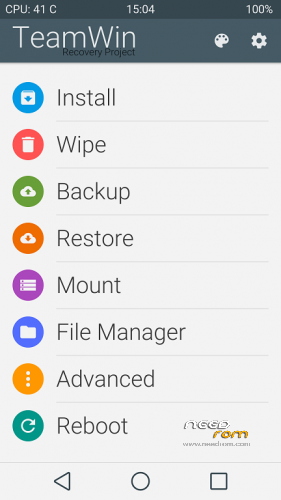
To apply the material theme as shown in screenshot download the ui.zip file somewhere in your PC.
Open a command prompt in that folder and type: adb push ui.zip /storage/sdcard0/twrp/theme/
Then type: adb reboot recovery
※Please make a backup of your device before installing or updating ROM
awesome job! but you got one little type
the command to apply theme should be
adb push ui.zip /storage/sdcard0/twrp/theme/ui.zip
looking great btw!!
Thank! I just pasted the command I used but of course yours should work as well
are you sure? when i use /storage/sdcard0/twrp/theme/ it says error: is a directory, if i use /storage/sdcard0/twrp/theme it moves the zipfile in the twrp folder and renomes it "theme" (even without zip) wich doesnt work too! However might be different versions of adb we are using?
Still, awesome looking recovery
Hi I try to download the recovery but nothing star please help how to download the recovery I click on link but only new page open.
Can I install the recovery.img file with mobileuncle MTK Tool ??
yes u can i did
Gread job, thanks.
Regards
Thanks tried it with mobile uncle tools but it didnt work for me. So i used rashr which worked without any problem. Btw you can also just move ui.zip in the theme folder manually with root explorer which is more easy in my opinion =)
Great thanks