
- Title: TWRP Oukitel Mix 2
- Listed: January, 2018
- Last modified: 01/18/2018 4:30 pm
- Version: TWRP v3.2.1 Nougat
You must be logged for ROM download.
20739 total views, 2 today
3 Total favorites
 Member Info
DESCRIPTION
TWRP (Nougat) for Oukitel Mix 2 Final
Fixed: Internal Storage=0Mb. Credits: rico69
Thanks to rico69 for his patient and work testing the diferent releases and solutions
Here is the TWRP custom Recovery for our Oukitel Mix 2, necessary to install the ROOT (Magisk) and future custom ROMs.
The installation process is not simple, but with patience and following the instructions carefully you will have it ready in a few minutes. VERY IMPORTANT! The installation process requires formatting the internal storage, because it is encrypted and for TWRP to work correctly and have total control over our device, it is necessary to perform the internal storage formatting.
Please, before continuing, make a backup of your data. For example, in WhatsApp use the option to backup your chats. In any other app that has the option to backup data, use it. Use the option to synchronize your applications with the google account so that afterwards the applications are installed automatically when you start using your mobile. The process will make your mobile look as if it had done a factory reset.
The installation must be done with fastboot.
Requirements:
Download and install drivers for your phone (MT67xx VCOM and preloader) in your PC. Follow this tutorial: http://www.techglobex.net/2017/03/download-mediatek-usb-vcom-drivers-for-android.html
Download and install ADB software and ADB drivers in your PC. Follow this tutorial: http://rootmygalaxy.net/install-android-adb-and-fastboot/
Download the TWRP-Mix2.zip on this page.
Download the lazyflasher-no-verity-opt-encrypt.zip file on this page.
Take a Micro SD Card
Copy lazyflasher-no-verity-opt-encrypt.zip to the Micro SD Card (Copy Magisk installer in the SD Card)
Instructions for first installation:
IN YOUR PHONE:
1. Tap on Settings -> About phone -> Tap Build number seven times to enable "Developer options". Go to Developer options -> OEM unlocking enabled and USB debugging enabled.
IN YOUR PC:
2. Extract the recovery.img file from de TWRP-Mix2.zip
3. Go to adb installation directory (usually C:\ADB) and copy/paste here the recovery.img file
4. In an empty zone of the folder, hold shift key (in PC keyboard) and right click (in you mouse). In the context menu choose “Open Command Window Here”
5. Connect your phone to the PC via USB cable.
6. Type the next command : adb reboot bootloader (and press enter). The phone will reboot in fastbood mode.
7. Now type the next command: fastboot oem unlock (and press enter)
IN YOUR PHONE:
8. Press volume up (into your phone) to confirm to unlock the bootloader. You will see in the CMD prompt the next messages : "Start unlock flow", and when it will be finished, you will see "OKAY".
9. Reboot in normal mode (be patient, when you unlock the bootloader, the phone reset to factory).
10. Tap on Settings -> About phone -> Tap Build number seven times to enable "Developer options". Go to Developer options -> USB debugging enabled.
11. Connect your phone to the PC via USB cable.
IN YOUR PC:
12. Now type the next command in your PC: adb reboot bootloader (and press enter). The phone will reboot in fastbood mode.
13. Now type the next command: fastboot flash recovery recovery.img (and press enter)
14. Now type the next command: fastboot boot recovery.img (and press enter, the phone will reboot in TWRP
IN YOUR PHONE:
15. Choose your language and press "Cancel" when ask for password encryption
16. Go to Wipe > "Format Data" (don't go to "Advanced Wipe", don't go to "swipe to Factory Reset, look at the image)
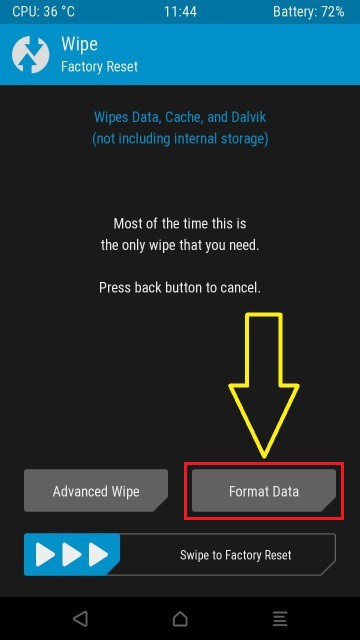
and type “Yes” in the provided field. Press the check button in the keyboard.
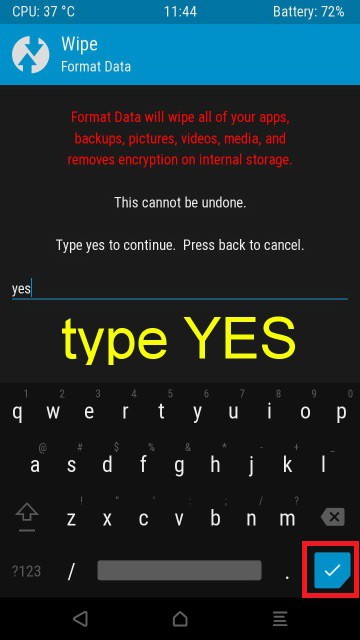
17. Reboot in recovery mode again
18. ¡Pay attention! TAP ON DO NOT INSTALL (the next screenshot) :
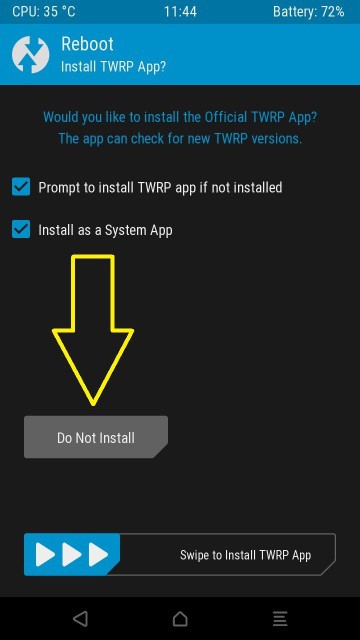
19. Go to "Install"-> Select Storage: Micro SD Card -> Look for lazyflasher-no-verity-opt-encrypt.zip and install
20. Go to Install and look for you favorite Magisk ROOT installer
That's all.
Note: SuperSU is not compatible still with this ROM. Use Magisk for ROOT
Instructions for repair installation (Fix "internal storage=0mb"):
VERY IMPORTANT! The repair installation process requires formatting the internal storage, because it is encrypted and for TWRP to work correctly and have total control over our device, it is necessary to perform the internal storage formatting. BACKUP YOUR DATA.
Requirements:
A Micro SD Card
Follow these steps:
1. Donwload the file TWRP-Mix2-Final on this page and unpack the recovery.img file to ADB folder
2. Download the lazyflasher-no-verity-opt-encrypt.zip file on this page and copy to a Micro SD Card
From PC with phone connected:
3. Go to adb installation directory (usually C:\ADB) and in an empty zone of the folder, hold shift key (in PC keyboard) and right click (in you mouse). In the context menu choose “Open Command Window Here”
4. Now type the next command: adb reboot bootloader
5. Now type the next command: fastboot flash recovery recovery.img
6. Now type the next command: fastboot boot recovery.img (The phone will reboot in recovery mode)
In your Phone:
7. Go to recovery. Install -> Select Storage: Micro SD Card -> Look for the lazyflasher-no-verity-opt-encrypt.zip and install
4. Go to “Wipe”-> “Format Data”, type “Yes”
5. Go to reboot -> Recovery, Check the internal storage.
6. Reboot in system
7. Configure the basic for start android
8. Reboot in recovery and Check the internal storage.
PLEASE! NEVER INSTALL OTA UPDATES DIRECTLY IN ROOTED ROMs.
THIS IS A BASIC KNOWLEDGE.
OTA updates must be installed differently.
※Please make a backup of your device before installing or updating ROM
Ok, pls i need help.
I had my Oukitel rooted. Before, I made a backup with TWRP. In any case, the phone had not restarted. It always got stuck in the ANIMATED boot logo.
Even when I re-recorded the recovery, the phone stuck with the boot logo. I've tried everything possible, but the phone does not want to start anymore.
I made the following modifications:
TWRP Recovery – Works
xposed installed via twrp – after that the mobile phone does not start anymore
Kernel Audit Apps tested
PLEASE I NEED HELP !!! How do I get the phone back to factory condition?
I found this backup in the XDA forum:
https://forum.xda-developers.c.....-t3730835/page3
But I can not flash it with SP Flashh Tool, how does it work?
I had the same problem earlier today. Somehow, the phone just booted after I restored the boot image from one of the backups provided online. But with that boot image, the data partition was locked again. So far any of my attempts to get a working, rooted ROM with access to /data on TWRP have failed.
How have you solved? I have the same problem. The Operative System doesn't start. Only the TWRP every time I boot the device!
@leveredxda
Hello everyone
I already ask the firmware to Oukitel 1 month ago already I'm still waiting, it's not that easy to have
Download it: https://yadi.sk/d/kjibuT1R3RcB.....Vz
Flash with SP Flash Tool
And the classic TWRP Recovery + scatter that is flashing through SP Flash Tool is not yet?
Gpablo1.
Hi. You could do a video demonstration. How to get exactly TWRP recovery. Thank you for all fans.
Hi all
Firrmware original Oukitel.com
OUKITEL_MIX_2_V24_20180112
https://mega.nz/#!vo9lkSzL!EyM.....HLDQGcXvYEnmk8A
Thank's, i flash this STOCK ROM over SP Flash Tool?
Thanks! I need some help, can you add me on skype?
Oh, is there something new in this update?
Last time I had problems with the roots and I am very careful about the flashing.
Has anyone tested this update already?
That is very strange !
The pictures in the tutorial are the same pictures at the next link :
http://www.chinaphonearena.com.....=77169#pid77169
The system will not boot and will continue to boot in recovery mode only.
Please help me.
Please tell me how to wear the system on TWRP.
Please tell me how to repair the firmware.
Same problem. You solved?
The problem happens from time to time. I always recommend making TWRP backups so you can recover. I was able to solve by restoring all boot partitions from an earlier backup.
Hi, I have formatted phone until unrooting it.. I think it was a very bad idea. Now my phone is blocked on the TWRP recovery and it doesn't launch the system anymore. I tried to flash the stock firmware but it was totally useless, TWRP said that the .zip file is not correct. How can i solve?