
- Title: TWRP Recovery
- Listed: November, 2015
- Last modified: 11/15/2015 7:34 pm
- Version: 2.8.6.0
You must be logged for ROM download.
14765 total views, 2 today
4 Total favorites
CUSTOM
 Member Info
DESCRIPTION
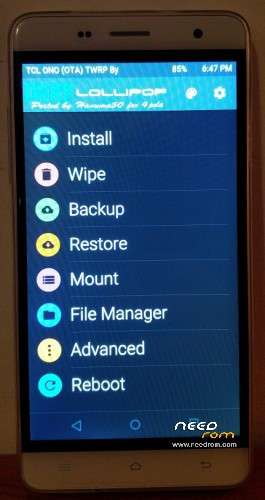
Ported the TWRP Recovery from the Bluboo X550.
It's a prototype. Seems to work on my Cubot H1 MT6735P
Edit: Updated, stripped out branding images – Revert to plain TWRP.
You can flash one of two ways:
1) Using MTK Tools – replace "stock" recovery.img with this recovery.img
2) After ROOT, Enable OEM Unlock from Settings -> Developer, then:
adb push ./recovery.img /sdcard/
dd if=/sdcard/recovery.img of=/dev/block/mmcblk0p8
※Please make a backup of your device before installing or updating ROM
hi dude , tried and did not work
Evening…
Well… I've the photo above and a working device here that says otherwise.
Maybe if you outline what procedure you took, I can help identify where it went wrong?
Regards.
Tested, full working.
Thanks !!!!!
Works great – thanks!!!
I used the second way and it works just fine!
Thanks
MTK Tools was not working for me. I used SP Flashtool by using the Scattern from the R15 version. By uploading only the recovery.img.
WORKS PERFECT!! Thank you.
Im struggling with this. The MTK Droid app does not find the phone (I can see it with ADB) and I cannot get the phone rooted whatever I try.
Any ideas why MTK Droid might not be able to see the phone, or steps needed to actually obtain root.
For MTK Tools you'll need the "MTK Serial Port Driver", which is seperate to the ADB Driver. The "MTK Serial" Driver only appears (and this is weird) when the phone is completely powered off, THEN plugged into the computer. So for MTK Tools, you need to completely switch the phone off, then plug in, then make sure the right driver is installed.
You should be able to find the correct MediaTek USB VCOM driver here: http://www.mediatek.com/en/dow.....ads1/downloads/
Just an update, I have the phone rooted not, but still cannot get twrp onto it. Step 2 does not work for me and ive tried flashify as well to flash the rom with no luck. Perhaps its a problem with R15.
You won't be able to use "Method 2", without ROOTING the phone, then toggle "OEM UNLOCK". Root gives you permission to do low-level "dd" operations, however, the NAND flash isn't unprotected until the "oem unlock" flag is set. I've never heard of "flashify" so I can't comment.
If your not rooted, I would suggest getting the MTK Tools, and the R15 ROM from the other forum page, then replacing the recovery.img in that firmware and flashing that way. Good luck.
I do appreciate what you are doing for others, im afraid my H1 may not be the same somehow.
It is rooted, that was fine and supersu etc all work just fine.
The OEM unlocking switch seems determined to switch itself off, but I jhave switched it on then restarted the handset to make sure it is definately on.
Then ive performed the following commands and got the results shown.
C:\android-sdk\platform-tools>.\adb devices
List of devices attached
* daemon not running. starting it now on port 5037 *
* daemon started successfully *
0123456789ABCDEF device
C:\android-sdk\platform-tools>.\adb push ./recovery.img /sdcard/
7837 KB/s (11507712 bytes in 1.433s)
C:\android-sdk\platform-tools>.\adb shell
root@hct6735m_35gu_l:/ # su
root@hct6735m_35gu_l:/ # dd if=/sdcard/recovery.img of=/dev/block/mmcblk0p8
22476+0 records in
22476+0 records out
11507712 bytes transferred in 1.227 secs (9378738 bytes/sec)
root@hct6735m_35gu_l:/ # reboot recovery
root@hct6735m_35gu_l:/ #
Im afraid im not aware of the other forum, Ill have look and see if I can find it and if that may work.
Thank you.. This worked for me and my R15 Cubot H1
Mmm. Just looking at the above and your instructions and
[quote]Seems to work on my Cubot H1 MT6735P[/q]
Meanwhile my device root seems to be indicate it is a 6735M. That may be why its not working.
Hi, tried with a H1 purchased in 02/2016 with R16 ROM.
After flashing the recovery4.img (11.507.712 bytes) the device was no longer able to boot into recovery.
When I tried, the H1 simply crashes/reboots and booted to android.
I tried flashing with SP Tool as well as the manual way using "fastboot flash recovery recovery4.img" – both with the same result.
It appears that the provided recovery4.img is not compatible with my device or
Just for information: SP Tools claims my device has a 6735M SOC, MTK tools claim that it is a 6735P SOC …
To "repair" the defective recovery, I used fastboot with a recovery.img from one of the ROMS provided here.
hi, for R16 you need my last twrp (different kernel and recovery used)
https://www.needrom.com/downlo.....y-megthebest-2/