
- Title: Twrp Umi F1 Play
- Listed: April, 2019
- Last modified: 04/13/2019 12:05 pm
- Version: twrp 323
You must be logged for ROM download.
8466 total views, 1 today
 Member Info
DESCRIPTION
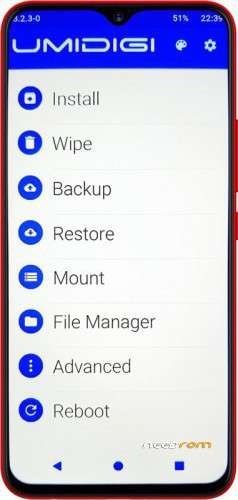
Twrp for UMIDigi F1 Play (64gb Rom, 6gb Ram)
Twrp 3.2 ported for new device
Twrp material design
A) Procedure For Flashtool :
Copy and replace the original in the firmware folder
Run flashtool and select the scatter of the firmware of Umidigi F1_Play
Flag only the recovery and make download and now connect the usb cable with the device…take the button of volume + in the same time….
when the progress of flash in flashtool start release the button level volume +….
To obtain The Right Root on the 6771 Mtk Device follow these instructions:
Install:
1) Copy to Micro SDCard the file "Magisk-v17.3.zip"
2) Flash the "recovery.img" using SP FlashTool
3) Wipe Data 2 times and enter always after reboot in recovery twrp
(do not reboot in system android)
4) reboot and reenter in twrp mode and Install Magisk.17.3.zip
5) Reboot to the Android System
6) to receive right root at 100% in the play store install Busybox app and install after installed the app the binary in partition system.
Probably magisk version 18 is not good for this device use magisk 17,X.zip version
New Details
1) Set up the english language like default;
2) Change colors menu.
3) New Kernel inside different from umidigi F1 normal
Many Thanks to Jemmini
Many Thanks to Iceman
Many Thanks to bencebacsi the Admin of the Umidigi Official Forum
Of Course many thanks to SOCRATE the Great Admin of Needrom
※Please make a backup of your device before installing or updating ROM
hi tried flashing twrp . flashes ok but phone come up with signiture verification faild and it reboot back into system how do i get over this?
tried fastboot phone will boot into fastboot from adb but wont accept any comand after that not even reboot . please help need to get this phone rooted.
w.walton@intnet.mu