
- Title: UMI C1 2.08 – with Root + CWM + SuperSU 2.46
- Listed: March, 2015
- Last modified: 03/02/2015 3:56 pm
- Version: 2.08
You must be logged for ROM download.
26972 total views, 2 today
4 Total favorites
 Member Info
DESCRIPTION
Attention: If you're looking for the stock ROM of version 2.08 or you need to unbrick your smartphone, please follow this tutorial: http://firmwarefile.com/umi-c1 SuperSU can be installed in recovery mode using their tutorial: http://www.supersu.com/gettingstarted#recovery
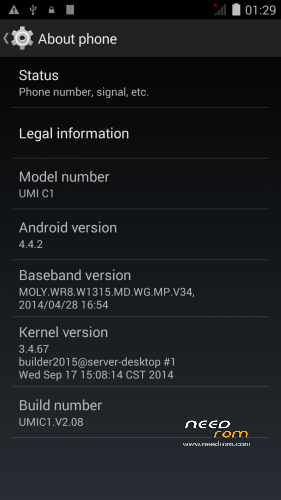
UMI C1, MTK6582, stock ROM with root access, plus CWM recovery and SuperSU 2.46. Files are ready to be flashed with SP Flash Tool.
Pass: needrom.com
Instructions (assuming you're new to flashing ROMs):
Warning: Do a full backup of your ROM with MTKDroidTools before flashing this ROM. In order to do a backup install CWM with this tutorial and then flash SuperSU Update*.zip with CWM in inserted external SD Card, do a full backup of your system with MTKDroidTools and then flash the files of the provided ROM with SP Flash tool. If in doubt, it's just better to leave it as it is. UMI C1 does not mount internal storage as mass storage (only as media device) and CWM cannot recognize it either to flash files (only from inserted external SD Card). A factory wipe/reset will wipe all data from the internal storage. You might also root the device with RootGenius (see tutorial here) and then do a full backup with MTKDroidTools before flashing your device.
If you have problems with MTK Preloader driver: Disconnect smartphone from PC. Uninstall all previously installed MTK Preloader drivers with USB Deview. Keep smartphone disconnected from computer. Install the supplied MTK Preloader drivers using the supplied installer. Connect the smartphone to PC without the battery. Insert the battery and PC should automatically recognize the preloader and install drivers. Disconnect again from PC. Choose scatter file of the ROM backup in SP Flash tool and the blocks which will be flashed. Click on Download. Connect smartphone to PC without the battery. Insert the battery and the download/flashing process should start.
-You'll need:
1. MTK Droid Tools & Root:
http://forum.xda-developers.com/showpost.php?p=49597819
http://forum.gsmhosting.com/vbb/f606/latest-mtk-droid-tools-v2-5-3-2014-imei-repair-rooting-tool-more-1780568/
http://chinagadgetsreviews.blogspot.com.br/2014/04/download-mtk-droid-root-tools-v253.html
2. Smart Phone Flash Tool (SP Flash Tool)
http://androidxda.com/smart-phone-flash-tool
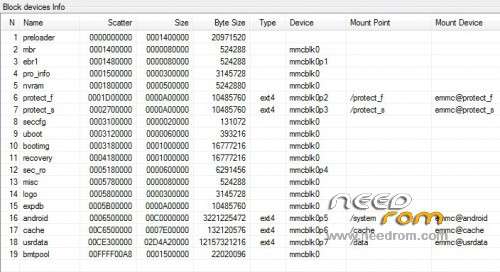
-Compare the included BlockInfo map, generated by MTK Droid Tools with your device: http://www.china-devices.com/Thread-How-To-Make-a-Scatter-File-For-all-MTK-based-Smartphones If the blocks are different, the ROM might not be suitable or work for your device! Flash at your own risk or do your research in specialized forums. You might also flash only some blocks, if they are the same size. See: http://www.china-devices.com/Thread-What-are-all-the-IMAGES-in-a-ROM-Basics-Tutorial
-Flash the ROM following this guide: http://www.china-devices.com/Thread-SPFlash-Tool-Guide Note: 1) install the MTK Preloader drivers (see attachment); 2) connect the phone without the battery to computer and insert the battery so that the computer detects the MTK Preloader and install drivers; 3) after selecting the blocks you want to flash and clicking on "Download" in SP Flash Tools, connect the phone to the computer without the battery and insert the battery so that the computer will detect the MTK preloader and start the flashing process.
-Read the referenced tutorials before doing anything
-About possible problems with IMEI, see:
http://forum.xda-developers.com/showthread.php?t=2538273
http://forum.gsmhosting.com/vbb/f781/android-phones-imei-null-invalid-repair-guide-1698501/
http://www.china-devices.com/Thread-IMEI-and-NVRAM-Repairing-Tools-For-MTK-65XX
http://www.androiddevs.net/restoring-lost-imei-mtk-phone/
Good luck!
Note: UMI C1 doesn't mount internal storage as mass storage, only as media device. CWM recovery cannot mount it either. A factory wipe/reset deletes all data from internal storage. It's necessary to insert external card to flash files through CWM. UMI C1 native launcher is not good either. If you're able to customize/fix this ROM to mount internal storage as mass storage as well and include another launcher such as NOVA, C Launcher or other your contribution will be very much appreciated.
※Please make a backup of your device before installing or updating ROM
this file needa a password?! anyone?
The password for the file is needrom.com You can do a full clean stock ROM install using this guide: http://firmwarefile.com/umi-c1
Guys I really need your help. I think I just bricked my girlfriends UMI C1. I wanted to install this rom because the GPS was not working properly in the OS version that came with the phone. Now all i get is the boot screen and nothing happens. Have waited for several hours as I know that the first boot after flashing may take longer. Can get into recovery mode but clearing the cache or doing a hard reset doesnt fix the problem. I cannot change to the previous rom. Then the phone wont even start and stays completely black. Any ideas?
Hi! You can do a full clean stock ROM install using this guide: http://firmwarefile.com/umi-c1