
- Title: UMI eMAX TWRP 2.8.0.1
- Listed: July, 2015
- Last modified: 07/27/2015 9:14 pm
- Version: TWRP 2.8.0.1
You must be logged for ROM download.
16770 total views, 2 today
1 Total favorites
CUSTOM
 Member Info
DESCRIPTION
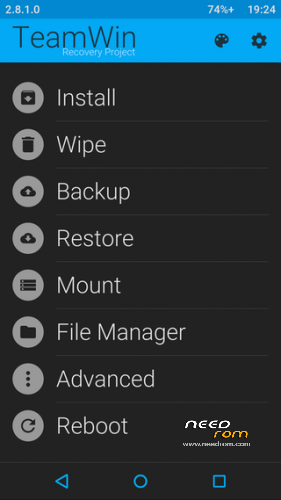
Since there were none, I've ported TWRP 2.8.1.0 to the UMI EMAX.
Theme is 284X_v2
Flash it, only if you know, what you are doing.
※Please make a backup of your device before installing or updating ROM
Whats the best way to flash?
Exactly the way that brick don’t. Also, you could use Flashify after backing up the stock recovery, be sure to select the recovery.
Thank you for your work
The simplest (and safest) way is to install (flash) it with Mobileuncle Tools. Just download it from the Play Store. Unzip the downloaded 7z file downloaded from here, copy the recovery.img file to your sd card or to the phone's internal memory and install it with Mobileuncle.
1 how to go back from twrp to stock recovery? …
2 can we install flyme , color os etc. via twrp?
3. i am really confused should i use rootjoy for all or TWRP or spflash tool ?
4. is twrp and spflashtool only for custom roms if we use them how 2 back to stock rom
thank you in advance
as nanalala explained first root the device then use 'flashify' from playstore to 'backup' your stock recovery.img store this on your p.c. in a folder and on an ex sd card if you have one…a friend of mine also used this recovery and i think it does not see your ex sd card as it is a port from a siswoo…only the dev can tell us more
how to flash this twrp ?
Mobile uncle can not flash this file .
Mobile still wake up with stock recovery .
tried to flash it with mobileuncle tools, now i get a dead android with the red /!\ when i try to get into the recovery mode
Confirmed working. Made a backup, flashed, and restored. I used flashify. Backup of stock recovery then flashed twrp.img
Also, mine is able to show external sd . all seems to work
Thanks for your work. Works great.