
- Title: UNLOCK MOTOROLA (Metro Apps)
- Listed: February, 2025
- Last modified: 02/19/2025 2:36 pm
- Version: ANDROID
You must be logged for ROM download.
7770 total views, 1 today
11 Total favorites
 Member Info
DESCRIPTION
Unlock Motorola
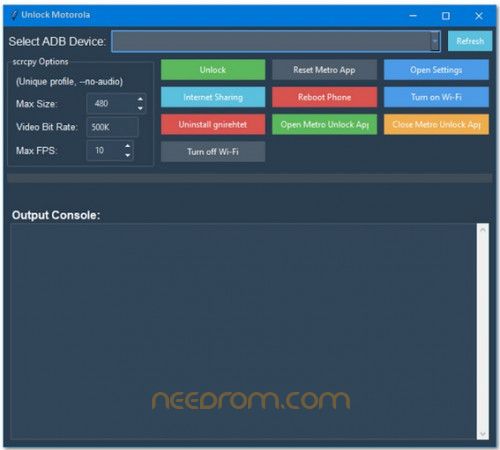
Are you having trouble with a locked Motorola device on the T-Mobile network? Your best bet for a smooth and cost-free unlocking solution is the Motorola Unlock Metro App. By releasing your device from carrier restrictions, this potent network unlocker will increase its usability and flexibility.
The Motorola Unlock Metro App's features, advantages, and proper usage will all be covered in this guide. Essential scrappy options for more experienced users who desire more customization will also be covered.
What is the Unlock Moto App?
The Motorola Unlock Metro App is an advanced tool that enables users to network unlock Motorola devices from T-Mobile and Metro by T-Mobile carriers. This allows you to use your device with any network carrier globally, giving you the freedom to switch networks without restrictions.
Why Unlock Your Motorola Device?
-
Use Any SIM Card – Travel internationally without extra roaming charges.
-
Increase Device Resale Value – Unlocked phones sell for higher prices.
-
Better Network Coverage – Switch to a carrier with a stronger signal.
-
No More Carrier Restrictions – Enjoy full control over your device.
Features
1. Unlock Your Device
The app removes network locks imposed by Metro by T-Mobile and T-Mobile, allowing you to use any carrier's SIM card.
2. Internet Sharing (Hotspot Tethering)
Once unlocked, you can share your mobile data with other devices using hotspot tethering.
3. Uninstall Gnirehtet
Gnirehtet is a reverse tethering tool often pre-installed on locked devices. The app allows you to uninstall Gnirehtet easily.
4. Turn Off Wi-Fi
A simple toggle lets you disable Wi-Fi to save battery or troubleshoot connectivity issues.
5. Reset Metro App
If you're experiencing errors, you can reset the Metro Unlock app to its default settings.
6. Reboot Phone
A built-in option to restart your phone without using the power button.
7. Open Metro Unlock API
This feature grants advanced users access to Metro's API for troubleshooting or modifying unlocking settings.
8. Open Settings
Quickly navigate to device settings without manually searching through menus.
9. Turn On Wi-Fi
Enables Wi-Fi with a single tap, ensuring a stable internet connection.
10. Close Metro Unlock API
Securely exit the Metro Unlock API after making the necessary changes.
The Motorola Unlock Metro App also provides scrappy options, giving advanced users the ability to customize their unlocking process.
Customization Options:
-
Unique Profile: Generates a unique profile with —no-audio to maintain privacy.
-
Max Size: Users can set a custom file size limit.
-
Video Bit Rate: Adjustable to control video quality during unlocking.
-
Max FPS: Set frame rate limits for optimized performance.
THANK AND DONATE…
FILE FREE
※Please make a backup of your device before installing or updating ROM
nice
YOU WELLCOME
Hi! Is there an update to this? Doesn’t seem to work with later security updates (I get error 200)