
- Title: visi0nary kernel
- Listed: November, 2015
- Last modified: 11/19/2015 2:28 pm
- Version: stock ROM
You must be logged for ROM download.
14583 total views, 2 today
1 Total favorites
 Member Info
DESCRIPTION
I discovered a modified kernel for Elephone P8000 on XDA. Author BlueFlame4 made a really interesting modified kernel. Very thank him. I put it here for information. Please check out his pages. The authors of the stock ROM could learn from him.
Authors page: http://forum.xda-developers.com/elephone-p8000/orig-development/kernel-visi0narys-kernel-t3226081
Modified kernel is designed for the stock ROMs and custom ROMs based on the stock ROM.
It really works, double tap wake up function is a really cool (wake up your phone by tapping the screen). In addition to this function, the modified kernel brings a lot of other improvements and bug fixes (e.g. better battery consumption). I installed it on the latest version of the stock ROM 20151105. I am using TWRP recovery. If you are using an older version of stock ROM, check out the author's website and download the appropriate files from there.
Instructions:
- in PC unpack file "vTool.rar", will get "vTool.apk"
- save to SD card files "visi0narys_kernel_v1.6.1.zip" and "vTool.apk"
- go to TWRP recovery
- install file "visi0narys_kernel_v1.6.1.zip", then click on the "Wipe cache / Dalvik," then "Swipe to wipe", then "Reboot System"
- first start will be awhile -> Android optimization will run (approx. 3 min., will see counter …)
- when the phone boots up install "vTool.apk"
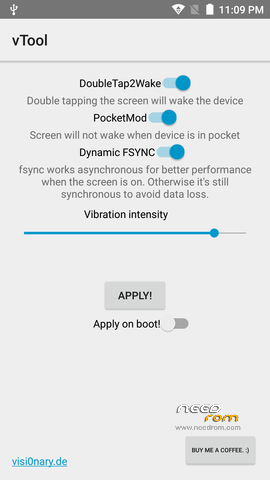
- launch vTool.apk

- turn on all items, check the "Apply on boot!" and then click "Apply"
- restart your phone
- enjoy a new fantastic functions and bug repairs
- I recommend set using Gravitybox a new function -> "Suspend phone" by long holding of the left button under the screen. Then Power button will not need anumore 
If you turn ON DoubleTap2Wake function, do not turn ON PocketMod function. Otherwise, the function DoubleTap2Wake stops after some time.
How it roll back:
- By using Flashify.apk install the original kernel
- For ROM "20151105" original kernel is file "stock_kernel_1105.zip"
- in PC unpack file "stock_kernel_1105.zip", will get "boot.img"
- Save it to SD card
- Run Flashify.apk in it application click on "Flash" button, then "Boot image", then "File Explorer", select the file "boot.img" and click "YUP!"
- Original kernel will loading, then restart your phone
- Uninstall vTool.apk
- Done
※Please make a backup of your device before installing or updating ROM
hi bro , if i install this kernel can i install every custom or official roms too ?!