REDMI Stable 13 changelog:
MIUI ROM Update Highlights
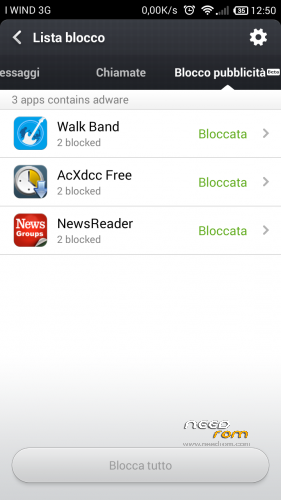
New – Security center now includes Optimize, Cleaner, Data usage, Blocklist, Power settings, Virus scan, and Permissions (7 features) (12-11)
App location function added in Global Search (12-18)
New – Themes can be given as gifts (12-25)
New – Video supports offline downloading (only for some sources now) (12-25)
New – Video sync supported in Cloud albums (12-25)
New – Samba file share access supported in File Explorer (12-25)
Xunlei download engine added to increase your downloading speed by 70% (01-03)
User can view list of themes that they have already purchased (01-08)
When user is clearing garbage, they can tap garbage files to view, clean, or lock (01-08)
User can set up shortcuts for different actions on the Home screen (01-08)
Delete batch call logs (01-17)
Optimized MIUI Weather App: More ways to share Weather info (01-22)
Changelog
Phone
Optimization – Logic of redailing the train ticket booking number (12-31)
Fix – Some parts of the dial pad were displayed incorrectly (12-17)
Contacts
Optimization – When user is not signed in to Email account, tapping a contact's picture on their cover page will display their Email address (12-17)
Optimization – Groups added to Contacts main page (01-07)
New – Delete batch call logs (Open “Keypad” , press “Menu”, click “Delete batch” and select the call logs you want to delete) (01-13)
Fix – When user had too many contacts, group delete would fail (12-10)
Fix – When an unknown number was added to contacts, sometimes the list view would not be displayed correctly (12-17)
Fix – When using the +17951 and +86 prefixes to dial the same number, the number would display as two separate numbers in call history (12-17)
Fix – Sometimes, when syncing contacts from SIM card to phone, app would FC (12-17)
Fix – When user had no contacts, the "Select all" button could still be tapped (12-17)
Fix – On contact's detail page, birthday was displayed incorrectly (12-17)
Fix – When contact's detail page had 3 tabs, the triangle indicating the current tab would not align properly (12-17)
Messaging
Optimization – Right arrow added to notification message groups (12-10)
Optimization – When you pin a notification message, it will be displayed at the top of the message list view (12-10)
Fix – When airplane mode was on, user would be reminded to re-sign in to their Xiaomi Account (12-17) (12-17)
Fix – Outing going message status icon displayed incorrectly (12-19)
Fix – Marking all notification messages as read will not affect private messages anymore (12-31)
Lockscreen, Status Bar, Notification Bar
Optimization – Custom notifications will now change along with system language (01-21)
Launcher
New – Search for new apps (12-17)
New – Added Gausscian Blur effect for dynamic framework (12-31)
Optimization – Auto-complete search: User doesn't need to enter the full name of the app or file they are looking for to view search results (12-17)
Optimization – Animation effect for app location function in global search (12-24)
Optimization – Ripple effect after user releases long press on an icon (01-07)
Optimization – Other system apps are allowed to delete shortcuts (01-07)
Fix – When system language was set to traditional characters (Taiwan), “移除” was displayed as "Uninstall" (12-10)
Themes
New – Video sync supported in Cloud albums (12-25)
New – User can view list of themes that they have already purchased (01-07)
Optimization – Smoother animation for slide action on the comments page (01-07)
Optimization – Memory use optimization for previewing wallpaper (01-07)
Fix – Sometimes applying a theme would cause app to FC (01-07)
Fix – Recommended portion at the bottom of the Featured page would disappear (01-07)
Fix – Sometimes Themes app FC (01-14)
Gallery
New – Video sync supported in Cloud albums (12-25)
New – Cloud albums support downloading original pictures (12-25)
New – Move pictures to other albums (12-31)
Optimization – Logic of Cloud albums automatically uploading (12-25)
Optimization – Cloud album upload detection logic (01-07)
Optimization – SMB guide and icon (01-07)
Optimization – Uploaded video names will not display the file extension (01-21)
Fix – Going to Settings > Display > Screensaver, would cause app to FC (12-12)
Fix – When downloading pictures or videos, the downloaded files don't show in Gallery because of some wrong files (12-24)
Fix – Screensaver won't stick after rebooting (12-25)
Fix – Some bmp pictures with the jpg. extension cannot be set as wallpaper (12-31)
Fix – Sometimes there's no response when download original pictures or videos (12-31)
Remove – Additional filter SMB services in addition to Mi Wi-Fi (01-07)
Music
New – High Quality Music service (pay per month) (12-17)
New – Song select feature for Leishi KTV consoles (12-17)
New – Sync playlist feature (12-17)
New – Support using MiCredits to buy higher quality online music (12-31)
Optimization – Added guidance prompt for Online music (12-25)
Fix – In Settings, the Filter by folder function wasn't displaying correctly (12-10)
In File Explorer, when demoing a music file, if headphones were disconnected, the Play button did not refresh (12-10)
Fix – On the main page, touching "Get song info (ID3)" multiple times would cause FC (01-07)
Optimization – Cannot download higher quality music immediately after purchasing (01-14)
Weather
Optimization – Updates automatically when connected to network (01-07)
Optimization – Location function for cities outside mainland China. (01-16)
Optimization – Weather warnings are only displayed when system language is set to Simplified Chinese (01-21)
Optimization – If a city name hasn't *obchod*porusuje*nasu*licenciu translated into the current system language, it will be replaced by the local language automatically (01-21)
Optimization – More ways to share Weather info (01-22)
Fix – Sometimes, weather widget doesn't show current weather condition (12-25)
Fix – Weather widget cannot update timely after deleting locations in weather app (12-31)
Fix – Some themes cannot get weather data (12-31)
Fix – Sometimes duplicate weather advisory warnings would be sent (01-07)
Fix – The same weather alert appears repeatedly in Notification sheet. (01-16)
Fix – After switching system language, Weather widget would display incorrectly (01-21)
Settings
New – Default app settings (12-11)
Downloads
New – Added Xunlei engine, increasing downloading speed by 70% (12-31)
Fix – File formats and links to apps were incorrect (12-17)
Fix – Sometimes downloaded files would not display app icons (01-08)
Browser
New – Quick search in the notification bar (12-25)
Clock / Calculator
Optimization – Updated 2014 holiday info for China ("work days" for alarm settings) (12-19)
Video
New – Support offline downloading videos (only for some sources currently) (12-23)
Searching for videos in DLNA using Chinese pinyin added (12-25)
New – Added more video sources (12-25)
New- Mi Link function notification (01-22)
Optimization – Combined Video player and Video app (12-23)
Optimization – Merged cached offline video playback and streaming online player histories (01-08)
Optimization – My videos list now displays types (01-08)
Optimization – Enhanced loading speed of video lists (01-15)
Optimization – For Mi Link, when there is only device, it will be displayed directly on the screen (01-22)
Fix – Sometimes when user was streaming content, app would FC (12-19)
Fix – User couldn't delete items in "My videos" list view (12-19)
Fix – Sometimes the sound doesn't disappear when changing channels continuously (12-25)
Fix – When playing videos in Cloud albums, it shows Local instead (12-25)
Fix – Online TV exists after only pressing the Back button once (12-25)
Fix – When watching online videos, connect device with computer will cause the video to reload (12-31)
Fix- Sometimes offline videos cannot pause (12-31)
Fix – When downloading offline video, click on the video name on status bar will not lead to the correct video (12-31)
Fix – No thumbnails for cached offline videos (01-08)
Fix – Sometimes videos' (in the Notification shade) cached notifications would disappear (01-08)
Fix – Sometimes when watching a live stream, phone would lock automatically (01-08)
Fix – Sometimes, advertisements would prevent videos from playing (01-08)
Fix – Cannot play vob files (01-15)
Fix – Video app FCs after it fails to analyze file path (01-15)
Fix – Sometimes cannot load the posters of online videos (01-15)
MiCredit Center
New – After top-up card QR code is read, app will complete top-up automatically (12-18)
New – Details page for user purchase and top-up history (12-18)
New – Horizontal view added for pop-up payment windows (12-18)
Optimization – When user needs to enter a password, keyboard appears automatically (12-18)
Optimization – Lock screen hides user account info (12-18)
Xiaomi Account
Fix – Avatars of MiCloud service were blurred (12-25)
Game Center
Fix – It still downloads pictures after choosing Reduce mobile data usage (12-25)
Fix – The links in Online support cannot be clicked (12-25)
Security Center
New – Security Center now includes Optimize, Cleaner, Data usage, Blocklist, Power settings, Virus scan, and Permissions (7 features) (12-10)
New – User can set up shortcuts for different actions on the Home screen (01-07)
New – Clean up can now detect empty files (01-07)
New – When user is clearing garbage, they can tap garbage files to view, clean, or lock (01-07)
Optimization – Increased Data usage calibration success rate (12-11)
Optimization – In Permissions, user can view blank pages display format (12-19)
Optimization – After check process is complete, new title displayed at Cache Clean Up page (12-19)
Optimization – The whitelist in Memory usage is the same as the apps locked in the task manager (12-26)
Optimization – "Power save" control flow (01-07)
Fix – After check process was complete, tapping the Clean up button would cause app to FC (12-19)
Fix – After apps were designated as risks or viruses during scan, when user tapped app to view details, the app size would display as "0" (12-19)


 Member Info
I'm sorry that is not a multilanguage
unofficial multilanguage ROMs are now available for download.
if you install over another MIUI ROM you don't need to wipe data before install, so your current setting will not be lost.
give a try and let me know
Good rom, but on my phone FMradio dont work.
strange. now i'm usigng the multilanguage rooted and FM receiver play good.
I think my phone is from very old lot (version). FM receiver work fine only in Miui and Robocolor from Robotnik. On stock rom not working i try more than 20 diferent roms. If you have idea how to fix ?
chip for FM radio is MT6628.
try coping full folder /system/etc/firmware and file /system/lib/modules/mtk_fm_drv.ko from Robotnik ROM to rom under test. You can use Root Explorer to do this. After copy reboot the phone.
How to remove / reallocate internal memory 3,65Mb?
i wish to know too!
Don't work frontal camera!
The worst Miui-based ROM.
Why ?
It’s the Hongmi ROM whitout any changes.
Don't work frontal camera too!
Hi!
I have another ROM installed on my V5 (Tillaz’s ROM) and I want to install this ROM but I don’t know wich file I have to download to install. Can someone help me?
Then I just need to do a full swipe and clean and then install zip from SD right? Do I have to do anything else?
Thanks for the help!
try the ROM RedRice-multi-140808 to have multilanguage ROM, the others are original Xiaomi with only EN/CN language.
Tillaz is not a MIUI ROM, so full wipe is mandatory, nothing else to do, _BUT_ a full backup is always a good operation before try any ROM.
Great rom thanks for share
Great rom thanks for share.
It’s working verry good
thanks, but i done nothing, it's the original xiaomi RedMi ROM without changes (just the ones needed to work on V5)
remember frontal camera don't work !