
- Title: X5 Pro R14 (recovery install)
- Listed: March, 2016
- Last modified: 03/11/2016 11:33 pm
- Version: 5.1
You must be logged for ROM download.
20272 total views, 3 today
4 Total favorites
CUSTOM

 Member Info
DESCRIPTION
ATTENTION!!! ONLY FOR X5 PRO (2GB RAM / 16GB ROM STORAGE)
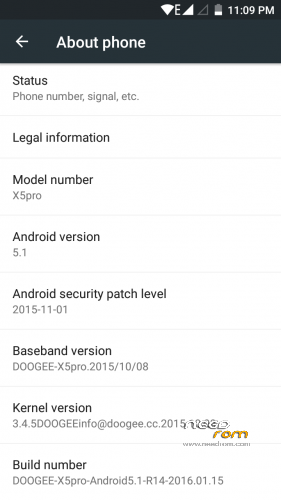
Based on DOOGEE-X5pro-Android 5.1-R14-2016.01.15 official firmware.
Don't forget to make a security backup from your system by TWRP recovery!
- Rooted, multilanguage
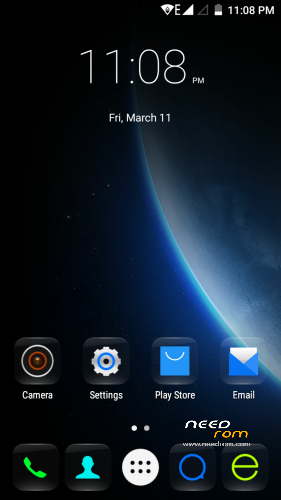
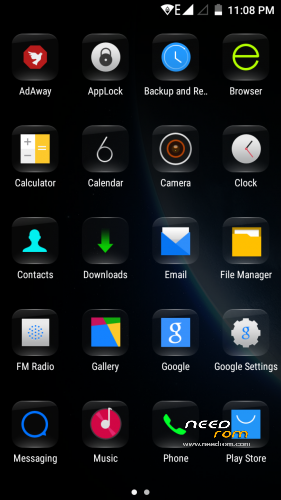
- Installed: Minimal Gapps, MiraVision
- Patches: FM radio without headset, 360 rotation, MP4 video recording, etc.
- Install with TWRP recovery (attached), if you want a clear install first make a full wipe!
Be patient! First boot will take around 5 minutes!
※Please make a backup of your device before installing or updating ROM
HELP ME DOOGEE X5 PRO
Hello everyone, I just got my X5PRO and I wanted to install a TWRP
 )
)
ROTT then to my phone.
I have not managed to intsaller the TWRP
My phone is the latest SOFT so I try the "DOWNGRADE"
lower version in order to install TWRP.
So I download a ROM NEEDROM and installed it with "FlashTools".
Everything went well (Download OK green at the end in "FlashTools"), but since
My phone displays nothing more me on the screen (the screen lights up but I have nothing that appears on it
The phone starts well, I sound that I press the volume keys and it is well recognized
my PC once started but the display is "Gray" and no longer shows me nothing
I tried to put different ROMs with FlashTools and it is every time the same, ROM
installs correctly but the screen goes blank me.
I specify that the display worked fine before I made my manipulations so I think
the problem apparently stems from the internal driver management of graphics on the phone.
Someone you already he had this problem and if so do you have a solution to this one, please.
Thanking you in advance for your answers, greetings, YL
try flash it again. I recommend R04 rom for starter
In flashtool option, tick download all with checksum (in latest version it will be usb checksum)
turn off the phone, take out battery, click download in flashtool and hold volume down button while connecting usb to your phone
pc will detect phone, and flashtool will start
I had the same problem. The problem caused becose i have downgrate the firmwre.
I flashed R14 and everything OK.
I thing Doggee changed the display.
You can dowload the firmware form http://4pda.ru/forum/index.php.....howtopic=699029
Good luck
i have r09? can i upgarde to this rom? is it necessery first that i upgrade to r12 then r14?
i have installed it. test it and report its situation
its good tanks so much.
but radio work unless headset but headset is necessery to find cannals
YESSS, thank you very much to all and especially to "asher b12" I followed his intstruction and downloaded and installed the ROM he recommended and all is well again My phone working again with conformre display; -) by cons, is it possible to "ROOT" and install the TWRP recovery and Xposed on this version ???
Thank you in advance for your answers, good day, Yannick Idf
Load kingroot for root, flashify for twrp 2.8.7, and xposed sdk 22 arm v 82… If you want change your root manager use super su me… At least that worked for me, good luck
Dear FlickAir
Can you upload here a flashable version of this ROM. I cannot install TWRP recovery. I have tried many recovery version with no success.
Whwn I try to boot to I get android icon sleeping and a triangle with no command
I own Doogee X5 Pro MT6735P
I installed twrp 2.8.7 version from this post via flashify without any problems… You tried this?
Hi Necrnom
Yes I have tried twrp 2.8.7 version with flashify and with flastools and did not succeeded to boot to recovery.
http://4pda.ru/forum/index.php.....0#entry46354360 use Google translation and download this version, I’m sure it works..
I have try to download the recovery form 4pda.ru but I get error 404. Do have another link to download this recovery? I will appreciate .
WHEN THE ICON SHOWS WAIT FOR FIVE SECONDS THEN CLICK VOL UP AND POWER BUTTON AT THESAME TIME . IF FOR THE FIRST TIME IT DOESNT WORK TRY IT AGAIN
What absolutely works is humana50′s twrp 3.0.2 for doogee x5s, it’s 100 percent compatible … With flashify or rashr. You can find here on needrom.com
Yessss !!!! It's works for me. TWRP 3.0.2 for doogee x5s resolved my problem. Now i can boot to recovery.
Thank you so much Necrrnom for your help.
Very welcome…
If you ever have problems to find your backups read the comments in the x5s post..
Hi guys,
I seem to be the only one here for whom it is not clear, but how do I install this??? There is no scatter file or nothing.
thanks.
Use Google, if recovery install via twrp doesn’t tells you anything you better just let it be.. Not to be rude but can you help yourself when something goes wrong?
can you please explain how to root the cellphone
Search for kingroot apk… The easiest way to
so bad!!! otg in this rom not work !