
0
- Title: XIAOMI FASTBOOT FLASHER
- Listed: February, 2025
- Last modified: 02/04/2025 7:20 pm
- Version: ANDROID
You must be logged for ROM download.
4588 total views, 4 today
1 Total favorites
CUSTOM
 Member Info
DESCRIPTION
XIAOMI FASTBOOT FLASHER
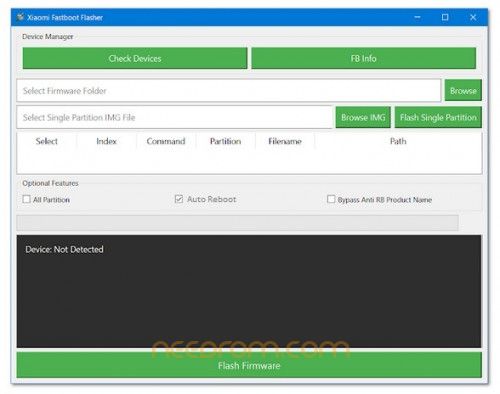
Xiaomi fastboot flasher is a small program for Windows computers is allows users to flash Xiaomi devices in fastboot mode, in some cases needs a bootloader to unlock then it works. but some firmware easily flash without bootloader unlock. also, you can flash the sideload zip file in a single click only.
Key Features:
1. Live Device Detection
- Automatically detects connected devices when the program starts.
- Displays the model number and device ID.
- Alerts users if a non-Xiaomi device is detected.
2. Firmware Selection and Flashing
- Users can browse and select the firmware folder.
- The tool automatically detects all available partitions within the selected firmware.
- Provides an option to flash all partitions at once or select individual partitions for flashing.
3. Single Partition Flashing
- Allows users to flash a specific partition by selecting an individual IMG file.
- Ensures a seamless flashing process with real-time progress updates.
4. Progress Bar and Logs
- Displays a progress bar indicating flashing progress with percentage.
- Logs every step of the flashing process, making it easy to track and debug if needed.
5. Additional Features
- Supports automatic reboot after flashing.
- Includes a Bypass Anti RB Product Name option for specific firmware.
- Features a user-friendly log menu to keep track of operations.
- Provides a Flash Firmware button for one-click flashing.
How to Use
Step 1: Connect Your Xiaomi Device
- Boot your device into Fastboot Mode by pressing Power + Volume Down.
- Connect it to your PC via USB.
Step 2: Launch the Program
- Open Xiaomi Fastboot Flasher.
- The tool will automatically detect your connected device.
Step 3: Select Firmware
- Click the Browse button and select the folder containing your firmware files.
Step 4: Choose Partitions to Flash
- The program will display a list of detected partitions.
- Select the partitions you want to flash (or choose all).
Step 5: Start Flashing
- Click the Flash Firmware button to begin the process.
- Monitor progress through the log menu and progress bar.
Step 6: Completion
- Once flashing is complete, your device will reboot if the Auto Reboot option is enabled.
- If an error occurs, check the log menu for troubleshooting information.
Step 7: Support
- only for windows 8, 8.1, 10 & 11 (x32 bit & x64 bit)
THANK AND DONATE…
FILE FREE
※Please make a backup of your device before installing or updating ROM