
- Title: Z11Max NX523J MM ComboRom 5.0
- Listed: January, 2017
- Last modified: 09/06/2017 1:25 am
- Version: 6.0.1 V5.0
You must be logged for ROM download.
25193 total views, 5 today
15 Total favorites

 Member Info
DESCRIPTION
***UPDATED on 03 Sep 2017***
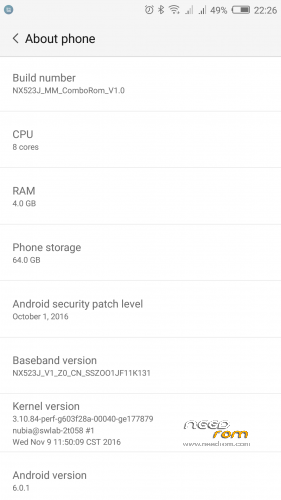
ComboRom 5.0 for Nubia Z11 Max NX523J based on stock rom MarshMallow 1.13 (Multilanguage)
MD5: 2cce0cfa3c9cda498a2c8ecdb2d38195
Features:
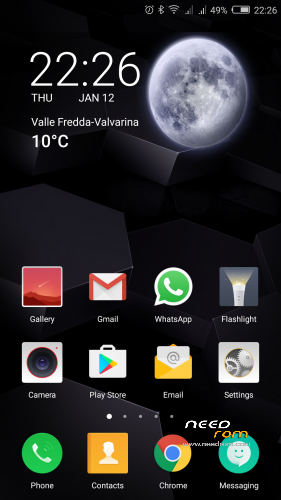
- NubiaUI 4.0 with android 6.0.1
- Data partition decrypted
- SmartLock settings available
- Contacts order by Name or Surname
- Added single hand mode
- Added gallery on lock screen
- Added performance mode for games
- Added Smart leather case function
- Improved compatibility of app clone (whatsapp, facebook etc…)
- Added Email AOSP to have 2-way sync contact on Exchange account
- Mod on launcher to adjust visual effect
- Improved speed on use
- nubia Music: full function available
- Solved notification color issue (subject text color of gmail)
- Safety Update to december 2016
- Gapps installed (basic package)
- ROOT System-less (Powered by SuperSU)
- Added some useful app (eg. Reboot – Font Change and Meteo widget…)
- Removed unnecessary App
- Miscellaneous amendments to facilitate the use of the ROM
- Added ringtones
If your phone after install ComboRom 4.0 have problem with audio you have the z11 max international version, please flash fix
***In some cases you can have same issue also if flashed the fix. In this case flash previous comborom based on Lollipop and then install this rom***
Changelog 5.0 -> 4.2 (Full ROM)
1. Updated APN list
2. Now available SmartLock settings on Settings -> Security
3. Updated baseband to 113, improved signal of wifi and the fingerprint recognition (modded for audio issue on chinese smartphone) european phone, please flash the FIX
4. Contacts, now is possible to order by name or surname
5. SearchBox on stock launcher have online search with google
6. Updated SuperSu to latest stable version
Changelog 4.2->4.1 (OTA PACK)
- Fixed a permission issue with neoSafe
Changelog 4.1->3.0
- Updated to stock version 1.13
- Better camera focus
- Improved response of fingerprint unlock
- Autostart manage to improve battery life ( if your app have some issue please enable autostart from Settings – Other Settings – Autostart management
- Security update to Dember 2016
Changelog 3.0->2.1
- Added Smart Leather Case
- Added performance mode for games
- Added battey statitics and advanced battery settings
- Added gallery on lock screen
- Speed optimization of the Rom
Changelog 2.1->2.0 (OTA PACK)
- Added Single Hand Mode
- Restored function of Home button (long press open recent apps)
- Graphic mod (dual istance icon; various fix)
- Added on Settings – Security – Notification access
- Added on Settings – Other Settings – Google Settings
Changelog 1.0 ->2.0
- Solved bug on fingerprint
- Improved camera focus
- Improved permission manager
- Solved compatibility problem with Gapps
- Solved problems with clone app function
- Better performance and battery life
___________________________________________________________
How to install the ROM version 5.0:
****Remove any password on lockscreen; before update set Slide to Unlock****
- Make a TWRP backup first*
- Download the zip of the ROM in the internal memory
- Go into TWRP recovery
- Wipe Cache, Dalvick cache and Data (factory reset). (only wipe cache and dalvick cache when update from comborom 2.x or 3.x or 4.x)
- Then install the ROM ZIP
**** Attention: at the first boot the phone restart automatically during bootanimation due to root procedure.
* When you do the backup just Data - System – Cache – and Boot
If your phone after install ComboRom based on MM have problem with audio you have international version, flash fix (at the end of this post how to install)
In any case you still have sound issue or trouble watching video, please install comborom based on 1.31 available here on needrom.
How to install the OTA (when available):
- Open Settings – Other Settings – OTA update and search on firmware for update package (please follow this video for more information)
- Or if you have problem to download the package, download the pack from the top of this page and:
- Go into TWRP recovery
- Then install the OTA ZIP (NO WIPE)
_____________________________________________________________
Fix for International Z11Max changelog and installation procedure
Changelog:
- Solved audio problems on Z11 Max international
How to install the fix:
-Download and copy to internal memory
-Go on TWRP recovery and flash zip
-No Wipe are necessary
Instruction Videos
※Please make a backup of your device before installing or updating ROM
This ROM is very stable and It is better than official one. I like this ROM.
However, I am still wating for update.
Updated to stock 1.13 enjoy
Thanks pesa1234 for the new rom
Hello Pesa, I wonder if in this new version of the ROM combo, it's with thema's store, or you know how to install it.
Themes… I don't had time to look at that app… in these days I will try to add
Updated to 4.2
fix a permission with neoSafe… Available via OTA on Settings – Other Settings – OTA updates
Thanks for all pesa1234 !!!
The ROM is working fine with nubia UI. Everything except one thing is really working fine.
I found one function that doesn't work. I connect my car via "android auto" app but to send a message via "whatsapp"
is not working especially in this case.
I tried another launcher and I got the message "app_overlay" and the interoperability between apps was faulty. So now I use the nubia launcher.
Thanks pesa! Good work, I will donate that in the next days.
Hi, I'm happy that you enjoy my rom.
Regarding app_overlay if your previous rom was a 1.0 I suggest also to wipe data…
Reagrding android auto I will test it. Thanks
Does ist support band 20 now?
No, no support for 800Mhz LTE
Hallo kommt auch eine rom mit Nougat für das nx523j?
Thanks for the update. The only thing I find is not working is the theme manager app. Unfortunately it force closes.