
- Title: Z11MINIS V1.30 fourth edition
- Listed: March, 2017
- Last modified: 03/21/2017 1:34 am
- Version: V1.30 fourth edition
You must be logged for ROM download.
11156 total views, 1 today
 Member Info
DESCRIPTION
This post is finally edited by youyim at 2017-2-20 09:17
Adaptation models Z11MINI-S-NX549J ROM maker Cwz1996 release time 2017/02/14
● ROM status bar function code re-reference aurora ROM, and PIXIE ROM expressed thanks!
● Disclaimer: ROM default closed full-featured NFC, if necessary, please go to the personality settings – Advanced – open the full-featured NFC, I do not open the full function of any problems caused by NFC!
● Built-in part of the software, please click on the system to simplify the system to delete
ROM download (ROM download)
ROM complete package:
micro cloud network disk: http://url.cn/44wbgj6
Baidu network disk: http://pan.baidu .com / s / 1qYGtiXY
OTA upgrade package (from the previous version can be directly updated only 50 MB! Has been repaired brush OTA package error can not upgrade the bug)
micro cloud network disk: http://url.cn/44wa1Ae
Baidu network disk : Http://pan.baidu.com/s/1cINAb0
on the micro-cloud prompts to download traffic overrun, please tomorrow in the retry or the chain to share the number of
downloads overrides click on the brush package right to save to the micro-cloud login The qq number, and then to their own micro-network disk click to download!
ROM main features: 20170214 update modify the content log ● new: based on V1.30 | official version of the ROOT built-in program SuperSU version of the latest 2.79-SR2 and do start optimization, ROOT response speed optimization, optimization software to obtain ROOT prompt ● Added: Based on V1.30 | The official version updates the Android System WebView to the latest 56.0.2924. 87 stable version, help part of the software online experience optimization (only for the complete package) ● new: based on V1.30 | official version update VIPER4 sound to the latest VIPERFX audio driver official version v2.5.0.5 default does not open, such as (PS: Note that afterinstallation to the phone butler to give Viper sound related permissions such as read and write storage, use of Bluetooth , etc.) ● Added: based on V1.30 | official version Add X exposure disable log log open this function after using the Xp framework and will not record any module usage log,effectively reduce the use of XP framework after the frequent recording log system powerconsumption and cardton ● new: based on V1.30 | The official version of the re-join Busybox repair Busybox before the incorrect installation of the problem, before the repair part of the software can not use Busybox problems ● new: based on V1.30 | official version of the repair before opening thetransparent part of the invalid or must restart the system to have the effect of the problem ● new: based on V1.30 | official version of the previous version of the switch before switching the status of the default wallpaper to restore the original problem ● new: based on V1.30 | official version of the full-featured NFC, a friend said the invalid question, Here I put the specific use of the way and we talk about! Open the steps: personality settings – advanced – full-featured NFC (click on the switch, given the ROOT authority will prompt the full function of NFC open success, please restart the system) – restart the system – this time you can use full-featured NFC, Z11 and Z11MINIS NFC modules are close to the screen, not the other machines on the back of the phone! The need to simulate or read and write IC card attached to the screen back and forth to move slowly, the phone will respond to the prompt! 20170120 update to modify the content log, integrated 20170115 update log ● new: based on V1. 30 | The official version of the anti-compiler to amend the status bar, reference to the Aurora ROM status bar function, expressed gratitude! ● Added: based on V1.30 | The official version of the status bar function may change due to the re- modification of the status bar ● Added: based on V1.30 | official version of the status bar time Added: display seconds, time switch, display the week, display the date, display the month, show the year, time refinement (show morning, morning, noon …) Etc. (see the date when the time, ugly, when …), etc. ● Added: based on V1.30 | official version of the status bar speed support the following mode switch: disable, display upload speed, display download speed, display upload and download speed The ● Added: Based on V1.30 | The new version of the sliding status bar to adjust the brightness , double-click the status bar and long press the status bar to support the following operations: no operation , power menu, lock screen, return, background tasks, The menu key ends the current application. ● Added: based on V1.30 | official version of the new lock screen lantern display and pull down the lunar display, the new support for custom display runners ● new: based on V1.30 | official version full-function NFC, the default is off , Need full-featured NFC please go to the personality settings – advanced open full-featured NFC! ● Added: based on V1.30 | official version to re-optimize the NFC part of the parameters ! note! Full function NFC can only read and write. Analog IC card! ID card is not enough! There are so many full-featured NFC success stories on the forum! ● Added: based on V1.30 | new version of the new NFC touch payment interface, to the personality settings – advanced entry! ● Added: based on V1.30 | official version to join the perfect ROOT, and update the upgrade SuperSU to the latest V2. 79-SR2 version, and do reinforcement to System and Authorization Response Speed Optimization. ● Added: based on V1.30 | official version of the added ringtones switch, low power ringtones switch, the default open to the personality set off ● new: based on V1.30 | official version to join VIPER4 Viper sound, the default does not open, Need to be able to set the personality to open the installation! ● new: based on V1.30 | official version of the personality settings – play machine new RE manager, the default is not installed , you need to click to install ● new: V1.30 | official version of the new boot animation switch, the current support Three animations, disabled (that is, Nubian official animation), Google animation (that is, the first few versions we see the animation), native animation (that is, the whole boot only show android boot faster). ● Added: based on V1.30 | official version of the new settings XPosed module access method ● repair: based on V1.30 | official version of the previous version of the abnormal consumption of electricity , life somersault (That is, Nubian official animation), Google animation (that is, the first few versions we see the animation), the original animation (that is, the whole boot only shows android boot), the original version of the animation, Faster). ● Added: based on V1.30 | official version of the new settings XPosed module access method ● repair: based on V1.30 | official version of the previous version of the abnormal consumption of electricity , life somersault (That is, Nubian official animation), Google animation (that is, the first few versions we see the animation), the original animation (that is, the whole boot only shows android boot), the original version of the animation, Faster). ● Added: based on V1.30 | official version of the new settings XPosed module access method ● repair: based on V1.30 | official version of the previous version of the abnormal consumption of electricity , life somersault
Z11MINI-S for ~ V1.30 | stable version of the official update log
update log | Updated recommendation
Added: fingerprint function to grab a red envelope, red envelopes grab quick step!
Update log | Desktop
Added: fingerprint grab a red envelope
optimization: grab a red envelope scene performance
update log | System
optimization: system stability
optimization: NFC stability
optimization: the screen backlight stability
optimization: WLAN compatibility
optimization: Bluetooth compatibility
fixes: Mobile phone stickers tempered film or ordinary film touch screen button is not sensitive to the problem
update log | camera
optimization: camera shooting
optimization: Gallery
update optimization include but not limited to the items listed above
● 20170108 modify the update content log:
● new: based on V1.30 | official version of the full-function NFC, the default is off, you need full-featured NFC to the personality settings – advanced open full-featured NFC!
● new: based on V1.30 | official version of the following full-featured NFC measured video! Thank friends, wind gentleman @ heart language statement refers remote debugging! Http: t.cn/RMVzycf http
: t.cn/RMV719h http : t.cn/RMcuys8 ● new: V1.30 | based on the perfect version of the perfect ROOT, and update the upgrade SuperSU to the latest V2. 79 version, and do the reinforcement to System and Authorization Response Speed Optimization.
● Added: Based on V1.30 | The official version of the three state bar to join the layout switch, support time left, time is centered, time right, and real-time switch, no need to restart the system.
● Added: Based on V1.30 | The official version of the status bar to join a variety of functions Key definition, including time seconds, significant, significant week, Home background memory remaining , speed, lock screen pull down the lunar calendar
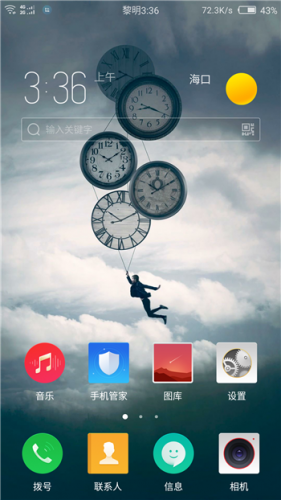
● : Based on V1.30 | official version of the desktop layout to join the switch and desktop icon custom size, support 4 × 5 and 5 × 5 and desktop icon custom size
● new: based on V1.30 | official version joined the shaking mobile phone action , Including: memory cleanup, lock screen, Home key, end of the current application, return to the previous level, the menu key, power button, screenshots, the last application and other functions
● Added: 30 | The official version adds more personality features, support system animation switch, contains 7 different animation effects. Supports font switching, including 6 different fonts. Support set transparent.
The new version: V1.30 | The official version adds more auxiliary functions, including call flash, night mode, screen assistant , red envelope assistant, one button to install XP frame, lock screen auto clean memory, call recording, full function NFC, Hardware acceleration, disable the phone steward, a key repair due to the use of WeChat for the XP module caused by WeChat flashback, custom 420-480DPI switch, the system freeze and view the connected WIFI password. (PS: already mentioned functions are used to achieve the code).
● Added: Based on V1.30 | The official version has added the performance control FM function to support the setting of four different operating modes:
● Mode 1: Power saving standby: Turn off CPU2 and CPU6 (8 core machine processing) to switch CPU0 and CPU4 operating mode For the powersave and for the 810 processor GPU frequency is the lowest, and open the temperature control
● mode two: daily use: turn on CPU0 CPU2 CPU4 CPU6 and other core, and switch CPU0 and CPU4 operating mode for the ondemand and for the 810 processor GPU frequency for daily And turn on the
temperature control ● Mode 3: High performance: Turn off the temperature control and activate the CPU0-4 core and set the CPU0 CPU4 to run mode for the interactive and for the 810 processor GPU frequency is higher and remove the temperature control
● mode four : Performance mode: the implementation of the lifting of temperature control related commands and activate the CPU0-CPU7 related core and set the operating mode for the performance and modify the 810 processor GPU frequency is the highest, and lift the
temperature control ● Added: V1.30 | official version of the performance module Added memory fine-tuning function, support for custom input virtual machine initial memory (control the Build.prop dalvik.vm.heapstartsize parameter), the application allows the maximum (control Build).
Prop dalvik.vm.heapgrowthlimit parameters), virtual machine maximum memory (control Build.prop dalvik.vm.heapsize parameter) PS: personal understanding of the name meaning, if any misunderstanding please understand Kazakhstan …. ● new: based on V1.30 | official version added full eight-core eight-core models for open full, has been tested in the Z9 without borders, Z9MAX, Z9MINI, Z11MINI other eight-core machine in the fully charged case is loaded with eight-core open
● new : Based on the V1.30 | official version of the release of the temperature control rewrite the lifting temperature control related code, it is
recommended to open the eight-core full load before the start to lift the temperature control ● Added: based on V1.30 | official version support to modify the CPU frequency , and for Z11-MINI-S models made the
parameters ● Added: based on V1.30 | official version of the mandatory modification selinux strategy to 0, and merged part of the APK ODEX, joined the relevant Busybox. Hide the shortcut icon for the personality settings, you can use the drop-down status bar click on the lunar calendar or settings – personality settings can quickly enter the personality settings, and can also be created through the personality settings in the shortcut icon to the desktop! 30 | official version to support the revision of the CPU frequency , and for the Z11-MINI-S models made parameters ● Added: based on V1.30 | official version of the mandatory modification selinux strategy to 0, and part of the APK merger ODEX, joined the relevant Busybox. Hide the shortcut icon for the personality settings, you can use the drop-down status bar click on the lunar calendar or settings – personality settings can quickly enter the personality settings, and can also be created through the personality settings in the shortcut icon to the desktop! 30 | official version to support the revision of the CPU frequency , and for the Z11-MINI-S models made parameters ● Added: based on V1.30 | official version of the mandatory modification selinux strategy to 0, and part of the APK merger ODEX, joined the relevant Busybox. Hide the shortcut icon for the personality settings, you can use the drop-down status bar click on the lunar calendar or settings – personality settings can quickly enter the personality settings, and can also be created through the personality settings in the shortcut icon to the desktop!
※Please make a backup of your device before installing or updating ROM