
- Title: Z7 Max 2.13 Android 5 Beta_Eng_Chi
- Listed: March, 2015
- Last modified: 04/24/2015 1:46 pm
- Version: 2.13
You must be logged for ROM download.
27354 total views, 5 today
3 Total favorites
OFFICIAL


 Member Info
DESCRIPTION
The main changes:
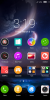
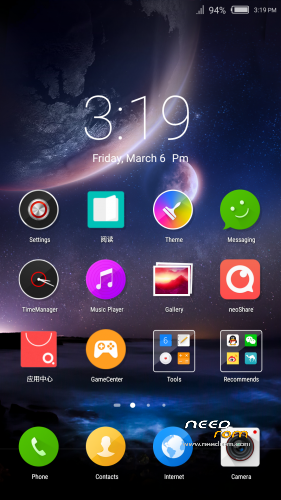
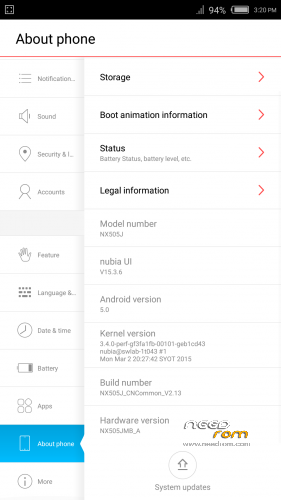
1. Upgrade Android 5.0 system
2. The depth of customization nubia UI2.8
3. Adjust the Flash partition
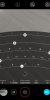
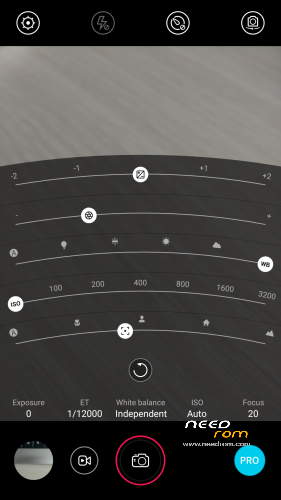
4. New nubia camera visual effects
5. new desktop visual effects designed to increase the lock screen wallpaper, quick access to camera, etc.
6. The new lock screen, status bar, as the effect of
4. New nubia camera visual effects
5. new desktop visual effects designed to increase the lock screen wallpaper, quick access to camera, etc.
6. The new lock screen, status bar, as the effect of
Root, Recovery OK but only chinese
If you back to 1.64 , 4.4.2
guide:
1- Tool Studio download
https://yadi.sk/d/9z2cq939fAvQW
2- flash rom
https://yadi.sk/d/9_Pr4t_3fAvnk
and, towelroot, CWM is work.
※Please make a backup of your device before installing or updating ROM
******HELP NEEDED*******
Normally, the update package is a zip file. This one is TAR.
I copied the TAR file to the sd root and tried to flash using stock recovery, but stock recovery did not even LIST the TAR file.
So I extracted the TAR (on Windows 7) and a built a zip file with the same name.
Now the stock recovery does list the file fine, but on updating, I get: Signature Verification Failed.
I'm on 1.64
How do I install the TAR without any trickery? PLEASE someone help me.
Nevermind. Got it done, and it sucks. Terrible fonts and object sizing, feels like a downgrade throughout the UI.
Can someone please post a step by step guide to fallback to KitKat (1.64 Nubia Rom Release)?
I don't know what the previous partition configuration was and how to reset it to that.
A detailed guide would be very helpful.
Thank you.
>Hi , i would appreciate yor help, my Nubua Z7 max is bricked after flashing the new(from needrom site) 5.0 stock rom and reflashing the original kitkat stock rom.
I need to repartition the phone storage , when i boot it appears only 4.0 Gbyte storage for programs , but no internal storage.
How to repartition the internal storage?
Thank you
http://www.androidiani.com/for.....7-max-mini.html
there you can download Files for getting bACK ON 4.4.2 Stock Rom
i google tranlated the italian text and could unbrickmy Phone:
Once that is done we proceed thus:
1. Pull nubia tool and start it as an administrator after disabling the antivirus protection otherwise automatically recognizes it as trojan … do not worry it is not a trojan;
2. Go on the download section eMMC;
3. Tap on refresh if you did everything right you should see our device;
4. Now click on Browse and specify the path where we save and extract the folder that contains the files needed to restore (NX507J), I recommend the files must necessarily remain in the same folder, for easier I suggest you create a folder on the desktop of your PC inside with everything you need (ToolStudio, Driver and file recovery);
5. Then click on to start, do not worry if you just started the procedure you were to block and give error in the "Status" (happens when the device switches from normal to the diagnostic mode, changing the number of the com port connected to the device) to Now without disconnecting the phone from the computer, click again on refresh and once ToolStudio will have identified the new port com click on to start, wait for the process to finish … .at the end you will have your nubia "always if everything runs smoothly" functioning , peel it off and restart it ….
But you have to do a clarification whether the device is battery-0 (you'll know from the LED lit off), you first need to do everything to stick your phone to pc always press the three buttons, volume plus-minus and power, release the power button always but always keeping it pressed more and less volume for about fifteen minutes, so doing you are going to load forcibly say the battery of your nubia advice disabled in the properties of the USB ports on the Power ……
I personally have not tested the guide on my end but as mentioned a user here on Androidiani following these instructions has managed to resume his z7 mini …… there are also other programs for the unbrickare z7 max mini-guides but I will deal with Following another thing … I know I already said but trust yourself a backup IMEI that you could serve the risk is non-existent follow the guide and already installed drivers ….
Obviously neither I nor Androidiani we are responsible for any damages that might result, although I see it hard to combine multiple damages because of hard brick you have to act on hardware XD
Hi i could at last unbrick my Phone and restore EHs Partions now Phone is Working
some Hints how to install rom:
!! i am not responsible if you brick your PHone!!!
1.!!!! PLEASE make a efs Backup by wnam app!!!
2. The phone must running Stock 1.64 AND be switched on!
3.download Rom , Tool and Recovery unip Rom (NX505J_CNCommon_V2.13.tar)
4. install Tool (nubia NX505J Updater) on PC an start it ;
5- browse with upper key (inside Tool program) the unzipped Rom Files
6. connent running Phone (the Rhone Icon should turn green-if not chech usb debugg)
7. With the second key inside Tool program you start the upgrade prccess
!!!!!!!!!!!!!!!!!!!!!!!!!!!!!!!!!!!!!!!!!!!!!!!!!!!!!!!!!!!!!!!!!!!!!!!!!!!!!!!!!!!!!!!!!!!!!!!!!!!!!!!!!!!!!!!!!!!!!!!!!!!!!!!!!!!!!!!!!!!!!!!!!!!!!!!!!!!!!!!!!!!!!!!!!!!
!!!! PLEASE DONT TOUCH ANYTHING UNTIL THE PROGRESS SHOWS "100/100" und the Phone has startet with 5.0 stock ROM!!
!!!!!!!!!!!!!!!!!!!!!!!!!!!!!!!!!!!!!!!!!!!!!!!!!!!!!!!!!!!!!!!!!!!!!!!!!!!!!!!!!!!!!!!!!!!!!!!!!!!!!!!!!!!!!!!!!!!!!!!!!!!!!!!!!!!!!!!!!!!!!!!!!!!!!!!!!!!!!!!!!!!!!!!!!!!!!!!!!!!!!!!!!
The Tool will create a EFS backup (on C: nubia backp), Format the Phone Storage , install stock 5.0 restore EHS and start Phone with stock 5.0
You still dont have GAPPS and custom recovery, for that :
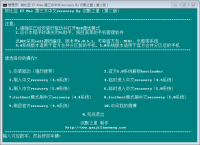
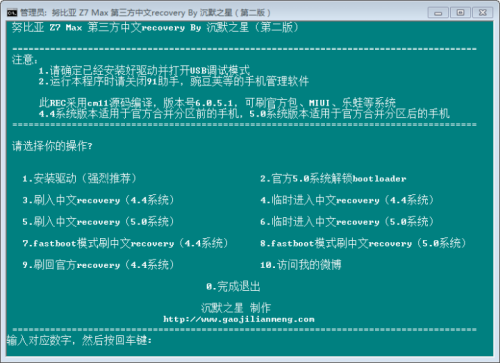
1. unzip root recovery File and start "Z7max_2.13_Android _5.0_CWM recovery.exe" program
2. Put Phone in download Mode (Volum – and Power)
3.start Z7max_2.13_Android _5.0_CWM recovery.exe program and connect Phone.
3 Type: "8" / custom (chinise) recovery will be flashed /
After flashing recovery, you can boot Phone in recov. Mode and flash GAPPS and another custom recovery (you can read therfore in the chinise recover. the Words: "ZIP" (meaning install ZIP) and "extr SD"
THE ROM IS FANTASTIK only thing the IR remote Stock App does not work..
Thank you so much.
can you explain step by step how to install twrp to flash cm12 please.
i've flashed 2.13. it's ok but i want to flash cm12
Hot to use Tools studio.
Hi
its descibed in the Post above..
Regards
I installed CM12 rom (new partition-32gb) and I want to return to Nubia Lollipop rom but I lost my backups and nubia updater doesn't work with CM12… Anyone knows another way to install nubia L rom???
Hi i am afraid if you lost your backup, then you hane to download from: http://www.androidiani.com/for.....7-max-mini.html
And follow translation Form post above to get to stock 1.28 then update to 1.64 und then go to stock lollipop…
Thanks simonas but my phone doesn't brick! it works fine with CM12 new update (16/3/2015). I just want to know if I can install Nubia 5 by other way…
Hi Hugolobo6,
yes i know your phone is not bricked, but the mentioned Method works anyhow for you to get to official Stock Lolipop Rom, if you can't find any other method you can make it by this
Regards
Everything works except for cellular….it is greyed out and the SIM cards are not noticed by the phone. Please advise.
i have the same problem….no sim is recognized even when i installed another rom…no IMEI on status nothing….did you manage to solve the problem?
well… I'll wait for a custom rom (nubia lollipop) ………………..
I messed up a couple of exchange server files while bypassing pin security. Now the exchange services keep crashing. Is there a way to reinstall the ROM.