
- Title: ZEROMDM ITI BYPASS V1.0.0.0
- Listed: January, 2025
- Last modified: 01/12/2025 6:51 pm
- Version: ANDROID
You must be logged for ROM download.
5356 total views, 4 today
2 Total favorites
 Member Info
DESCRIPTION
ZeroMDM ITI Bypass Tool V1.0.0.0
- A useful tool called the ZeroMDM ITI Bypass Tool V1.0.0.0 has been developed to help users work around various security locks on devices made by brands like Tecno, Itel, and Infinix. For professionals who must properly oversee locked devices, this tool is an excellent tool because it provides several important functions.
Features ZeroMDM ITI Bypass:
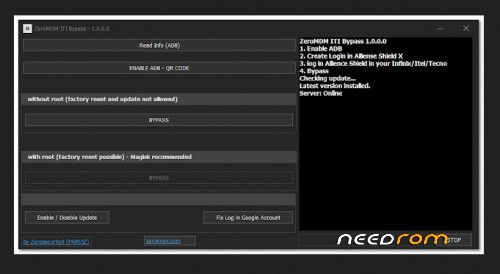
1. Read Info (ADB)
This feature allows you to fetch detailed information about your connected device via ADB, providing insights into the device's current status and settings.
2. ENABLE ADB – QR CODE
Users can enable ADB through a QR code without needing to root their devices. This simplifies the process and avoids complex steps.
Bypass Modes
Without Root
Features: Factory reset and system updates are disabled in this mode to protect the device's integrity.
Functionality: Allows users to bypass certain security restrictions without modifying the system partition.
With Root
Features: Factory reset functionality becomes available, providing greater flexibility for advanced users.
Recommendation: Using Magisk for rooting is highly recommended to ensure smooth operations.
Additional Features
Enable / Disable Updates: Manage system updates by enabling or disabling them as required.
Fix Google Account Login: Resolve issues with Google account login, once you can bypass the MDM lock face the open Play Store or all Google services with this option you can easily fix it.
How It Works
Follow these simple steps to use ZeroMDM ITI Bypass:
- Enable ADB
- Activate ADB on your device to establish a secure connection with your PC.
- Create a Login in Alliance Shield X
- Set up an account in Alliance Shield X, a vital tool for device management.
- Log in to Alliance Shield X on Your Device
- Access the Alliance Shield app on your Infinix, Itel, or Tecno device.
- Perform the Bypass
Use the ZeroMDM ITI Bypass tool to bypass security locks and access your device.
THANK AND DONATE…
FILE FREE
※Please make a backup of your device before installing or updating ROM