
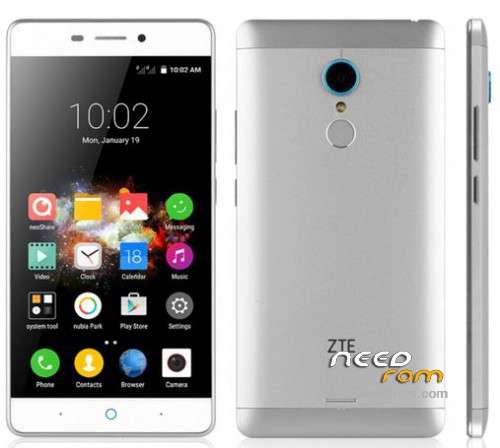
- Title: ZTE V5pro N939St Fw 1.36 Mutli languages Patch + TWRP, Root and Gapps
- Listed: February, 2016
- Last modified: 02/02/2016 9:38 pm
- Version: official Fw 1.36
You must be logged for ROM download.
20633 total views, 2 today
3 Total favorites
 Member Info
DESCRIPTION
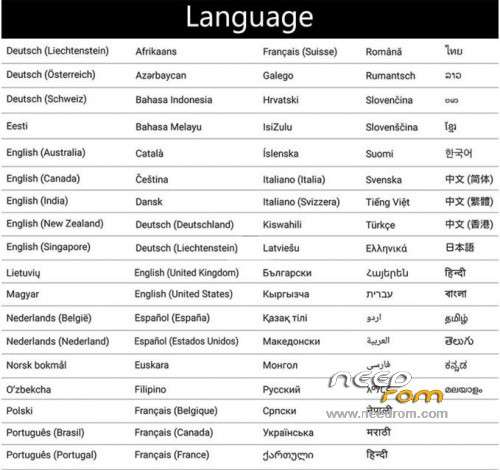
MUlti languages Patch Version 4.5 for ZTE V5 PRO official Fw 1.36 made by XDA : Supercowz (spzjulien)
THIS PATCH IS FOR ZTE FW 1.36, please update your phone first !
QUICK GUIDE
full install (TWRP + root + gapps + mutli langs ) use :
install original ZTE FW 1.36 and
use:
1.install.TWRP.Root.Gapps.bat
then
PS : i spend lot of time to fix it, if you like my work feel free to buy me a cofee, i will be very happy 
version 3.0 :
(bootloop fixed !!!) for zte pro v5 official Fw 1.35
decompiled framwork-res and Setting from Firmware 1.35 (not used 1.29 files anymore) and recompiled will all languages, no more bugs !! and v3 working on all phone, not only my phone ….
version 3.1 :
added SystemUI.apk transalted to de,es,fr,ja,ko,pt,ru,zh
version 4.0 :
- improved bat file, auto install ZTE and ADB driver and auto check/run as ADMIN,
and check if the phone is connected ….
- only 2 easy bat file for user-friendly install :
1.install.TWRP.Root.Gapps.bat
2.Install.Patch.bat
- improved translation
- added all language to SystemUI.apk, not only de,es,fr,ja,ko,pt,ru,zh
- added translated Contacts.apk
- Gapps installer modified to auto delete Chinese apps (Fw1.34 and Fw1.35), before installing
version 4.5 :
support official Fw 1.36
How to install Full Fw1.36 and patch:
1) copy firmware in zip (N939St_update 1.36.zip)to your external SDCARD (you need SDcard to flash FW) flash 1.36 firmware via original recovery or TWRP then reboot by pressing power button since reboot option doesn’t work on TWRP
* to easy boot recovery use software update from nubia and clic recovery …..
OPTIONAL BUT BETTER : wipe and factory reset !!
(backup your data first !)
or
if you want to keep your Data just wipe cache and dalvkit
then scroll down to apply update from SDcard in original recovery
or clic install on TWRP
then choice N939St_update 1.36.zip
2) when phone boot, switch to English language, go to setting and from last option count 8 and ist language setting (ist above cloud icon !)
change keyboard form sogu to English keyboard
3) activate Developer options (Settings/About phone and click 10x on Build number)
4) connect phone to the computer
5) in Developer options switch on OEM unlocking and USB debugging
6) made sure USB MTP mode is enabled
7) enable your computer (look at your phone…)
 extract full.Patch.for.FW1.36.verXXX.zip (Password is : spz)to your computer and start 1.install.TWRP.Root.Gapps.bat, it will ask you to istall driver if you dont have them,then follow the process and it will unclock and flash TWRP recovery and install english patch and copy SuperSU-v2.52.zip (root your phone) and Gapps.ZTE.Spz.zip (install play store) from your internal memory
when patch finished the phone will reboot to the new TWRP recovery
10) when in TRWP recovery clic install and choice SuperSU-v2.52.zip then install Gapps.ZTE.Spz.zip too and reboot the phone by keep pressing power on your phone !
wait your phone fully boot and install … the phone may blink
just wait 4-5mn … Finish enjoy rooted and google play…
11) now your phone is rooted and google play is working, you can install 2.Install.Patch.bat , and after patch is done, your phone will reboot, all is done, enjoy
※Please make a backup of your device before installing or updating ROM
when I install the adb files you copy 0 files ...is normal?Excellent !! no task kiler ??
Hello SPZJULIEN
I have a ZTE V5pro N939ST fault fails to make the boot.il phone is dead if I send it to you by courier might try if you can get it working again.
let me have your response in my email ocirne58@tiscali.it
THANK YOU
I can not place the phone in Spanish, I followed all the steps
follow everything as instructed and works PERFECT. THANKS A LOT!!!!!
good!!
Please help, I'm a stupid rookie, delete all of my phone with Wape, now I can not get the file to copy system.img with adb, it is a ZTE V5 PRO n939st, he tried to update it.
I have already installed the recovery but I can not take the .zip of the new version
I would like to ask if this rom supports GREEK language. (ELLINIKA) Ελληνικά
Я все сделал как написано,но неустановился рут,он тоит но не работает,и нет языков кроме китайского и английского.Пробовал несколько раз,но все не меняется,только предложила обновится на Fw 1.38.I did everything as it is written, but it did not work, it does not work, and there are no languages other than Chinese and English. I tried it several times, but it does not change, only I offered to update to Fw 1.38.
salve è possibile avere la recovery originale?