
- Title: AOSP PURE St 1.5
- Listed: July, 2016
- Last modified: 07/15/2016 12:45 am
- Version: 6.0
You must be logged for ROM download.
29125 total views, 2 today
17 Total favorites

 Member Info
DESCRIPTION
Note : For people having battery drain issue due to wifi follow this method and continue 2 charge cycle to see the improvement….
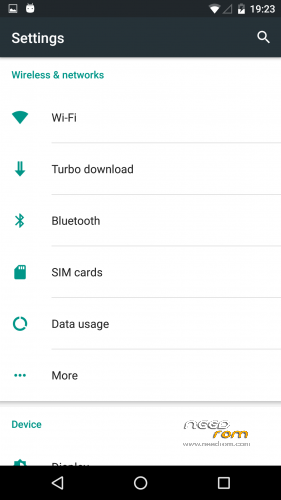
Goto Settings and press search button on top right corner….type in "Scanning" now u should get results like Wifi Scaning open it and disable it….and also if u feel drain due to google play services download the app "My Android Tools" in playstore and disable the things mentioned in this thread
http://forum.xda-developers.com/showpost.php?p=67254249&postcount=922
Update 1.5
Removed FineSearch Yahoo Ad in quick setting tile. The update pack posed systemui problem for few hence a complete rom is uploaded.
Stable 1.4
Updated to latest zopo speed 7 firmware Build Number: 20160708-144458
Apparent fix with slow system response [as mentioned in zopo firmware changelog]
Updated to June Security update [as in firmware]
Removed the addition apps included in st 1.3
Replaced Root Explorer with MiXplorer for ethical reasons
Improved UI Response
NOTE
There is a new app in /system/app called "FineSearch" which opens to the newly added search bar as a part of Quick Settings tile. Seems like zopo added it to promote yahoo which sucks. I leave it to the user to remove it if u want. Don't ask me to remove it from quick setting tile, anyone who know how to do it are welcome to do it coz i hate it too
Time Appropriate Greetings fellas!!!
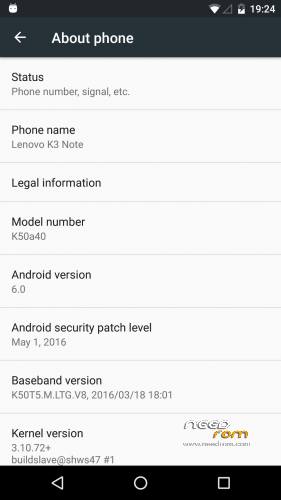
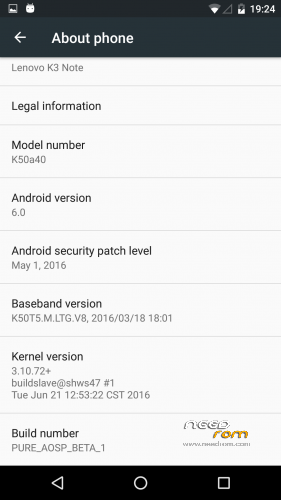
This is my take on the AOSP 6.0 for Lenovo K3 Note….
AOSP_PURE is ported from Zopo Speed 7 just like it was done during the early lollipop days, with the help of few tutorials available on the internet I managed to port a stable marshmallow rom with few bugs obviously, its a learning process for me and those who wish to test it or modify it are welcome to do it but please credit me and people in my credit section and also please comment in the thread what u have done to correct the bug because in the end all we need is Fully functioning ROM and knowledge of how to do it….
AOSP PURE based on the latest firmware of zopo speed 7 with latest security updates. It is not a modification to zoromax port. This AOSP release has very few modifications so that the user can do whatever you want. Have fun!!!
Known Bugs
LED for stuffs
D2W
3G/4G Connection Issues
SMS Issues
Proximity not working during calls
SDCard Corruption
Camera doesnt open
Hardware Capacitive buttons not working (only software touch buttons)Cannot play Video or record sound
Comment if u find more….
this is a stable release except for the usual LED and D2W stuff….rooted, gapps installed, busybox and is MultiLanguage…
This rom comes as two versions ODEXED and DEODEXED
ODEXED ROM means the app have seperate odex files to make them open faster. The odexed rom usually boots quicker but the boot time increases as the number of apps installed increases. In general odexed roms are snappier than deodexed rom but modern smartphones have better processor to make this delay negligible.
DEODEXED ROM means the the odex files are placed in apk instead of being a seperate file, so every time an app is opened it is extracted to load the odex file in memory which takes more time than having odex files outside. But again in current gen processors the delay is negligible. Deodexed rom has long intial boot time but after the first boot no matter how many apps are installed they boot at the same time.
WARNING TEST THIS AT UR OWN RISK….BACKUP EVERYTHING U HAVE BEFORE DOING ANYTHING…
Boot into TWRP recovery
Wipe Dalvik Cache, Cache, System and Data
Flash the file
Reboot….
Credits :
Lenovo for phone, Zopo for the rom, Sandeep for the guide, Ninad and Kaka for the suggestions and finally SuperR for SuperR's Kitchen with which the rom is made.
※Please make a backup of your device before installing or updating ROM
This version has less mb as 1.1. what happened?
removed few unnecessary libs and also deodexed version added as i thought people are used to it
Trying to install Getting an error saying “this package is for aio_otfp,K50,K50a40….etc…; this is a k50. ”
Mine is a K50a40 and I didn’t have any problems installing other ROMs. Can anyone help ?
i don't know why ur devices is named k50 ususally after wiping system most of the devices will be aio_otfp……anyway its not a problem, edit the update-script in the zip file and rename any of those names to k50 or delete the asserts part altogether, then it will install
i didn't knpw devices are named k50
or use the updater script from here
https://drive.google.com/file/.....iew?usp=sharing
Thanks.
Could you maybe add init d feature in next version? http://odn.kz/mobile/skript-dl.....hki-init-d.html
there are flashable zips for that search for it, its easier that way
clearmotion option goes into fc
it used to work, i might have messed by removing its libs…idk, i dont feel any difference with or without clearmotion…not gonna look at those files again…with quite a few customisations of ur wish the rom flies
Blend rom use cheskin kernal, so it can support LED and Double click 2 Wake. does anyguy try to restore boot fr blend rom. may be work on this rom.
I tried. LED works but not DT2W.
This rom is very smooth. No problem till now. Thanks.
flash some mods of ur wish audio, video or whatever and have fun
Thank you pvkiniyan!
I installed this ROM and use it for few hours , I must say that this ROM is like buttery smooth and fast
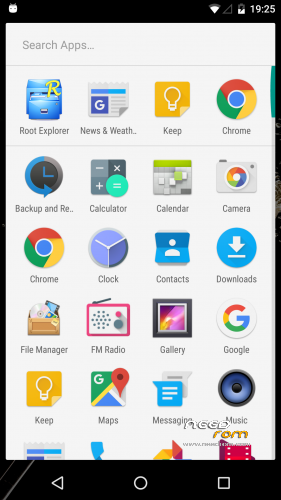
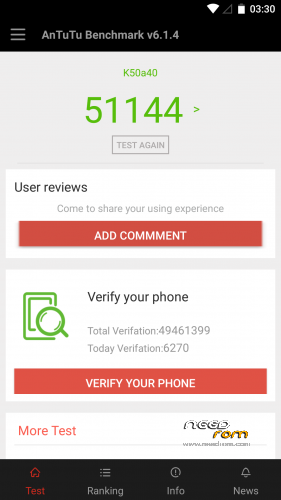
 . I get 51000+ score in antutu benchmark without any tweak . I play Asphalt 8 airborne in this, it plays like a charm. I am just little bit upset with the icons, it looks quite old, i saw this kind of icons on my iris 504q phone, how can I change these icons look?
install xposed and then xposed gel settings and u pretty much modify it to ur taste….or use different launcher like nova and install some icon pack
Any camera app will not save any photo taken.
i exactly knew where i messed….working on the mess
fix for camera uploaded…make use of it
For working LED you could try this http://odn.kz/mobile/zapuskaem.....vo-k3-note.html like Mr-Needrom did in nexus MM
link isn't opening here buddy
Translate with google translate:
Members Lenovo K3 Note phone with iOS dev eventually or immediately confronted with the fact that these insertions and some custom firmware does not work led notifications to third-party applications, it is not at all in some firmware. For fun and raise this even the slightest knowledge of the agreed existing scripts to piece together. How can I run led notice on the phone Lenovo K3 Note? What the script does: – turns on itself after 60 seconds when the phone is loading – check whether the screen is off – if the screen is off, check the notification log dumpsys for these applications – if the notice is, it starts flashing, if not, respectively, then ignore – if the screen It is on, off ice, even if there is a notification (I think it is better) PS can live your life, here is a script not to blame, and logs dumpsys Led notification will run on the following приложения: org.softeg.slartus.forpdaplus org.telegram.messenger com.google.android.gm com.skype.raider com.viber.voip com.whatsapp com.vkontakte.android com.perm.kate_new_6 com.google.android.youtube com.instagram.android com.android.chrome com.android.vending What do we need: – root – busybox – TWRP – the init.d If you have not activated init.d firmware, you can use an automated script to add support for init.d scripts So, let's say in the firmware has all of the above, just download the required script and install TWRP through (without a wipe). For the vibe (dev / st) through 6.0 https://cloud.mail.ru/public/8.....gcY/g7LQsroKD
Источник: http://odn.kz/mobile/zapuskaem.....vo-k3-note.html
При копировании материала с сайта, активная ссылка на оригинальный материал обязательна.
© Блог DaraDan – http://odn.kz