
- Title: P780 4.4.2 ROW for China Baseband P780
- Listed: August, 2014
- Last modified: 12/07/2014 6:09 pm
- Version: Android 4.4.2 KitKat
You must be logged for ROM download.
72728 total views, 5 today
7 Total favorites







 Member Info

DESCRIPTION
Lenovo P780 ROM, Android 4.4.2, patched to work with Chinese version of the phone
This is a signifiant upgrade to Lenovo P780 ROW, The OS is upgraded to version 4.4.2 KitKat. It is a full upgrade package and will erase all user data. After update, the internal storage will no longer have the virtual SD card, the entire internal storage is partitioned as 'usrdata', the android data partition.
This ROM was initially released for the international version of the P780, I made 2 changes to it, to make it work with the chinese version (no 900 MHz), 4GB (non-ROW), which is now bundled with the VIBEUI ROM. Here are the changes I made: 1) I removed the device check from the installer, now the zip could (but I don't advise to) be installed on any device, and 2) the baseband used on this device is the one bundled with the VIBE UI ROM, the one that works with the non-ROW version of the phone. This ROM has all the apps which the international version has: Google play, more languages, etc.
Applying the zip update will also remove custom recovery and replace it with factory version. The first restart will take longer as usual, so be patient on the first boot. 'boot' and 'recovery' images are overwritten by the update, if you use root and/or custom recovery, you will have to reinstall them custom recovery with SPFlash Tool.
Before upgrading, back up your data (SMS, Call logs, Apps) with Lenovo Backup & Restore, you will be able to restore contacts/sms and logs later with the settings / backup and restore feature, and reinstall APKs from the SD card backup folder manually. APKs can be easily located with the file browser.
The 2nd package provided is in SP Flas tools format, it can be installed fast and easy, no matter what is your phone currently running. The package includes the factory ROM and apps, plus Superuser and Busybox. A custom recovery is also included.
What's new
- OS is upgraded to version 4.4.2 KitKat
- A new 'Lenovo Security' app is provided, this includes antivirus, privacy guard, data usage (and firewall), SMS/call anti-SPAM, speed-up, private space and anti-theft features
- new versions for most system apps (dialer, sms, calendar, email, power manager, etc), google play store, flashlight widget and app
- more privacy
- a memory cleanup button has been added below the task list
- SMS and home screen app can now be switched from the settins app
- 'Smart Scene' feature allows automated audio profile switch, either at a specified time or at a specified wireless network presence
- More theme-able (lock screen, system UI, boot animation, notification UI, contact manager and in-call app can now have different themes (even though a very low number of themes is provided).
- reboot option added to shutdown menu
- all audio volumes are available/adjustable when pressing volume-up/volume-down
- flip-to-mute incoming call alert, auto-redial option
- LED alert now flashes, instead of staying continuously lit (but still doesn't provide notification from other apps, such as facebook)
- the display colours can be tuned for saturation and hue (white balance)
- a 'wireless display' function has been added
- 'Smart Display' feature, preventing the screen to enter standby if the user is looking at the screen.
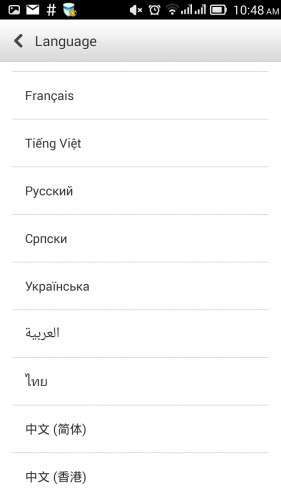
- Available languages: Bahasa (Indonesia & Melayou), English, Spanish, French, Vietnam, Russian, Chinese, Ukrainian, etc.
- the internal virtual SD card has been removed, now all the available internal storage is provided as a single partition
Notes
- The baseband contained within this ROM is for China version of Lenovo P780, you may lose the 900 MHz for 3G data band if you will install it on the international version of the phone!
- You have to backup IMEIs with MobileUncleTools before flashing. It's a known fact that sometimes IMEIs are lost when flashing ROM, it already happened with many ROMs and many MTK65xx devices.
- automatic updates will fail, due to changes Lenovo made in the update mechanism. For example, the update to ROW_S221 checks for the checksum of the modem.img file, thus making the update to fail.
- after installing Chainfire SuperSU onto this rom, you will gain root, but the current version of chainfire will complain about ‘not being up to date’, this will likely be fixed in a future version of SuperSU
- newer P780s use a different preloader image. I have uploaded both preloader.img on the spflashable ROW-s222 package, you will have to manually select the 2nd preloader.img file manually if your device is manufactured after march 2014.
How to install the ROM
Common prerequisites:
- Use lenovo backup and restore, do a backup of your data to SD Card (apps, contacts, messages, call logs), you will be able to restore them later with settings/backup and restore feature.
- connect the phone to PC, enable USB debugging, install Lenovo drivers if you didn't already, do a backup of your IMEIs with MTK Root & Tools app
1 – P780-S220, zip update – This package can be installed if your device is already running a factory ROM for P780. Versions P780-ROW S119-S124 work fine. You need to have installed a custom recovery able to install zip from SD Card. Download the zip, copy it to the phone card, Power off the phone, start the phone by pressing 'power + vol-up + vol-down' to enter recovery interface, apply zip update.
Recovery working with this ROM: Carliv Recovery v. 2.2 (even though it isn't perfect, it's able to apply zip/sideload updates), TWRP 2.5.0
2 – The SPFlash format package – This package can installed with spflash tools, regardless of what is your phone running. Grab SPFlash tools (version 3.12 or any higher 3.x version recommended) and the Mediatek USB VCom drivers, install the driver, unpack SPFlash tools and the ROM.
Power off the phone with 'Fast bootup' option disabled, connect the usb cable to the phone (only this cable end), start Flash_tool downloaded previously, make sure 'DA DL All checksum' option is enabled within app, click on 'scatter…' button, browse to the 'MT6589_Android_scatter_emmc.txt' extracted with the ROM, click on 'Firmware upgrade' button. Take a look to all memory partitions on SP Flash tool window, make sure all partitions are ticked and HAVE a file associated to them. SPFlash tools version 5 may not automatically check all segments!
Connect the usb cable to the PC end, watch the Flash_Tool how it's transferring firmware, until it displays a window with a green circle.
Unplug the cable, start the phone, wait for the initial setup (it will take longer than the usual start-up), enjoy!
You will notice requests for root from Lenovo Power and Security apps. It's absolutely safe to hit 'Deny', those apps work very well without root access.
Update 2014-12-07: P780_ROW_S226_140919_TO_P780_ROW_S227_141121_WCF9.zip
This is an incremental update from version S226, it can't be installed without havig P780_ROW_S226 installed on device. Installing the factory update alone will not affect the existing modem firmware, but it will disable root. This incremental update can be installed as a zip update.
To install it, download the zip to SD card (and ClockworkMod Superuser if you want root, you can take it from here), reboot to TWRP recovery (with Mobile Uncle Tools or 'adb reboot recovery' command), install BOTH zip files, then reboot. If you do not need root, then you can ignore references to superuser.
Common post-update actions:
- use settings/backup and restore to bring back contacts/messages/call logs
- ignore update notifications, they will allow you to download future updates, but they will likely give errors when attempting to install the update.
- hit the 5 stars button under 'Author rating' on this page and take into consideration a donation!
※Please make a backup of your device before installing or updating ROM
I have install it on Lenovo P780 with S135 CN and it's working perfectly !!
oacky did you use SPflashtool or via recovery? i have S136CN, i dont know anymore how to do it…so many complications…
Spflash version works on top of any exiting ROM. What issues are you encountering?
I downloaded first zip s220…and SP cant read scatter…with another scatter doesnt load directories right…something is wrong with upload of that one…
The S220 zip is a 'update zip' package, can't be installed with SPFlash. S221 and S222 are in SPFlash format, go straight to S222.
Hi, sorry to bother but I am rather "green" in flashing..
I have a chinese version of the P780, pre march 2014, with these details:
ROM P780_ROW_S115_130807
Baseband: P780.V16, 2013/07/03 17:08
Mobile uncle tools and TWRP 2.5.0.0 already installed.
Which version of the file shall I use? I'd like to test "P780-ROW-S222-PreRooted-TWRP-CNFW"
Will I install usind recovery or try to follow the spflash procedure?
Many thanks in andvance, I cannot wait to see this new rom working!
Yes, go straight to S222, I don't see any specific reason to stay below. You will have to use SPFlash, the internal storage will be repartitioned and unified.
Don't forget to do backups:
- with TWRP – for the entire device, you can skip the external SD card, but do not skip NVRAM
- with Lenovo backup & restore (contacts, call logs, apks), you will restore it later with settings / backup &restore
- with mobile uncle tools backup IMEIs. Who knows, I heard sometimes IMEIs are lost (this didn't happen to me), you may have to restore IMEIs later.
Make sure backups are kept on SD CArd!
Happy upgrade!
thanks man I am noob it seems , and on some tutorials I see that I shouldnt tick preloader whatever I install, on some others people do tick it…it would be nice If someone can explain that stuff just in short…thanks! also thanks for very fast answers
Here’s the issue with ‘preloader’ : if the ROM layout differs between old and new ROM, then spflash will stop flashing, with a PMT related error, if used in “download” mode. “download” mode allows rewriting parts of rom, unlike “firmware upgrade”, which is used to flash ‘entire’ rom. So, PMT mismatch error implies full firmware upgrade, which can’t be done with missing parts. Therefore, if you have different ROM layout, you are forced to use ‘firmware upgrade’, which Must be done along with a ‘Preloader’ segment.
Anyway, if you do flash the wrong preloader, there is still hope, mediatek chips are almost unbreakable. They can be brought back to life even from wrong preloader flashed.
Hi,
I have written down the IMEIs manually (15 digits) and saved using mobile uncle tools, used "backup and restore" from lenovo apps and finally made a full backup using TWRP 2.5.0.0. Everything went to external storage (physical sd card). it seems drivers are ok on my win system. Backup phone is charged and ready . It seems I am ready to begin…
I will use the exact procedure described in your "SPFlash" instructions. Last question: the full backup I have just done using TWRP 2.5.0.0: in case something goes wrong… how would I use it to recover? Will it be compatible with newer TWRP version (I see 2.7.0)?
Yes, that format can be restored by newer TWRP. But you can install TWRP back anytime, if something goes wrong, right?
I assume you won’t encounter any issues, though
thanks for sharing that knowledge only thing left is how can I know which preloader to use, where can I find out manufacturing date, I bought it in July this year but who knows when its manufactured….
If you really want to avoid flashing preloader, you could do a zip install with s220 first. S220 update does a system repartition, among other things. After you do that, you could then use ‘download’ mode with spflash, to download only ‘system’, ‘recovery’ and ‘boot’ fragments.
I dont want to avoid, just to make sure I am using right preloader….mine is after 2014/4 i think, the same preloader is in this rom that I am using (S136) so it has to work I suppose…
i done all backups so…i shouldnt worry (i guess) hahah
If you load a scatter file to spflash, read the first megabyte of ROM (start 0×0000, length 0×10 0000, actually the first 160 Kb should suffice), then I could extract your own preloader off it.
I really dont know how to read first 160 kb you already helped a lot no need to bother…. I dont see a reason why it shouldnt work
just to update…i flashed and everything WORKS flawlessly..thanks for upload once again…
i deleted 2013 preloader and did it with 2014..i checked on my box that came wiith device it said 2014 / 4 also on back of battery you can see manufacturing date…..and everthing like described in install notes…cheers!
Welcome! Don’t forget about the stars
sure , just one tiny question cant find it anywhere…what is the difference between pressing download button (if I tick everyhing, so whole ROM is downloaded) and firmware upgrade button where everything has to be ticked like you already said? Does SP flash tools does something different or is it the same?
Firmware upgrade: the whole ROM map is erased (PMT, an in-device equivalent of the scatter map file) and you have to upload a whole ROM back, along with the preloader fragment. This operation will succeed if the scatter is different than PMT
Download: requires that the scatter to match the binary contents of PMT, allows partial transfers (ie: only system and recovery), it will fail if the map from scatter has a different about than PMT
The s220 introduced a new ROM layout, it’s impossible to use ‘download’ when upgrading from a previous version (or VibeUI ROM, for example) to s220, a “firmware upgrade” is mandatory. But the layout is unchanged between s220-s222, therefore an upgrade (keeping user data) from s220 to s221 (or even s222) is possible by downloading only ‘Android’, ‘boot’ and ‘recovery’.