
- Title: P780 4.4.2 ROW for China Baseband P780
- Listed: August, 2014
- Last modified: 12/07/2014 6:09 pm
- Version: Android 4.4.2 KitKat
You must be logged for ROM download.
71935 total views, 2 today
7 Total favorites







 Member Info
DESCRIPTION
Lenovo P780 ROM, Android 4.4.2, patched to work with Chinese version of the phone
This is a signifiant upgrade to Lenovo P780 ROW, The OS is upgraded to version 4.4.2 KitKat. It is a full upgrade package and will erase all user data. After update, the internal storage will no longer have the virtual SD card, the entire internal storage is partitioned as 'usrdata', the android data partition.
This ROM was initially released for the international version of the P780, I made 2 changes to it, to make it work with the chinese version (no 900 MHz), 4GB (non-ROW), which is now bundled with the VIBEUI ROM. Here are the changes I made: 1) I removed the device check from the installer, now the zip could (but I don't advise to) be installed on any device, and 2) the baseband used on this device is the one bundled with the VIBE UI ROM, the one that works with the non-ROW version of the phone. This ROM has all the apps which the international version has: Google play, more languages, etc.
Applying the zip update will also remove custom recovery and replace it with factory version. The first restart will take longer as usual, so be patient on the first boot. 'boot' and 'recovery' images are overwritten by the update, if you use root and/or custom recovery, you will have to reinstall them custom recovery with SPFlash Tool.
Before upgrading, back up your data (SMS, Call logs, Apps) with Lenovo Backup & Restore, you will be able to restore contacts/sms and logs later with the settings / backup and restore feature, and reinstall APKs from the SD card backup folder manually. APKs can be easily located with the file browser.
The 2nd package provided is in SP Flas tools format, it can be installed fast and easy, no matter what is your phone currently running. The package includes the factory ROM and apps, plus Superuser and Busybox. A custom recovery is also included.
What's new
- OS is upgraded to version 4.4.2 KitKat
- A new 'Lenovo Security' app is provided, this includes antivirus, privacy guard, data usage (and firewall), SMS/call anti-SPAM, speed-up, private space and anti-theft features
- new versions for most system apps (dialer, sms, calendar, email, power manager, etc), google play store, flashlight widget and app
- more privacy
- a memory cleanup button has been added below the task list
- SMS and home screen app can now be switched from the settins app
- 'Smart Scene' feature allows automated audio profile switch, either at a specified time or at a specified wireless network presence
- More theme-able (lock screen, system UI, boot animation, notification UI, contact manager and in-call app can now have different themes (even though a very low number of themes is provided).
- reboot option added to shutdown menu
- all audio volumes are available/adjustable when pressing volume-up/volume-down
- flip-to-mute incoming call alert, auto-redial option
- LED alert now flashes, instead of staying continuously lit (but still doesn't provide notification from other apps, such as facebook)
- the display colours can be tuned for saturation and hue (white balance)
- a 'wireless display' function has been added
- 'Smart Display' feature, preventing the screen to enter standby if the user is looking at the screen.
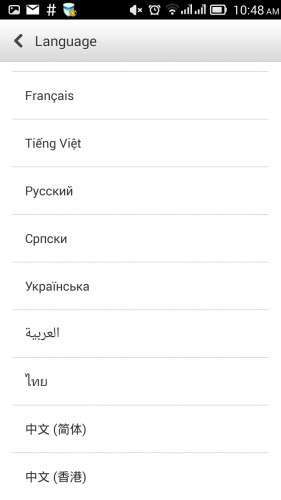
- Available languages: Bahasa (Indonesia & Melayou), English, Spanish, French, Vietnam, Russian, Chinese, Ukrainian, etc.
- the internal virtual SD card has been removed, now all the available internal storage is provided as a single partition
Notes
- The baseband contained within this ROM is for China version of Lenovo P780, you may lose the 900 MHz for 3G data band if you will install it on the international version of the phone!
- You have to backup IMEIs with MobileUncleTools before flashing. It's a known fact that sometimes IMEIs are lost when flashing ROM, it already happened with many ROMs and many MTK65xx devices.
- automatic updates will fail, due to changes Lenovo made in the update mechanism. For example, the update to ROW_S221 checks for the checksum of the modem.img file, thus making the update to fail.
- after installing Chainfire SuperSU onto this rom, you will gain root, but the current version of chainfire will complain about ‘not being up to date’, this will likely be fixed in a future version of SuperSU
- newer P780s use a different preloader image. I have uploaded both preloader.img on the spflashable ROW-s222 package, you will have to manually select the 2nd preloader.img file manually if your device is manufactured after march 2014.
How to install the ROM
Common prerequisites:
- Use lenovo backup and restore, do a backup of your data to SD Card (apps, contacts, messages, call logs), you will be able to restore them later with settings/backup and restore feature.
- connect the phone to PC, enable USB debugging, install Lenovo drivers if you didn't already, do a backup of your IMEIs with MTK Root & Tools app
1 – P780-S220, zip update – This package can be installed if your device is already running a factory ROM for P780. Versions P780-ROW S119-S124 work fine. You need to have installed a custom recovery able to install zip from SD Card. Download the zip, copy it to the phone card, Power off the phone, start the phone by pressing 'power + vol-up + vol-down' to enter recovery interface, apply zip update.
Recovery working with this ROM: Carliv Recovery v. 2.2 (even though it isn't perfect, it's able to apply zip/sideload updates), TWRP 2.5.0
2 – The SPFlash format package – This package can installed with spflash tools, regardless of what is your phone running. Grab SPFlash tools (version 3.12 or any higher 3.x version recommended) and the Mediatek USB VCom drivers, install the driver, unpack SPFlash tools and the ROM.
Power off the phone with 'Fast bootup' option disabled, connect the usb cable to the phone (only this cable end), start Flash_tool downloaded previously, make sure 'DA DL All checksum' option is enabled within app, click on 'scatter…' button, browse to the 'MT6589_Android_scatter_emmc.txt' extracted with the ROM, click on 'Firmware upgrade' button. Take a look to all memory partitions on SP Flash tool window, make sure all partitions are ticked and HAVE a file associated to them. SPFlash tools version 5 may not automatically check all segments!
Connect the usb cable to the PC end, watch the Flash_Tool how it's transferring firmware, until it displays a window with a green circle.
Unplug the cable, start the phone, wait for the initial setup (it will take longer than the usual start-up), enjoy!
You will notice requests for root from Lenovo Power and Security apps. It's absolutely safe to hit 'Deny', those apps work very well without root access.
Update 2014-12-07: P780_ROW_S226_140919_TO_P780_ROW_S227_141121_WCF9.zip
This is an incremental update from version S226, it can't be installed without havig P780_ROW_S226 installed on device. Installing the factory update alone will not affect the existing modem firmware, but it will disable root. This incremental update can be installed as a zip update.
To install it, download the zip to SD card (and ClockworkMod Superuser if you want root, you can take it from here), reboot to TWRP recovery (with Mobile Uncle Tools or 'adb reboot recovery' command), install BOTH zip files, then reboot. If you do not need root, then you can ignore references to superuser.
Common post-update actions:
- use settings/backup and restore to bring back contacts/messages/call logs
- ignore update notifications, they will allow you to download future updates, but they will likely give errors when attempting to install the update.
- hit the 5 stars button under 'Author rating' on this page and take into consideration a donation!
※Please make a backup of your device before installing or updating ROM
Hi,
does this rom has translations in Dutch/Netherlands?
best regards
anttel
I recommend use of ‘morelocale2′ app from Google play store, many system apps are translated already, useful even though some fragments are misleading.
Hi,
Yesterday I installed this Rom and it Works flawlessly! Thanks a lot! Could you add Dutch to the translations. Keep up the good work! I really appreciate it.
Best regards,
Anttel
Use morelocal2 for dutch language, I think it will work. I use the rom with german and everything is fine.
Seems I spoke too soon ! All is working well except that I now get "charging protection activated" when plugging in a charger to the USB port. I was able to get it to charge by dropping back to TWRP … then it seems to charge OK. I know charging has been an issue with some phones with Kitkat … any ideas ?
Regards
Rick
I also see messages containing “charging protection activated” and I don’t have any problems. I think this message only appears when battery level is high and the phone is connected to a PC. Battery charging has multiple phases, see builtin tutorial.
Hi
Thanks, now resolve – oddly it seems to have become more sensitive to the USB cable used. Using a different cable it has gone back to fast charging.
Regards
Rick
Hi,
I installed it for one week now and life battery is around 2-3 days (less than LiFe v05 ). When I look to power consumtion, I see that the aplication InCallUI is first consumer. Do you know what is this app and how can be disabled ? because now it is not possible to do this.
Lenovo wheather is not the best choise, but this can be solved by other app .
.
No other issues fount yet .
.
Thanks !
IncallUI should be the name of the dialer app. This should use much power if you make many calls or if use have some features activated (noise reduction, contacts synchronization perhaps). Please see how it will do after a couple of days, power consumption stats are not relevant on the first days.
Perfect. It worked perfectly the first time. With this ROM all signal quality problems are now solved. Some other ROMs may have done the same, but I think this ROM had the clearest description of the upgrade process I've ever seen, complete with links to all the necessary software.
Thank you, enterco, please keep up the good work. I can only help with a small donation.
Thank you for appreciation and for your donation!
Hi enterco,
I would like to know, if the rom contains german language.
My P780 chineese language on the battery now has
P780_S125_130529
Can I use your rom? How is it to install?
I´m a absolute beginner, bute my rom has a few bugs and I want to update it.
THANK YOU!
Hi,
Yes, you can use it. Make sure you select the right preloader segment (2013 or 2014)
Now I´ve installed it. Everything works, good instruction by enterco, both sims works fine, imei´s not lost! GREAT JOB!!!!!!!!!!
German language is working with morelocal2. Perfect.
Enterco is simply the best.
Hi man,
I installed yours last work S226 and have to say – it's going on really good job !
But it's one thing what I miss – I accustomed at long press menu key what leads to "task manager" where I can see running apps, but here it leads to "OK Google".
It possibility change this thing ?
Thanks.
The task manager appears when long-pressing the left button (contextual menu) on my device.
Hey man,
After connecting my Chinese p780 it says: "Unrecognized ROM detected." I'm using the P780_ROW_S226_Rooted_SPFlash_TWRP_CNFW.
If I try the Download Only option it says: "PMT changed for the ROM; it must be downloaded."
Any clue to how to fix this?
Cheers!
Ok so I was using SPFlash 5, which apparently was causing the problem. Using SPFlash 3 worked, until the green circle. The I disconnected the phone. And then nothing. It won't boot and when connecting it to my computer and trying to Upgrade Firmware it will only load the red bar until 141776 Bytes and then just stop…
That’s not necessarily a spflash5 fault. One of the files in archive (system.img) is accepted by spflash 3 but not by spflash5.
To fix the “PMT changed” issue, you have to select “firmware upgrade” instead of “firmware download”.
Hi, Downloaded P780-ROW-S221-PreRooted-TWRP-CNFW followed your descriptions. The flashing was successful, but my phone is now dead immediately after the upgrade. I press the power button and my phone can no longer power on. its two days now, and my phone cannot power on. Please I need urgent help. Thanks
There is no reason to use an old version, I suggest you download s226 archive. Make sure you chose the right preloader.img file (delete the one named 2013 if
your devices made after March 2014), then use the ‘reset button near sd card slot. Leave it powered off and try to reflash it.