
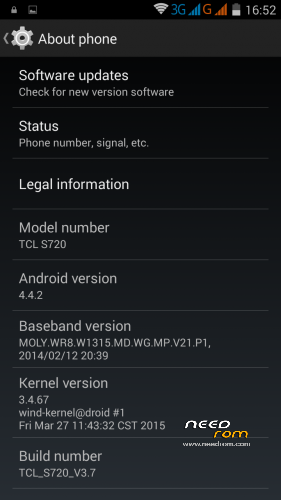
- Title: AOSP 4.4.2 for TCL S720-Unicom/WCDMA (Rooted)
- Listed: April, 2015
- Last modified: 04/13/2015 4:59 pm
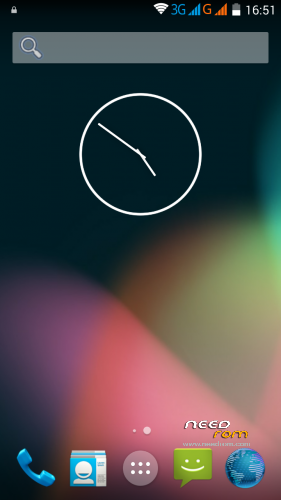
- Version: AOSP 4.4.2 (SuperSU-Rooted,Google Play Installed)
You must be logged for ROM download.
21993 total views, 2 today
6 Total favorites
 Member Info
DESCRIPTION
I made "my" version for TCL S720-Unicom/WCDMA from the Official TCL S720T firmware 
(it is based on a TCL S720T ROM/Firmware from ShiGe579—KUDOS to ShiGe579)
It has preinstalled Googe Play and Gmail and it is pre-rooted via SuperSU
I also pre-installed vannila AOSP browser because the stock AOSP browser has so called
"Great Firewall of China" issues and googe search gives error 403
It has WCDMA modem preinstalled and it works on my device S720 without any issues
(rom baseband might work on TCL S-720T also,
but I'm not sure because I don't have that model,it has both models basebands though)
(english user language is pre-selected…it has only Enlish And Chinese Languages)
you can install/flash the ROM via twrp/cwm/phillz recovery
if you have TCL S720 Unicom WCDMA model you don't need to edit anything,
play store works,gmail works,build prop is pre-edited for TCL S720-Unicom/WCDMA so everything is just fine.
here are some additional links
link from phillz recovery—(you can install Phillz Recovery via mobile uncle tools or via sp flash tool)
https://drive.google.com/file/d/0BzP6FDyPPswnbFpzY2lvMVk2cTA/view?usp=sharing
——————————————————————————————————————————————-
before installing/flashing this ROM,please make a nandroid backup from your current rom via recovery backup.
I will not be responsible for bricked devices,
you're installing/flashing this ROM on your own risk
——————————————————————–
installation
——————————————————————-
1.Copy Rom.zip on internal memory or SD-Card
2.Enter custom recovery (cwm,twrp.phillz)
3.Make backup of your current Rom ,so if something goes wrong you can restore your working Rom
4.Make Full Wipe
(in CWM and Phillz wipe data,wipe cache,wipe dalvik cache…in TWRP press Wipe and slide to Wipe)
5.Install the Rom
(in Phillz or CWM recovery ,install from SD and sellect the "Name OF the ROM".zip,and install it…
in TWRP go to Install and sellect "Name OF the ROM".zip and slide to install
6.Reboot the device/Reboot to System
7.Enjoy the ROM
***FIRTS BOOT WILL TAKE SOME TIME,About 3-5 minutes***
(If you end up in a boot loop,enter recovery,reflqsh/reinstall the rom ,wipe dalvik cache and reboot to system)
—————————————————————————————————————————————————-
If I'm breaking some of the site (forum) rules for posting links etc
please delete my post and links.
If I'm not breaking any rules on this site (forum) ,
then, you can re-upload or share this rom
Thanks guys
and Good Luck
※Please make a backup of your device before installing or updating ROM
Portuguese please
No multilanguage ,sorry
I tried but I failed
Download links updated
(added needrom link)
I’ve installed on my s720 & all is working as should . this is best ROM I’ve had yet
one question. vol down + pwr buton, and i see chinese, what next?
Would you past direct link to twrp.phillz for s720.
For entering recovery use
Volume UP and Power
(Volume Down and Power is a chinese test menu)
@maxmaster027
Needrom direct link for PhillZ recovery added.
New version NFS Most Wanted /1.3.63/ working fine. This is the best ROM for multitasking. Thx
exacly chinese menu……….i already reset phone once by accident..some guid would be helpfull as I don't know chinese
Gajkax Can you add here or there android drivers for windows xp. coz I have really often kode 28 error during instalation. Is like something with usb insturctions is missing. And it is anoying I tryied 20 different android ADB instalation versions and still not even one is working on both computers with xp.
Are you connecting the phone with the original cable? try the original cable and connect the phone directly to the pc main usb port, and not hub usb .
I'm telling you this because I had the same problem, and I solved with connecting the phone with the original cable and back usb port.
@maxmaster027
What Chinese menu???
The rom is set to US English automatically.
As for drivers…
Install pdanet,it will install usb and mtp drivers for any android device …if this doesn't solve your issue then sorry but I can not help you.
Start using newer windows version though.
ok i solved issue. Is there a possibility to swap this rom to scatter one, which you can basicly install rom thorigh sp flash tool v5? Coz all roms installed like that not need any superuser/root, other programs. just a though
I can not understand what are you trying to say.
If you like you can make a full backup of this rom with Mtk Droid Tools or FULL Readback backup with Sp Flash Tool,
and then you'll be abel to flash this rom via sp flash tool .
If you wan to flash another firmware via sp flash tool,yes you can,
just download a firmware for you model TCL S720 and flash it.
(lewa os ver.5 is available for sp flash tool a;so AOSP 4.2.2 ver,a03 but gps doesn't owrk on that one)
installing roms via twrp or cwm is much easier
i don't know why are you looking for sp flash tool flashable firmwares,
nevermind.
hmmmmmm. In Settings -> Storage, i'm able to change the default write storage to external SD. My apps are installing to SD i didnt get that prblem..
i installed the rom…but it is not rooted..wha can i do?thank you
this rom is pre-rooted.
if you lost your root premissions somehow ,
just re-root using flashable superSU 2.46.zip via cwm/twrp recovery
(download flashable superSU from chainfires site or xda thread)
or just download iroot apk and re-root it with iroot.
finally i worked.. after trying with kingroot 3 times (since supersu couldn' t update binary files)i was able to root the device and after that i installed supersu from playstore. Good rom, everyhing works almost perfectly but some times some applications stop to work, it freezes and only with reboot from the key opens again. Very good!