
- Title: b9500 lcd 960×540 rooted , cwm (gt-i9500) air gesture
- Listed: September, 2013
- Last modified: 09/25/2013 4:39 pm
- Version: 4.2.2 rooted cwm
You must be logged for ROM download.
33491 total views, 1 today
2 Total favorites



 Member Info
DESCRIPTION
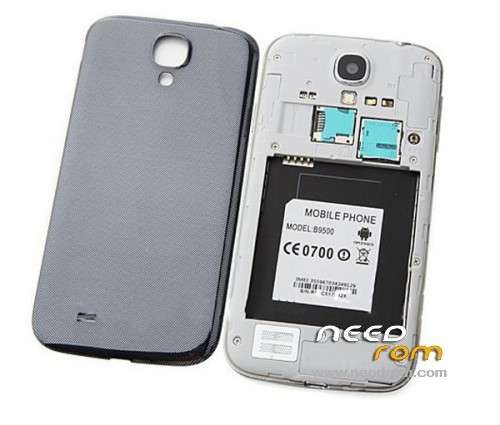
Hardware : MT6589 (UNIVERSAL5410 is Fake!)
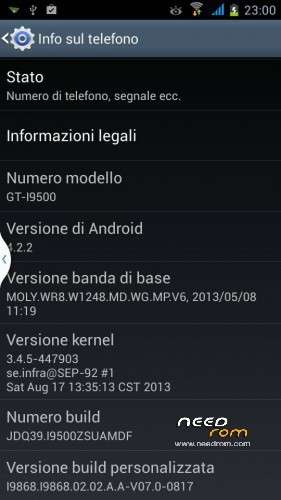
Model : GT-I9500 (star b9500)
Build number : JDQ39.I9500ZSUAMDF
Build date UTC : 20130817-054105
Android v : 4.2.2
Baseband v: MOLY.WR8.W1248.MD.WG.MP.V6, 2013/05/08 11:19
Kernel v : 3.4.5-447903
(se.infra@SEP-92) (gcc version 4.6.x-google 20120106 (prerelease) (GCC) ) #1 SMP
Sat Aug 17 13:35:13 CST 2013
Uboot build v :LCD Driver IC : 1-otm9605a_qhd_dsi_vdo
download with flash tool v3.1316.0.150
for cwm – press and hold volume up and power ,choose recovery and if dont show press home button or go to recovery with MTKdroidTools (press reboot and choose into recovery).
for instalation :
extract from rar and open flash tools , choose scatter from folder and hit download , power off the phone take out the battery and plug in your phone to the usb put in the battery and whait to finish the process
for sam…. logo install root explorer from internet (aleandroid) -setting - security- allow installation of app from unknown sources , open root explorer go to system/media/ and delete bootanimation.zip and shutanimation.zip and rename bootanimation_second.zip to bootanimation.zip and shutanimation_second.zip to shutanimation.zip after go to images and delete boot_logo_qhd and rename boot_logo_2nd to boot_logo_qhd , reboot .
thanks to Louie : for upside down display :
Louie - "open ROOT EXPLORER then go to system/build.prop then copy and paste to SDCARD.
Edit BUILD.PROP by using wordpad on your pc and replace the ro.hwrotation=180 to ro.hwrotation=0 then save.
copy it back to your SDCARD and go to ROOT EXPLORER and change replace the build.prop to the one you edited.. then re-boot… "remember to change the permission same as the original".. thanks."
※Please make a backup of your device before installing or updating ROM
YOU CAN HAVE THE INSTALL INSTRUCTIONS CLEAR?? THANK YOU
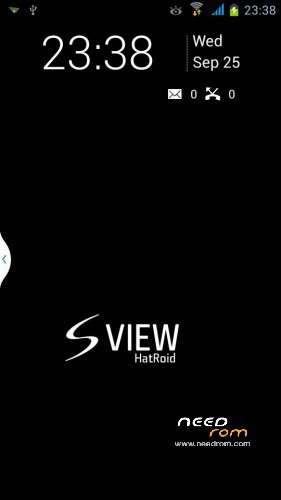
have air gesture
SCREENSHOT ????? tkhanks
extract from rar and open flash tools , choose scatter from folder and hit download , power off the phone take out the battery and plug in your phone to the usb put in the battery and whait to finish the process
image on the screen upside down, what to do?
your display phone it's not the same
Edit build.prop @ /system using root explorer, find hardware.sf.rotation=180, change “180″ to 0 then reboot
for display you can use your driver of display from your backup (open mtkdroidtool go to "root,backup,recovery" click on "to create updates for modified recovery" choose files.md5 and boot.img from your original backup folder and will create you a list of .zip file choose , the one of the driver and copy on the sdcard ,install from cwm.
Before that I used the firmware of the phone and all was well.
you have diferent display
I^m not saying you have a broken lcd , just this is not for your lcd (LCD Driver IC : 1-otm9605a_qhd_dsi_vdo)
is it possible to use this rom or install the display driver?
I allready answer , look up
Your way was not helpful
I also have the upside down problem. Is there any way to put the correct lcd drivers on this rom?
thanks for the screenshots, I wanted to know if the phone is fully compatible with this rom (I include photos), mine is completely "sam …", does not have labels with the model
you have a fake information in kernel and I dont know the real phone hardware.
at the end:
the rom is fantastic
the gestures all work
but the display is upside down
is not a video driver problem (the driver is the same as my backup)
would be great if I could find a solution, good work ………..
thanks again for your work ………….
open ROOT EXPLORER then go to system/build.prop then copy and paste to SDCARD.
Edit BUILD.PROP by using wordpad on your pc and replace the ro.hwrotation=180 to ro.hwrotation=0 then save.
copy it back to your SDCARD and go to ROOT EXPLORER and change replace the build.prop to the one you edited.. then re-boot… "remember to change the permission same as the original".. thanks.
Hope this will work for you as it works for me..I tried to contact the laurentZ404 but he doesn't reply.. So I just try to find out by myself..