
- Title: Backup Stable rom 9.6.3 , MIUI 9
- Listed: October, 2018
- Last modified: 10/24/2018 10:15 pm
- Version: 5.0.2
You must be logged for ROM download.
15109 total views, 1 today
1 Total favorites

 Member Info
DESCRIPTION
1 minute does not mean much to you, and yes to me Please Overall Rating.
Rot is not needed, You must have TWRP recovery
Exstrat in PC TWRP.rar and copy to exsternal sd card complet folder TWRP to your phone
and copy TWRP 3.0.2-0 by mic hermes
restart your phone to TWRP
install TWRP 3.0.2-0 by mic hermes
restart your phone to NEW TWRP
IN TWRP
1. WIPE: dalvick cashe , cahe , system , DATA , internal partition
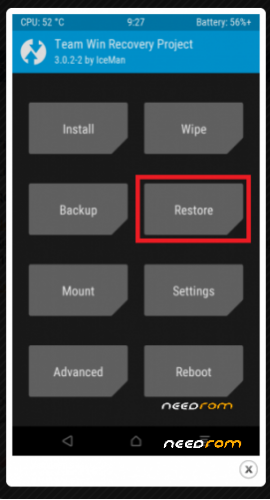
2. BACK to BACKUP-RESTORE
3. Tap RESTORE, and select from external sd card TWRP / BACKUPS / IBH65PFEFUTCKNTS / 24-10-2018-9.6.3_Global_LRX22G
3.1 Or Tap RESTORE, and select from external sd card TWRP 16.05.2020 (rename to TWRP) / BACKUPS / 9DZ99HHUBIPVGQOF(rename in your backup name) / 2020-05-16–10-41-37_ENG … Rom is full optimized 16.05.2020
after restore , WIPE: dalvick cashe , cahe and rebot to system. Wait 5-10 minutes and then enjoy
4. Rom is roted android 5.0.2
5. Work all
6.Multilang
7.Rom is full optimizet.
Everything at your own risk.
Please Overall Rating
XRN2_SP.V1.P2_modem flash for best signal
Dolby for best sound
※Please make a backup of your device before installing or updating ROM
Thanks for rom.
I'm glad you're happy
Please Overall Rating
Скажите это востановление рэкаври или прошивки?
Hello…can i flash it from TWRP>INSTALL>REBOOT SYSTEM?
Or i need to copying to sdcard>Backup folder first…
You can copy from the twrp first to an external but unpacked TWRP folder and then go to backup. If it's not in the phone, or sd card, then you have nothing to do
Do I need premium to get the download for this ROM ?
Nooo , This rom "TWRP" is for Redmi Note 2 ,
I moved the TWRP folder to the SD card, but now that I am in step 3, I tap restore and there's nothing there…SD card is selected, but it doesn't show any files or folders.
Have you previously unrar TWRP done? If it's not the cause, and if you are, then try your TWRP to do any backup, for example, the data partition, and then you get a number that is different from the number of folders in my TWRP
TWRP / BACKUPS / IBH65PFEFUTCKNTS / 24-10-2018-9.6.3_Global_LRX22G
I mean the IBH65PFEFUTCKNTS, then into the one you got by doing my backup insert
24-10-2018-9.6.3_Global_LRX22G and you will see your phone.
If I'm not clear as my English is not good, call file.mobile015@gmail.com
How can i unroot it to play Pokemon Go?
why i cannot extract with ziprar. what this rom just extract with pc
Yes, extrat with pc ….
Rot is not needed, You must have TWRP recovery
Exstrat in PC TWRP.rar and copy to exsternal sd card complet folder TWRP to your phone
and copy TWRP 3.0.2-0 by mic hermes
restart your phone to TWRP
install TWRP 3.0.2-0 by mic hermes
restart your phone to NEW TWRP
IN TWRP
1. WIPE: dalvick cashe , cahe , system , DATA , internal partition
2. BACK to BACKUP-RESTORE
3. Tap RESTORE, and select from external sd card TWRP / BACKUPS / IBH65PFEFUTCKNTS / 24-10-2018-9.6.3_Global_LRX22G
after restore , WIPE: dalvick cashe , cahe and rebot to system. Wait 5-10 minutes and then enjoy
HI!
with this one my imei changed to yours so i had to rewrite it
thanks!