
- Title: Backup Stable rom 9.6.3 , MIUI 9
- Listed: October, 2018
- Last modified: 10/24/2018 10:15 pm
- Version: 5.0.2
You must be logged for ROM download.
15110 total views, 2 today
1 Total favorites


 Member Info
DESCRIPTION
1 minute does not mean much to you, and yes to me Please Overall Rating.
Rot is not needed, You must have TWRP recovery
Exstrat in PC TWRP.rar and copy to exsternal sd card complet folder TWRP to your phone
and copy TWRP 3.0.2-0 by mic hermes
restart your phone to TWRP
install TWRP 3.0.2-0 by mic hermes
restart your phone to NEW TWRP
IN TWRP
1. WIPE: dalvick cashe , cahe , system , DATA , internal partition
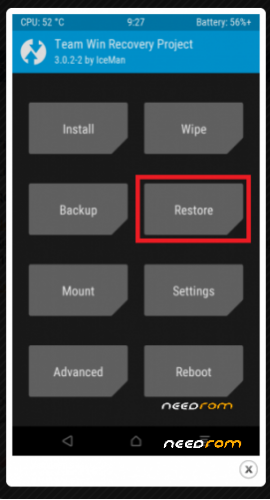
2. BACK to BACKUP-RESTORE
3. Tap RESTORE, and select from external sd card TWRP / BACKUPS / IBH65PFEFUTCKNTS / 24-10-2018-9.6.3_Global_LRX22G
3.1 Or Tap RESTORE, and select from external sd card TWRP 16.05.2020 (rename to TWRP) / BACKUPS / 9DZ99HHUBIPVGQOF(rename in your backup name) / 2020-05-16–10-41-37_ENG … Rom is full optimized 16.05.2020
after restore , WIPE: dalvick cashe , cahe and rebot to system. Wait 5-10 minutes and then enjoy
4. Rom is roted android 5.0.2
5. Work all
6.Multilang
7.Rom is full optimizet.
Everything at your own risk.
Please Overall Rating
XRN2_SP.V1.P2_modem flash for best signal
Dolby for best sound
※Please make a backup of your device before installing or updating ROM
What does "BACKUP ROM" mean?
Can I choose other region than Chinese with this ROM?
Thanks
Hi,
If I install Google TTS Text To Speech, Then Preferences/Additional settings/Language and Input/Text-ToSpeech Output crashes. How can I correct this bug? I tried everything, but the bug remains the same.
Thanks!
OK, I solved TTS problem myself. If Text-To-Speech not working properly bellow is the solution! It's an annoying Android bug, not the rom! The rom is perfect, thank you!!! The problem with tts: after install, it's not selected, this is why preferences crashes. You will need a computer with sqlite3 installed.
My steps:
with es file explorer (check root access enabled) copy /data/data/com.android.providers.settings/databases/settings.db and settings.db-journal to sdcard
copy this 2 files via ftp to your computer with sqlite3 installed and working
on the computer:
sqlite3 /YOUR PATH TO/settings.db
sqlite> Select * FROM secure WHERE name LIKE 'tts_default_synth';
//this line just lists settings. if empty, set it to google default:
sqlite> insert into secure values (null, 'tts_default_synth', 'com.google.android.tts');
//check again:
Select * FROM secure WHERE name LIKE 'tts_default_synth';
sqlite> .quit
//exit from sqlite3
copy back to phone settings.db
with a text editor delete all contents of settings.db-journal (the file must be empty but must exist)
rename settings.db and settings.db-journal files on sdcard to *.modified and move to /data/data/com.android.providers.settings/databases/ with es file explorer
SET PERMISSIONS AND OWNERSHIPS with ES explorer (properties)!
both ownerships must be system:system (check originals and just copy ownerships and permissions to the .modified files)
permissions must be:
settings.db rw-rw- —
settings.db-journal -rw—- —
reboot to twrp
mount system and data: mount menu and just select them and press home then file explorer
with twrp file explorer rename /data/data/com.android.providers.settings/databases/ original files to *.original
rename the .modified files to final settings.db and settings.db-journal
wipe davlik and cache
After reboot you will get TTS working and preferences will not crash
If you get bootloop then boot to twrp and check permissions and ownerships (see above!)
Hi,
send this this 2 files in main e-mail file.mobile015@gmail.com.
I'll add them to the rom so others don't have to do your steps.
Thank you
thank