
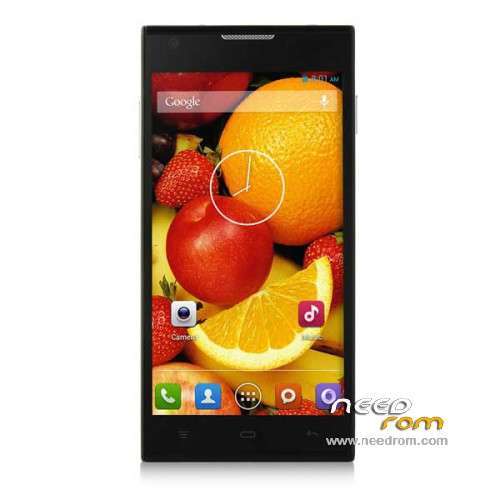
- Title: Cubot P7
- Listed: August, 2014
- Last modified: 11/15/2014 7:17 am
- Version: ROM Android 4.4.2
You must be logged for ROM download.
26574 total views, 3 today
2 Total favorites
 Member Info
DESCRIPTION
ROM Phone Cubot P7 – ROM Android 4.4.2
ONLY MT6582
Update Official ROM Cubot P7 Version: SPMTK6582M452WCUBOTP05V06KK -
13MW45_JFM45.A3.CUBOT.141106.KK1.MP1.V2.10.QHD.EN.4P32.COM – KOT49H – V1_WCDMA
————————————————————————————————————————————————————
Update Official ROM Cubot P7 Version: SPMTK6582M452WCUBOTP05V05KK -
13MW45_JFM45.A2.CUBOT.140905.KK1.MP1.V2.10.QHD.EN.4P32.COM – KOT49H – V1_WCDMA
————————————————————————————————————————————————————
Official ROM Cubot P7 Version: SPMTK6582M452WCUBOTP05V05KK -
13MW45_JFM45.A2.CUBOT.140827.KK1.MP1.V2.10.QHD.EN.4P32.COM – KOT49H – V1_WCDMA
Gapps include – No Rooted
Language support:
en_US,ru_RU,af_ZA,am_ET,ar_EG,be_BY,bg_BG,bn_IN,ca_ES,cs_CZ,da_DK,de_DE,el_GR,en_GB,es_ES,es_US,et_EE,fa_IR,fi_FI,fr_FR,hi_IN,hr_HR,
hu_HU,in_ID,it_IT,iw_IL,ja_JP,km_KH,ko_KR,lt_LT,lv_LV,ms_MY,my_MM,nb_NO,nl_NL,pl_PL,pt_BR,pt_PT,rm_CH,ro_RO,sk_SK,sl_SI,sr_RS,sv_SE,
sw_TZ,th_TH,tl_PH,tr_TR,uk_UA,ur_PK,vi_VN,zh_CN,zh_TW,zu_ZA
Install ROM:
- Unpack FlashTools, and Click on Flash_tool.exe
- Select a the MT6582_Android_scatter.txt in ROM
- Wait file to be added into Flash Tool
- choose Option->USB Model,click USB Model
–> Choose Option->DA DownLoad All->Speed->High Speed, click High Speed
- Turn off your phone, remove the battery.
- "Press F9 (hit Download button)" OR " if upgrade ROM Firmware->Upgrade "
- and connect your phone into the computer via USB data cable.
- The process will start and a red progress bar will appear after color purple, yellow.
- And green circles display
- Finish !
- You can now safely disconnect your phone and turn it on.
※Please make a backup of your device before installing or updating ROM
Hi. When I press upgrade and connect my phone, app does't do anything…. What could it be?
Hi, when i try to load the scatter file on flash tools it says the file is not legal? help?
To those who see nothing when the phone is connected. Please visit http://laurentiumihet.ro/sp-fl.....ricked-devices/ Thanks a LOT for this!
I had flashed this new image and now my imei is unknown Please, tell me what can i do.. Thanks for help
To fix IMEI you will need to install a recovery parition, you can do this using SPFlashtool.
Once recovery parition is changed using SPFlashtool you will have a CWM recovery on phone.
Use this to install the SU.zip and thus root the phone.
Then from here you can use MTKTools to write the IMEI into NVRAM once phone is rooted.
If your still stuck I will write a guide.
I have the same problem, need to fix imei. can you give me a guide on creating a cwm recovery image for cubot p7? Thanks for your help
To fix the scatter problem, please use MT6582_Android_scatter_0.dat.
rename it MT6582_Android_scatter_0.txt
That should work.
Sorry…for having post again.
Here is a link to the file you will need to install through recovery to root your phone.
Place it on sdcard and install it through recovery.
http://www.mediafire.com/downl.....2.zip
please how to enter recovery
error :Invalid OTA package<missing scatter instalation aborted: cant root the phone.
I had my wife flashed but encountered a issue, the phone was constantly displaying an error message, "com.android.phone has stopped unexpectedly", I was becoming desperate than I found a fix for it in this Facebook page, that mentioned something about changing the hour settings, it worked for me, I share.
https://www.facebook.com/notes.....08512
Installed perfectly here…thanks.
hallo auch wenn ich die neue Firmware einspiele bleiben da meine daten auf dem handy erhalten?
Nein, Du mußt vorher deine Daten Sichern.