
- Title: Cyanogenmod 12.1 – v3.0
- Listed: March, 2016
- Last modified: 03/06/2016 4:03 am
- Version: 5.1.1
You must be logged for ROM download.
18510 total views, 3 today
6 Total favorites


 Member Info
DESCRIPTION
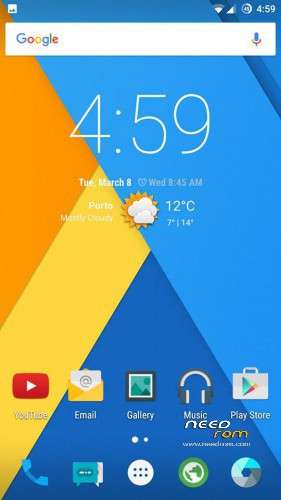
-Everything seems to be fixed finally. I ported this rom from mtkroms site and fixed its bugs and issues. I hope you can finally get the cyanogenmod experience that you always wanted.
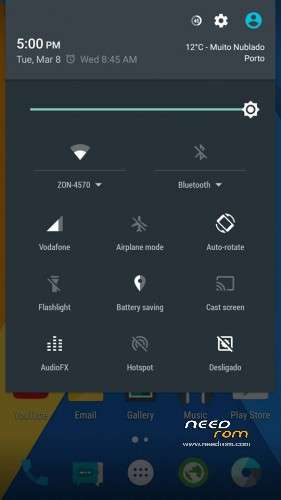
-Camera works now, flashlight works, nfc, wifi, you name it!
Changelog (v3.0):
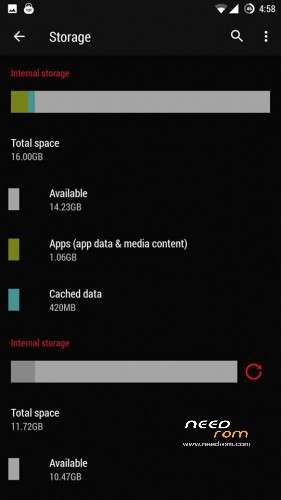
- Storage fixed finally (16gb internal memory + 12gb internal sd)
————————————————————————————————
-> As for the battery please feel free to try the performance and memory leak fixes that MAY or MAY NOT improve battery life and reduce temperatures (install performance tweak first; if you see no difference install memory leak fix).
UPDATE ON BATTERY LIFE: Using the performance and memory tweaks greatly improves battery life but sometimes the phone may not be as smooth and fast as before. However, if your facing lag you can fix it by flashing "performace_booster_by_Ajit_mtkroms-com.zip. If not, do not flash. After you flashed it download terminal emulator from google play, open a new window and type "su" and then "unlockfps". Turn your screen off and then on again and you will see a performance difference, but this effect may waste more energy and will dissapear when you reboot your phone. If you want to set it permanently move the "unlockfps" file located in /system/xbin folder to /system/etc/init.d folder and then reboot.
PLEASE READ CAREFULLY: (STORAGE FIX INCLUDED!!!!!) – Changes are highlighted
- Before flashing the actual rom wipe all your partitions and flash "partition.zip" file, change the emmc partition format to EXT4 if it is not yet, and after that do a full wipe. (ATTENTION: AFTER FLASHING THIS FILE YOUR PHONE'S MEMORY WILL BE PARTITIONED AS 16GB FOR INTERNAL MEMORY (APPS) AND 12GB FOR INTERNAL SD (MEDIA), SO IF YOU WANT TO SET IT BACK TO DEFAULT OR CHANGE THE PARTITIONS TO YOUR WANTED VALUES YOU WILL HAVE TO EDIT EBR1 AND EBR2 FILES INSIDE THE PARTITION.ZIP FILE. IF YOU WANT TO HAVE 6GB FOR APPS AND THE REST AS INTERNAL SD SKIP THIS STEP ONLY)
- Flash rom ONLY with TWRP by SevenMaxs 2.7.1.1 that you can download from this site
- Flash "NonEmulated_MT6592_Ajit_mtkroms-com.zip"
- Boot into the rom and then turn off your phone.
- Boot into recovery and flash the "pa_gapps-modular-pico-…-signed.zip" file (gapps) and the two zip files that are inside "Dolby+SuperSU_Ajit_mtkroms.com.rar" file (you have to extract .rar file first)
- If you want to change the display density you can go to the build.prop file and were it says "ro.sf.lcd_density" replace the default value with the value 440. Then reboot go to settings and change the display density to 440. (you can edit the build.prop file by downloading "build prop editor" from google play)
- Done. Enjoy the Rom 
※Please make a backup of your device before installing or updating ROM
I flashed nonemulated. So it should be the one to flashed first? Because your previous instruction it should be flashed after gapps, dolby and supersu. Does this make a difference?
Anyway, i have solved the partition problem by myself. . . thanks for the rom. i love it. Keep updating for fixes and improvement.
Then would you be so kind and write it down to let us learn from it, Sir?
Thank you!
Hi Dragonyzer
Could i ask you one question? What happenning if I flash the rom without flashing partition.zip file?
Thank for your work
PS: sorry for my bad english
Hello. If you don’t flash you will get 6gb for apps and the rest as normal storage
Thank you, Dragonyzer
Everything works very nice.
Good change the settings for GPRS (class 12).
Thank you.
Where do I actually get TWRP by SevenMaxs 2.7.1.1
and how do I use it ? Is it the same like ThL_T100S_TWRP_2.7.1.1_KK_by_SevenMaxs ? Or is this something different ?
I can't find it here, is it included in any of the linked downloads ? Sry I don't flash my phones that often and it's always that different.
https://www.needrom.com/downlo.....-for-thl-t100s/
Links for TWRP 2.7.1.1 is https://www.needrom.com/wp-con.....y_SevenMaxs.zip
I wanted to ask about the utility to calibrate the proximity sensor. I have two phones and one without problems, and the other needs calibration. KK 4.4.3 operating normally.
Thank you
send me a message
Yea, I found this version too, but wasn't sure if it will work. I better try the one from Dragonyzer.
Sorry there is no emmc opportunity. Do i Do wrong smt?
emmc means the internal sd card, sorrym i found it.
Thank you for your work, A2DP works like charm!
Cant write sd…. I modified the permissions in platform.xml but still no. How to solve this?
Atha95 install es file explorer and copy one file to sdcard and make what is in print http://droider.eu/wp-content/u.....08-04-00-44.png
The rom its good but need some improvements. Camera lags a litle when recording. The youtube maximum resolution its 360p and the videos starts and stop rewind to beginning.
Thanks
Tirosala thank you very much for your answer, but the es was about the only which works for me, unlike e.g. The chrome or the stock browser which couldn’t download or save sth.
Uninstall youtube app updates and stay with the older version that will fix the rewind and the resolution problem
+1 can’t turn off the Sim cards (for e.g. Energy save).
otg not work?