
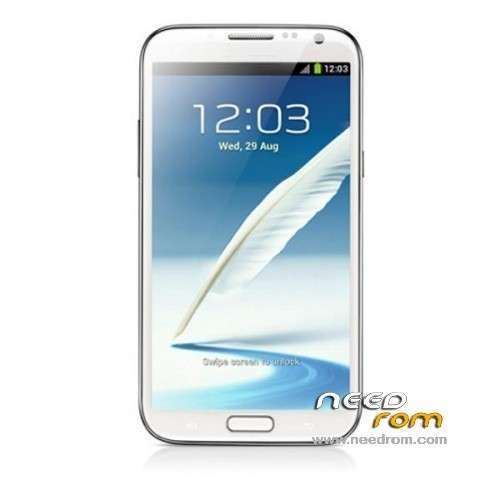
- Title: GT-N7100 Note 2
- Listed: May, 2013
- Last modified: 05/25/2013 4:58 am
- Version: ROM Android 4.1.1
You must be logged for ROM download.
43216 total views, 1 today
4 Total favorites
 Member Info
DESCRIPTION
This is my GT-N7100 Note 2 Clone backup ROM Android 4.1.1
My phone information is:
Hardware : MT6577
Model : GT-N7100
Build number : IMM76D.N7100XXBLFB
Build date UTC : 20130408-083442
Android v : 4.1.1
Baseband v: MAUI.11AMD.W12.22.SP.V14, 2012/10/08 18:03
Kernel v : 3.0.13 (liuxiuyun@mht-04) (gcc version 4.4.3 (GCC) ) #1 SMP Mon Apr 8 16:33:09 CST 2013
Hope this helps!
Install ROM:
Unpack FlashTools, and Click on Flash_tool.exe
Select a the MT6577_Android_scatter_emmc.txt in ROM
Turn off your phone, remove the battery.
Press F9 (or hit Download button) and connect your phone into the computer via USB data cable.
The process will start and a red progress bar will appear after color purple, yellow.
And green circles display
Finish !
You can now safely disconnect your phone and turn it on.
※Please make a backup of your device before installing or updating ROM
sorry I Had download it,but corupt on system img file
Sorry, I was download it, but file is corrupt when I use Unyaffs at windows xp…, and because of that Im affraid to flash it into my phone…
This file works with my clone Note 2
Hardware : MT6577
Model : GT-N7100
Build number : IMM76D.N7100XXBLFB
Build date UTC : 20130408-083442
Android v : 4.1.1
Baseband v: MAUI.11AMD.W12.22.SP.V14, 2012/10/08 18:03
Kernel v : 3.0.13 (liuxiuyun@mht-04) (gcc version 4.4.3 (GCC) ) #1 SMP Mon Apr 8 16:33:09 CST 2013
Uboot build v : MAIN2.2.ubt.2711
LCD Driver IC : 1-nt35516_dsi
Thanks!
can you please help me with my note 2 clone whenever i remove the battery and connect it to my computer the drivers were not detected:( but when i attach the battery back on the phone and connect it to my computer the drivers are installed what to do please help:( anyone please
can you help me??how you flash your clone note 2??help….plizzz…
Thank You, your backup ROM its work for my phone
i have this phone … and when i oppen the scatter it miss :
SEC_RO
CACH
USRDATA
when i flash i get this error :
BROM ERROR/ S_FT_NEED_DOWNLOAD_ALL_FAIL (4050)
Need download all images !
HELP please
i add that missed img from another rom ..and flash it
it's work just fine … i am so happy thx for ur help
i was looking for this rom more than 16 days u back my phone to live
i tired more than 30 rom before i found this rom
THANK YOU THANK YOU THANK YOU THANK YOU THANK YOU THANK YOU THANK YOU THANK YOU THANK YOU THANK YOU THANK YOU THANK YOU THANK YOU THANK YOU THANK YOU THANK YOU THANK YOU THANK YOU THANK YOU THANK YOU THANK YOU THANK YOU THANK YOU THANK YOU
how you find that missing img??plliiizzzz help…
strongmena
how you find that missing img??plliiizzzz help…
is your baseband is working fine?i mean to ask is thay your sim card working and phone get proper signals after flashing?
please help me with the mised files
i have same mobile and he is dead
what is the real internal memory for this device..in setting app manager it show 10gb
but i can use and mount only 2gb ??? wired !!!???
second thing can someone help me to get google play work ?
thx.
Just only 2 GB just backup your google play from root explorer (applicaton backup mention on root partition) to your sdcards and than restore your rom and than install it from your sdcard, if your logo boot screen change into mtk boot screen just change with this code in phone keypad *#7501# its automaticly restart and change into samsung logo boot screen, DWYOR
uppss sorry, Im forget, on applicaton backup mention on root partition google play apk name is vendng apk, you can copy folder application backup to your sdcards DWYOR
I already did…you are a master bro
Thank you so much..u just add the last touch perfectly.
Now my device is 100% perfect.
Especialy with samsung logo
Hello Friends, I have a Chinese cell clone N7100 with following features:
MTK6577, dual core Cortex A9, 1.0GHz;
GPU: PowerVR SGX 531
- 1 GB Ram
- 4 GB Rom
- Dual SIM
- Screen 5.5 “IPS
- 1280 x 720 pixels
- 16000K Colors
CAN USE THIS ROM??
U must check your spec with mtkdroidtools to know the real spec of your phone..
It doesn't open with samsung boot screen animation
just press keypad phone with this code *#7501# its will be restart its self and change to samsung boot logo, If doesn't open with samsung logo, I thnk your ROM in your phone is different from this ROM, you must check hardware/software with mtkdroidtools, to know the real hardware of your ROM…