
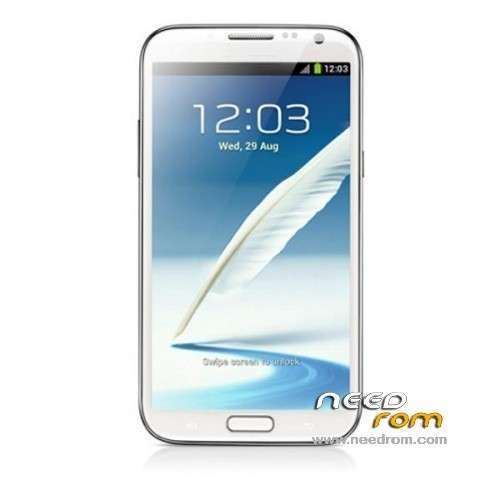
- Title: GT-N7100 Note 2
- Listed: May, 2013
- Last modified: 05/25/2013 4:58 am
- Version: ROM Android 4.1.1
You must be logged for ROM download.
42874 total views, N/A today
4 Total favorites
 Member Info
DESCRIPTION
This is my GT-N7100 Note 2 Clone backup ROM Android 4.1.1
My phone information is:
Hardware : MT6577
Model : GT-N7100
Build number : IMM76D.N7100XXBLFB
Build date UTC : 20130408-083442
Android v : 4.1.1
Baseband v: MAUI.11AMD.W12.22.SP.V14, 2012/10/08 18:03
Kernel v : 3.0.13 (liuxiuyun@mht-04) (gcc version 4.4.3 (GCC) ) #1 SMP Mon Apr 8 16:33:09 CST 2013
Hope this helps!
Install ROM:
Unpack FlashTools, and Click on Flash_tool.exe
Select a the MT6577_Android_scatter_emmc.txt in ROM
Turn off your phone, remove the battery.
Press F9 (or hit Download button) and connect your phone into the computer via USB data cable.
The process will start and a red progress bar will appear after color purple, yellow.
And green circles display
Finish !
You can now safely disconnect your phone and turn it on.
※Please make a backup of your device before installing or updating ROM
hey byeyou i hope u r doing fine thank you for your help i am enjoying my phone and so happy.
i just want to ask u :
-is there a any other tips and tricks for this phone to learn.
-is there a any custom or ported rom to test for this device.
thx in advance.
by the way notice that after flashing this rom there is a big change in the display it's better about 60% and more colors comparing with what had before is totally different and great.
thank you one more time.
Hey byeyou i have th einformation for my phone whit MTKtools
My phone ir…
Hardware – MT6577
Model – GT-N7100
Build bumber – GT-N7100 20130 109-181030
Build date UTC – 10130 109-101030
Android – 4.1.2
Baseband – MAUI.11AMD.W12.22.SP.V21.P1 2012/12/17 15:51
Kernel – 3.4.0 (user@linux-user)(gcc version 4.6 x-google 20120106 (prerelease)(GCC) #1 SMP Wed Jan 9 18:09:29 CST 2013
Uboot build – ——should be root shell
LCD Drover – —— should be root shell
so… can i use this ROM??
thanks
No, your phone doesn't same with this phone spec you have kernel 3.4 and android 4.1.2 it can damage your phone if you use that…
thnanks it works perfectly but PLAY STORE is not found and installed one from the web and couldn't download anything
Use Root Explorer, find in system folder name called appbackup, copy them on sdcard, and than install vending apk/ playstore on that apk file…but you must root your device first
I REALLY DONT KNOW WHAT TO DO .. U R GIVE THE INFORMATION SHORT ! I DO NOT UNDERSTAND TO HOW BE USE
Mamat1992 are you from Indonesia?? you can say with Bahasa Indonesia, because Iam from Indonesia too
Guys…anyone pls i need this rom MT6575 ROM MAUI.11AMD.W11.50.SP.V18 single sim pls help..THANKS!!!
Hi … I've accidently corrupt the (3e) recovery mode when I try to use a fix signature recovery file. Then I've flash to another type of ROM which I tought it was for this phone. After reboot, it only have startup sound but no display.. My silly mistake there coz it was ROM design for i9000. Now I'm downloading 3 of your suggested ROM which is :
1. File_to_flash_tool
2. Original ROM
3. Miui Style
Specifications:
BB Chip : MT6577
MS Board : GT-N7100
IMEI1 : 355555584707084
IMEI2 : UNKNOWN
Modem Ver : MAUI.11AMD.W12.22.SP.V14, 2012/10/08 18:03
Bar code : MT01234567890123456710Built Time : Sat Jun 1 10:18:08 CST 2013
UBoot Ver : 2010.06
Kernel Ver : 3.0.13 (liuxiuyun@mht-05) (gcc version 4.4.3 (GCC)) #1 SMP PREEMPT Sat Jun 1 10:16:26 CST 2013
Android Ver : 4.1.2
SW Ver : ALPS.ICS2.MP.V1.18
Custom Build Verno : V08_V2.0_MT6628_MC32X0_H9TP32A4GDMCPR_KDM_BFTLCD_20130601_1011_V1.1.3_EN_S_C1
EMMC : cARD AVAIL : YES
TOTAL SIZE (RAW) : 3.61GB
So can u please tell me which ROM do I have to flash first, or do I have to choose only one?
Thanks in advance mate, you're doing a good job there.
TRIMA KASIH MASSSSSSSS!!!!!
My death note 2 back to live again with original ROM.
Now downloading MIUI Rom & backup ROM Android 4.1.1
Any suggestion which rom do I have to flash 1st?
Status after flashing with original ROM:
Hardware : MT6577
Model : GT-N7100
Build number : IMM76D.N7100XXBLFB
Build date UTC : 20130328-032750
Android v : 4.1.1
Baseband v: MAUI.11AMD.W12.22.SP.V14, 2012/10/08 18:03
Kernel v : 3.0.13 (liuxiuyun@mht-05) (gcc version 4.4.3 (GCC) ) #1 SMP Thu Mar 28 11:26:22 CST 2013
TRIMA KASIH MASSSSSSS !!!!
Flashing process to MIUI Style done with no error.
Forgot to mention earlier. SPFT v3.1252.1.104. not work for me with error 3138.
I use SPFT v3.1224.01 & it work perfect.
This is my latest specification:
Hardware : MT6577
Model : GT-N7100
Build number : IMM76D.N7100XXBLFB
Build date UTC : 20130408-063715
Android v : 4.2.1
Baseband v: MAUI.11AMD.W12.22.SP.V14, 2012/10/08 18:03
Kernel v : 3.0.13 (liuxiuyun@mht-04) (gcc version 4.4.3 (GCC) ) #1 SMP Mon Apr 8 14:35:38 CST 2013
Uboot build v : MAIN2.2.ubt.4104
LCD Driver IC : 1-nt35516_dsi
You are doing good job mate… thank you very much.
Hi, i have the same phone but called n7102, this rom can help me?
hi mate… look in the net for MTKdroidTools. make sure your specification result same as suggested. good luck.
my note flashed successfully. but while powering on.. it don’t shows samsung logo. how to get it back.
and any know how to cut normal regular sim to micro sim..
plz help. me out
@Sunjeeb : just press keypad phone with this code *#7501# its will be restart its self and change to samsung boot logo
i did..but no restart take palce..plzz give some other suggestions..
how to get into the “engineer mode”…. is there any no. for that…