
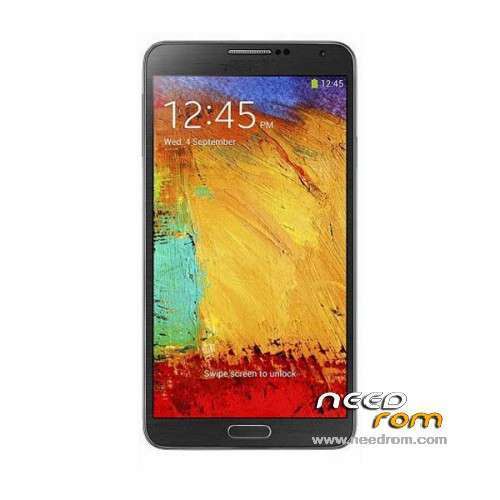
- Title: HDC Galaxy Note 3 Max N9006
- Listed: January, 2014
- Last modified: 01/11/2014 5:43 pm
- Version: ROM Android 4.3
You must be logged for ROM download.
69446 total views, 3 today
8 Total favorites
 Member Info
DESCRIPTION
Original standard (clean) ROM 4.3 for HDC Galaxy Note 3 MAX N9006 with real Infrared, Single SIM version.
1280*720 pixel – 1GB RAM, 8GB ROM – MTK6589 Quad Core 1.2GHz
I have only tested this ROM on MT6589 – Model: MAX N9006
Don't flash on wrong phone model! it may brick your phone!
ALWAYS make a backup of your original ROM first!
Read here how to http://forum.xda-developers.com/showthread.php?t=2730031
Hardware : MT6589 (UNIVERSAL5410(exynos5) is Fake!)
Model : SM-N9006
Build number : JSS15J.N9006ZCUBMJ3
Android v : 4.3
Baseband v: MOLY.WR8.W1248.MD.WG.MP.V7.P11
Kernel v : 3.4.5 (bz@ubuntu) (gcc version 4.6.x-google 20120106 (prerelease) (GCC) ) #1
LCD Driver IC : 1-otm1283a_dsi_lcm_drv
This version has no real multi-window. But has the sidebar.
But better fake for Samsung ID, KIES AIR App will work with this ROM.
ROM is untouched and clean.
- Has Samsung bootlogo/shutdown and animation with sound.
- Infrared Remote Control app is included
- Original Kies Air app together with a PC works with this ROM
- Not Rooted (but can easily be rooted with MTKDroidTools)
- Language support : Multilang
The ROM is used in these videos here (but the videos may show more apps that are not included in the ROM) The ROM is clean and default when you install it.
Check a lot of Note 3 N9006 videos here: https://www.youtube.com/playlist?list=PL4ZcKmLvMO7q5MXRAm9L8MNbObP40JXje
Install ROM:
Read here also: http://forum.xda-developers.com/showthread.php?t=2730031
Never needlessly Download preloader and DSP_BL blocks! It is always dangerous! On some models of phones you will have a brick even if you download these blocks read from phone which you own! Always remove from them marks in SPFT! ALWAYS have a working backup of your original ROM before you flash a new unknown ROM.
- Unpack FlashTools, and Click on Flash_tool.exe
- Select a the MT6589_Android_scatter_emmc.txt in ROM
- Wait file to be added into Flash Tool
- choose Option->USB Model,click USB Model
–> Choose Option->DA DownLoad All->Speed->High Speed, click High Speed
- Turn off your phone, remove the battery.
- "Press F9 (hit Download button)" OR " if upgrade ROM Firmware->Upgrade "
- and connect your phone into the computer via USB data cable.
- The process will start and a red progress bar will appear after color purple, yellow.
- And green circles display
- Finish !
- You can now safely disconnect your phone and turn it on.
To discuss ROM, tips & tricks for the model please go here
http://forum.xda-developers.com/showthread.php?t=2554192
※Please make a backup of your device before installing or updating ROM
es compatible con mtk6582 ??? gracias
Thank you
hi i'm new to this all i did everything in your post and had the red progress bar but nothing after that progress bar now says 0 i saw now color circles so is something wrong
It does not work this ROM, Bring it up because the ROM files are missing
Can i use this with N9006 NOTE 3 China MTK6572
Tested Don't work for HDC:Galaxy Note 3 Max N9006
Tested this ROM > https://www.needrom.com/mobile.....axy-note-3-max/
it's work for my device (HDC:Galaxy Note 3 Max N9006)
This is Error for HDC:Galaxy Note 3 Max N9006 > http://oi60.tinypic.com/mlqvyg......jpg
hello sir. i test the rom on link that you mention above. did you have problem such as touchscreen not calibrated and back button doesn't works?
i used it on hdc note 3 max n9006 mtk6589
My device is Note3 MTK6589 sm-n9006
4core 1.2Ghz 1Gb ram 8Gb Rom I'm try to flash Rom with Flash Tools over 10 versoin It's not work and I has click format in a tools. If possible for you please suggest me for step by step to recovery my device with your Rom.
Thank you Bro.
hello friend
as knowing that rom is compatible with my note 3 sm-n9006
i successfully flash this rom. but after that phone wont wake up, even charging.
i try to re-flash, there is error "enable dram failed"
how to fix this?
Hi, which version of spflashtools did you used to flash your phone, because I couldn't succeed flashing it.
I guess your problem is that you have to format the MMC first by loading the scatter and selecting all the options.
By trying a different preloader it is possible to flash, but have lcd issues.
Need Some One can fix this…. help
BROM ERROR: S_FT_ENABLE_DRAM_FAIL (4032)
[EMI] Enable DRAM failed!
[HINT]
how to fix it
help