
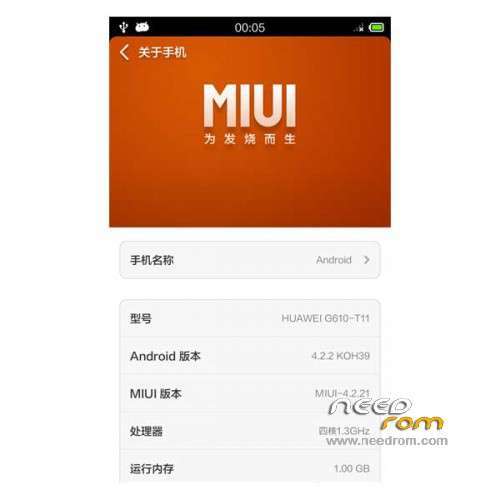
- Title: HUAWEI G610-T11 MIUI v5
- Listed: February, 2014
- Last modified: 02/26/2014 3:36 am
- Version: ROM Android 4.2.2 MIUI
You must be logged for ROM download.
20235 total views, 1 today
4 Total favorites


 Member Info
DESCRIPTION
ROM Mobile HUAWEI G610-T11 – ROM Android 4.2.2 MIUI
ONLY MT6582
Features ROM:
MIUI v5 – 4.2.21
1 call normal
2 SMS normal
3 camera / video are normal
4.wifi / Bluetooth normal
5 Perfect Camera
6 Storage perfect
7 Optimization stability
Functions are normal
Gapps not include – Rooted
Language support: Multilang
ROM install :
CWM ( CN )
Step 1: Download the custom ROM copied to an external SD card root directory
Step 2: the shutdown state. While holding down:
– Power button + volume button up, to enter the recovery mode.
– Wipe Data / Factory Reset -> delete all user data
– Wipe Cache Partition -> Wipe cache
Step 3: Return to recovery main interface Install zip from sdcard -> choose zip from sdcard -> Select your ROM
Step 4: Brush complete, restart the phone Patience required – first boot takes a while
※Please make a backup of your device before installing or updating ROM
Hello! I got a quick question: I ro*ted the phone with Root Genious, downloaded ROM + Recovery, and copied them in the root of an SD card, that's inside the phone (Huawei G610-T11).
As I reboot in Recovery Mode, after wiping everything, I have "Update from SD Card" instead of "Install.." and everytime I try, installation fails.
I tryed to install Mobileuncle Tools to update recovery, but it's the same.
Does anyone know why? How can I flash these ROMs (it's the same with all T11 Roms here).
Thank you!!!
Vietnamese language so do not you?
COMO intalo el recovery ??