System Advanced Settings category
=========================
Add into the " test mode " feature
Adjustable mobile phone network and view wifi, battery information
Add into the " engineering mode " function
Can be classified on the phone hardware test
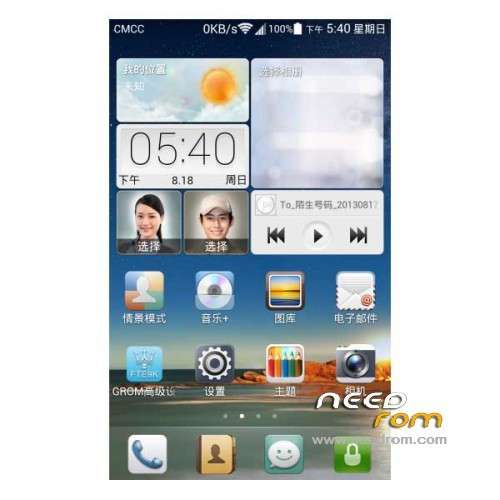
GROM Advanced settings support the white, black theme switching
GROM Advanced Settings tab style supports three theme switching
Optional text label at the top , bottom and bottom short Minister indicator indicator style
Advanced features like
=========================
Add "G key functions ", the user can customize the G key functions ambition
Click on the status bar shortcut "G key " to jump directly set by the user function
Add "Custom Google service function"
Enabled by default full Google service, users can customize the open, close , and completely remove the Google services
Adding " screen assistant " feature, transplanted from Huawei MATE
Screen assistant suspended in the top screen , similar to a virtual HOME key IPhone
Click on the screen will appear aides return key, Home key , lock screen and mute buttons
Screen assistant switches automatically remember user settings, after opening the switch from responding state
Add "Power Music " switch function, the user can customize the switch boot music
Adding " front button light switch " feature, users can customize the switch at the bottom of three entity key lights
Adding " virtual buttons vibration feedback adjustment " function
Users can customize the bottom of the three entities bond vibration feedback strength , 4 -speed adjustable
Add "VM virtual machine optimization " function
Adding " kernel parameter optimization" function
Add "battery parameter optimization " function
These three features support the boot from the response switch status
Ringtones and dial-up classes
=========================
Add "Call shaking Mute " function
When an incoming call , the user can turn off the call by shaking the phone rings
Adding " call mute sensitivity adjustment " function
Users can customize the sensitivity of the sensor shake , support for 8 -speed adjustable
The smaller the number , the stronger the shaking sensor sensitivity
Adding " Ringtone crescendo " function
Calls according to the time interval set by the user increases the ring volume
Support the largest ring setting, ie, the maximum volume crescendo ringtone
Support enhanced interval setting , ie 1 second , 3 seconds or 5 seconds after the increase a volume level
Adding " two-way conversation recording automatically " feature
Monitor the current call state, when the outgoing or receive calls when dialed automatically start automatic recording function
Enable automatic recording and recording will automatically turn off when the prompt
Adding "on vibrate " function, when turned on outgoing or access phone will vibrate prompts
Adding " hang shake " function, when the hook when the vibrating alert
Lock screen and SMS categories
=========================
Adding " unlock interface switching" feature
Support the user in Google Huawei unlock unlock and native real-time switching between
Adding " Huawei unlock vibration settings ", the user can customize the switch to unlock Huawei unlock screen vibration feedback when
Huawei unlock vibration settings, support for all unlocked Huawei theme styles
Add "New SMS bright screen prompts" function, when a new message is automatically bells screen 5000ms
Adding " SMS bubble style settings " function
Support for eight kinds of SMS bubble styles for users to choose , set up promptly after entry into force
Advanced Settings category status bar
=========================
Added status bar shortcut key dual-mode switching function
Users can toggle the status bar shortcut key is "double line layout " and " Grid Layout"
The official original single 10-key shortcuts based on the status bar and then expanded 10 shortcut keys
Were added to enhance the shortcut keys are as follows:
( 1 ) Restart option, click the exhaled reboot menu, you can carry out normal restart, fast reboot , reboot to recovery and fastboot mode
( 2 ) access point switch , click exhaled apn switch menu
( 3 ) flashlight switch, click the button to automatically switch flashlight, flashlight icon respond to changes
( 4 ) lock screen settings, click Outbound Security Settings
(5) G key, click the user-defined function exhaled
( 6 ) sound adjustment , a mute button can be completed , ringing and vibration mode switching , better than emui comes with three buttons to switch the sound
Respond to changes in the volume mode button icons , boot from the update icon status after
( 7 ) brightness adjustment, when clicked, will pop brightness adjustment bar
( 8 ) power-saving mode , click on the menu will be exhaled power saving mode
( 9 ) sound settings , click sound settings mode exhaled
( 10 ) advanced settings, click Advanced Settings exhaled GROM
Adding " at the top of the status bar color settings " function
Users can freely set the status bar color palette and transparency
Adding " digital clock status bar shows" Switch Function
Adding " Status Bar Digital Clock Color Settings " feature
Adding " network standard status bar displays" function, the default status bar displays the leftmost operator network standard
Users can also customize the status bar switch network standard
Adding " status bar network standard color settings " function
Adding " network standard custom status bar " feature , the user can edit the text operators
Adding " status bar displays speed " function is turned on real-time display the current downlink speed
Default unrealistic network speed status bar
Adding " status bar speed color settings " function
Adding " status bar battery icon shows " feature , can be customized switch battery icon
Adding " status bar battery icon style setting" function
Provides 14 power icon style for users to choose settings timely entry into force
Adding " status bar shows the percentage of power " function , you can customize the percentage of power switching status bar
Adding " the percentage of power status bar color settings " function
Adding " status bar signal icon color settings " feature , you can customize the signal , wifi signal icon color
Down the status bar to set the class
=========================
Adding " drop-down status bar background color set " function , adjustable color and transparency
Adding " drop-down status bar custom background " feature
Users can specify an image as the background of the drop-down status bar
Adding " drop-down status bar weeks and Clock Display" function , you can customize the status bar at the top of the switch down the date and clock
Adding " drop-down status bar at the top of regional color settings " feature , you can customize the status bar at the top of the drop-down color and transparency of regional
Adding " drop-down status bar displays enhanced shortcuts " feature , you can display or hide the status bar shortcuts

 Member Info
I have this error message :
"abd server is out of date. killing…
ADB server didn't ACK
* failed to start daemon *
Any idea?
JDEPA, IF DID NOT HELP YEY, TRY THE 2015 UPDATE TO THE KITKAT VERSION (RELEASED IN FEB) POSTED IN NEEDROM IN MARCH 2015.