DESCRIPTION
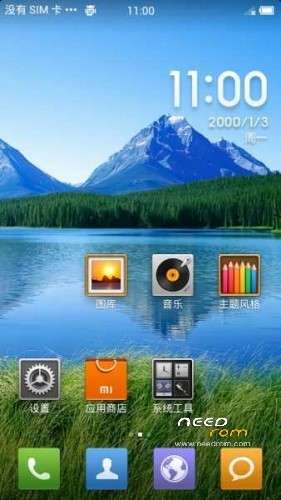
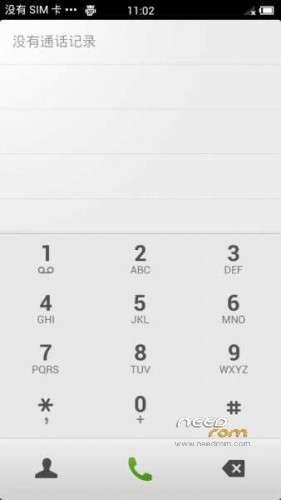
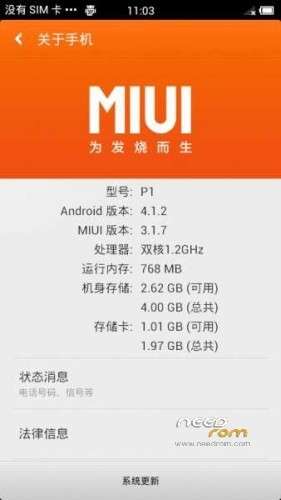
ROM Mobile HUAWEI U9200 – ROM Android 4.1.2 MIUI
Update MIUI version 3.6.14
Changelog:
| Hidden-text |
SelectShow |
New redesigned browser window management interface, a new night mode to increase the function of fast switching window (single finger sliding from the edge of the screen)
Add a new music experience
New camera supports two-dimensional code scanning
Add more convenient application store cloud push mechanism (without logging m chat, do not repeat the download installed applications)
[System]
Fix Google Calendar Sync failure problem
Fix some cases, uninstall the application causing MIUI restart problem
[Phone]
Fix "Call Recording" setup, specify recording number over 10, press and hold the list of issues will flash back
Fix "intelligent IP Dialing" settings, "No IP dialing" lists more than 10, press and hold the list of issues will flash back
Fix mute next (non-vibrating) to answer the phone, the phone will be muted + vibration problems
Repair call, notification bar airtime wrong question
Repair contacts to join the blacklist dialog pops up, press the 'Back' button to exit the current interface is not
[Contact]
Add call recording support through the "New Contact" Filter
New group within the group to send messages, select the support numbers
Optimization strange Contact Page
Optimization when selecting the numbers to send text messages, multi-number contacts will be prompted to "default" number
Optimize export contacts to a SIM card, display the results
Optimization New Contact page, select the account will highlight the current account
Sync Google Contacts cloud optimization support big picture
Fix click to call in the call log record or notes may flash back problems
Fix merged contact, details page, and edit pages Avatar inconsistencies
Remediation Selection Avatar picture, crop the picture page click "Back" or "Cancel", edit the page directly jump back issues contact
Click on the search box does not fix the issue into the search
Click to return repaired within the group, the group did not return a list of questions
Fix some cases, the contacts are not displayed call log call recording problems
Fix export contacts to a SIM card, the progress bar shows the incorrect questions
Enter the number of the repair part of the problem can not search results, for example, enter 1234 search for 13412341234
[Topic]
Add third-party themes can choose whether to use the Perfect Icon
[Camera]
Added support for two-dimensional code scanner
Contact to repair from the skin may occur when the camera button and the Flash button overlapping
Fix Bluetooth can not send video camera problems
[Gallery]
New album added quickly scroll bars cloud
View larger image optimization algorithms generate thumbnails when
Optimized cloud space occupied album thumbnails
Repair open some GIF pictures, gallery flash back problems
[Music]
New music new revision
[Browser]
Increasing number of new window animation
Add new window management interface
Add new window and close the window animation effects
Add new night mode
New single finger from the edge of the screen to quickly switch windows slide
New Tips when accessing secure Web
Tips for optimizing network error page
Optimization of web pages "link response area" showing the effect of
Optimization tool bar at the bottom of the height
Optimized Read Mode visual effects
[Notes]
Optimization is sent to a message, the message header is automatically added
[Video]
New Hide Local Video
Fix some cases, the collection and chase drama unsynchronized problem
Fix video playback pages from the horizontal screen after switching to vertical screen, vertical screen displays an error icon at the bottom of the issue
|
Install:
CWM
Step 1: Download the custom ROM copied to an external SD card root directory
Step 2: the shutdown state. While holding down:
– Power button + volume button up, to enter the recovery mode.
– Wipe Data / Factory Reset -> delete all user data
– Wipe Cache Partition -> Wipe cache
Step 3: Return to recovery main interface Install zip from sdcard -> choose zip from sdcard -> Select your ROM
Step 4: Brush complete, restart the phone Patience required – first boot takes a while
————————————————————————————————————————————————-
Features ROM:
MIUI Official version 3.2.22
CM10 adaptation miui4.1 — cm10 Masters compiled version of R
Language support: EN/CN
Install ROM :
Step 1. A MICRO SD card of 2GB or more should be available. The MICRO SD card made by Sandisk, Kingstone, or Kingmax is recommended.
Step 2. Format the MICRO SD card (This operation is optional).
Step 3. install recovery5.5.0.4_AscendP1.exe.
Step 4. Make sure your handset is power off. Insert the MICRO SD card into the handset. Pressing the VOLUME UP key and VOLUME DOWN key, then press the POWER key to power on the
phone, and VOLUME UP key and VOLUME DOWN key should be pressed more than 3 seconds, then enter the Software Upgrade Mode.
Step 5. Phone will restart automatically after the upgrade process finished, and then need restore phone to factory defaults.
ROOT:
The ROOT software a key, a key Huawei D1/P1 ROOT software
ROOT method is as follows:
The root command execution flow:
hwadb push mempodroid / data / local / tmp
hwadb push su / data / local / tmp
hwadb push Superuser.apk / data / local / tmp
hwadb shell
Sequentially input command [can be copied directly]:
cd / data / local / tmp
chmod 777. / mempodroid
. / Mempodroid 0xd734 0xad9f sh
mount-o remount, rw-t ext4 / dev/block/mmcblk0p13 / system
cat / data / local / tmp / su> / system / xbin / su
chown 0.0 / system / xbin / su
chmod 06755 / system / xbin / su
cat / data / local / tmp / Superuser.apk> / system / app / Superuser.apk
chown 0644 / system / app / Superuser.apk
For the convenience of everyone, making a small tool directly run and wait for auto-complete can!
The gadget unlockbootloader_P1D1.exe Download:
1, download attachments: July 8th update gadgets, resolve conflict and pea pods, July 9 update problems caused solve typo
2, install the ADB driver phone open adb debugging, and then linked to a computer with a USB cable [ADB driver must be installed correctly, can the phone connected to the computer running pea pods once can】
※Please make a backup of your device before installing or updating ROM

 Member Info
very thanks
Thank you
Support spanish language?
i can't install. signed error.