
- Title: JiaYu G3&G3N MIUI
- Listed: September, 2013
- Last modified: 11/12/2013 5:27 am
- Version: ROM Android 4.2.2 MIUI
You must be logged for ROM download.
50227 total views, 1 today


 Member Info
DESCRIPTION
ROM JiaYu G3&G3N – ROM Android 4.2.2 MIUI
Features ROM:
Update MIUI v5 – 3.11.08
Patch G3N included in the ROM
————————————————————————————————————————————————–
Update MIUI v5 – 3.10.25
Patch G3N included in the ROM
————————————————————————————————————————————————–
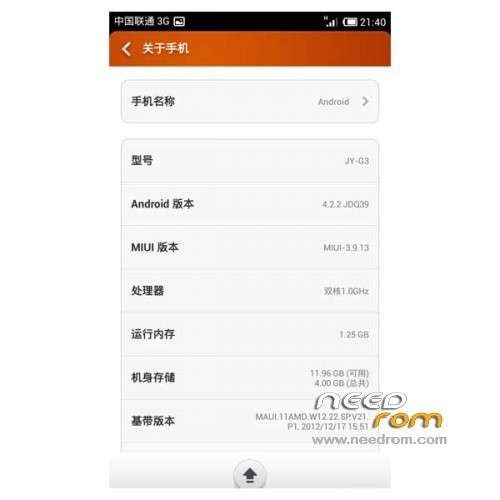
Ported Amoi N820 v5 3.9.13 on G3 JIAYU
Edit to add kernel support init.d script
Edit to add Google and Google Services Framework
[Amended] incorporated into the system built-in storage
[Optimization] added MtkTweak_V12 optimized script, the default mode "C"
[Optimization] host a large number of advertising shielded
[Optimization] built-in camera driver optimization
[Optimization] Add V4A FX sound effects, the latest
[Optimization] Add BOOT power saving self-test
[Note] V4 sound should make their own open
Gapps lite include - Rooted
Language support: Multilang ( Normally )
For G3N use Patch
Install ROM :
CWM
Step 1: Download the custom ROM copied to an external SD card root directory
Step 2: the shutdown state. While holding down:
– Power button + volume button up, to enter the recovery mode.
– Wipe Data / Factory Reset -> delete all user data
– Wipe Cache Partition -> Wipe cache
– Advanced -> Wipe Dalvik Cache
Step 3: Return to recovery main interface Install zip from sdcard -> choose zip from sdcard -> Select your ROM
Step 4: Brush complete, restart the phone Patience required – first boot takes a while
※Please make a backup of your device before installing or updating ROM
In the 3.10.25 rom apps don't open for me, so I restored a backup of a previous version. When I tap an app, backup or themes for example, I just see a white or black screen and then after a while it asks me if I want to close the app because it's not responding.
This rom is very fluid, but I got a notification "Preparing SD Card" that won't go away. Apps dont recognize the sd card. Too bad.
I've had the same problem. Try the version 3.10.25 from this homepage: http://en.miui.com/thread-7898.....-1-1.html It works for me. But notice, the power consumption is no good. But try it.
I managed to solve the problem by replacing the vold.fstab in the ROM files. But I notice that increased power consumption, the battery only lasts 1 day :S
Isn't the ROM in your link the same as this page?
The Installer is in chinese! Can somebody tell us which optio is which please! Or if possible for somebody to translate the Installer.
Just click on the bottom right button(Next) until you can't, and then hit the update button (it's a square with arrow if I remember correctly)
I received an update notice on my phone, can I update from phone, or do I need to download from here?
Don't update directly from MIUI notification since our ROM is ported from another phone… it will make your phone cannot boot…
In MIUI can we move application to SD ? because I got warning my System Storage is full but I check in APP Setting there are no option to move to SD Card
Please advice
thx
Portuguese translation is ultra incomplete
The Miracast works?
How I can switch to the English (or Russian) language in the Aroma Installer?
The default menu in Chinese.
Great ROM, but had some problems with the sync off ageneda and contacts. Fixed this by installing gapps.
The 3.11.08 rom don´t boot, i try with many options but my phone freeze in boot