
- Title: Koobee P1S – Halo 7 Mod stock
- Listed: August, 2016
- Last modified: 08/23/2016 1:28 pm
- Version: Koobee P1S - Halo 7 Mod stock v2.16
You must be logged for ROM download.
21879 total views, N/A today
30 Total favorites
 Member Info
DESCRIPTION
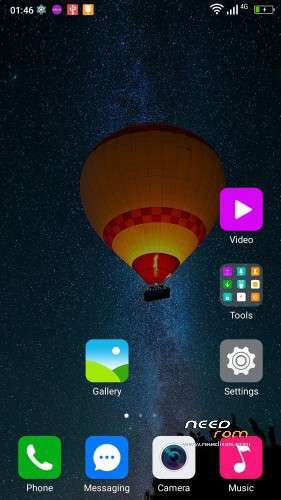
Pre-rooted Halo 7 Mod stock for Koobee P1S
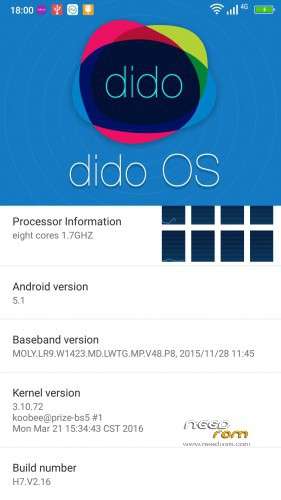
Based on stock firmware of Halo 7 Build number V2.16 (March 21 2016)
Features :
1) Firmware flashable by SP Flash Tool
2) DEBLOATED
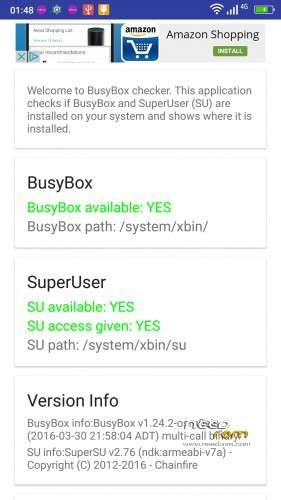
3) Added SuperSU version 2.76
4) Added Busybox version 1.24.2
PLEASE FOLLOW CAREFULLY THE NEXT STEPS :
1) Please install (flash) the Huber7052's TWRP at the next link :
http://www.mediafire.com/file/ttlih0f1qt6pq0y/Huber7052_TWRP.rar
2) Flash the Huber7052's recovery.img with SP Flash Tool (Download mode).
3) Make a backup of your NVRAM.
4) Keep the NVRAM somewhere (for example an external hard disk) like a little treasure.
5) Flash this rom (select the option "Firmware Upgrade" in SP Flash Tool).
6) Tap 7 times on "Build number", enable USB debugging & OEM unlocking (Developer options).
7) Tap on "SuperSU" and tap on "new user".
8 ) Flash once again the Huber7052's recovery.img
9) Download "2.16_utility.zip" at the next link :
http://www.mediafire.com/file/cxv2ktxbeivnmxy/2.16_utility.zip
10) DO NOT UNZIP IT, it is a flashable zip by TWRP.
It contains the next useful apps :
a) CM Browser
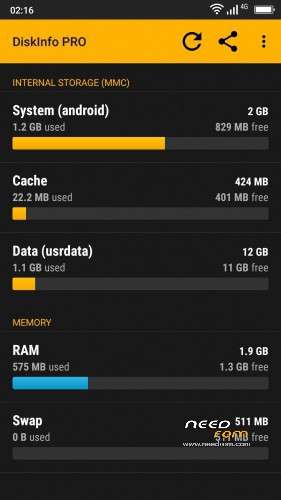
b) DiskInfo PRO
c) FX file manager & FX Root
d) AdAway
e) Chamelephon
11) Copy "2.16_utility.zip" & paste it into Phone storage.
12) Reboot into TWRP recovery.
13) Tap on Install, select "2.16_utility.zip" and Swipe.
14) Reboot the phone.
15) Tap on FX and follow the next steps :
a) tap on ACCEPT.
b) swipe from right to left 7 times.
c) untick START A 7-DAY TRIAL OF FX PLUS NOW and tap on the purple circle.
d) close app and open once again FX.
e) tap on System (Root) and tick "I understand the risk".
It takes times before SuperSU ask you to grant access to FX.
When you will grant superuser access … BE CAREFUL !
Now you are in the core of the system … do not delete any folder/file !
16) Download "open_gapps-arm-5.1-micro-20160817.zip" at the next link :
http://www.mediafire.com/file/9chmoocpcgv2318/open_gapps-arm-5.1-micro-20160817.zip
17) Copy "open_gapps-arm-5.1-micro-20160817.zip" and paste it into Phone storage.
18) Reboot into TWRP recovery.
19) Tap on Install, select "open_gapps-arm-5.1-micro-20160817.zip" and Swipe.
20) Reboot the phone.
21) Select UNI launcher.
22) DO NOT INSTALL ANY UPDATE.
23) Enjoy.
※Please make a backup of your device before installing or updating ROM
Thanks for your support <3
@Cleopatra81
If you are interested I unlocked the bootloader and enabled by default MTP and ADB.
What kind of recovery is included in teh ROM? Stock one? Or other type?
Which is the size of USERDATA (app) storage partition?
Thanks.
Hello Cleopatra,
Big issue here. Received a P1s from my coworker wich was stuck in a bootloop. Flashed the supposed original firmware (to be found in Needrom) and with that firmware i can´t get passed the step where you enter the google account data. After confiming my password for the google account , it jumps back to the wifi settings again and agian and again. rebooted the device several times and it showed a app actualization. first time 197 , then 43 and the last time 4 . So because this wasn´t working I flashed a other rom called Pepsi P1S ROM wich has the malaware already removed. After finishing flashing (everything seemed to be ok) I booted the device and waited … I know that this part can take up to 1 hour. But after 6 hours still nothing. The phone enters in the primary startup with the pepsi logo and there it stays … meanwile 8 hours.
I´m looking for a original ROM to get it running again to enter the device and make the changes wich are necesary to flash your ROM.
Formatting the device with SP isn´t having any effect.somehow SP doesn´t find the phone , only when i load the scatter and plug it will start downloading but will not format.
I can´t enter the phone it freezes at primary startup … Any Idea, thanks!!
hallo . Billytsen from Malaysia . you shou
you should flash stock rom format all + download to make your phone like new one . sorry back english
Hello and thanks bovirus,
What details?
Yes I read that Huber modded the ROM but wasn´t able to find and load it. I have no idea what version is or was installed and I still can´t acces the phone at all. Now I noticed that the battery indicator stay´s on minimum , like if it isn´t charging at all. Before starting all this at least the indicatorscreen was showing the charging progress until it got to 100%.
Now it´s for the last 3 hours with a red bar and the screen keeps on(doesn´t turn black or off). I´m going to try the Huber Rom and will let you know if it worked.
Thanks …
Huber Rom is working!!! Now at least I can acces the phone and check if everything is working properly
Thanks for the link for the the Huber Rom
so far it seems to be that providers network service isn´t availeble … doesn´t activate the sim futures and I can´t see the emei numbers.
And wich version of MTK Engineer mode should I use. There are plenty on PlayStore …
@mich_lex
If the ROM is Huber ROM pelase post in Huber ROM thread.
where is the download link? everytime i click on it, it return to login page..
same goes to me… did this ROM have been deleted??
@azlihazrin
The download link works fine.
To download a file from needrom you have to register on needrom.
yes.. already register.. but when i click to the link, it always return to log in page
@muhsin87
Tested it now. It works.
Try with a different browser.