
- Title: latest vibe ui with multilanguage, 4k support and fast charge
- Listed: April, 2016
- Last modified: 04/09/2016 2:50 am
- Version: 6.0.2
You must be logged for ROM download.
20865 total views, 3 today
6 Total favorites
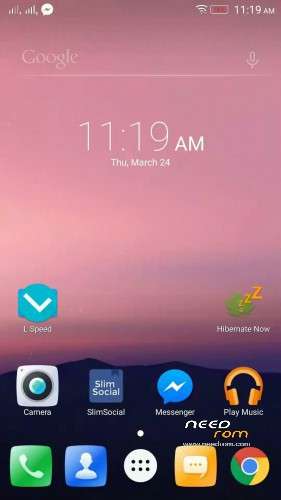
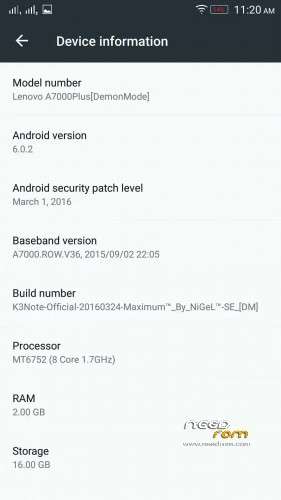
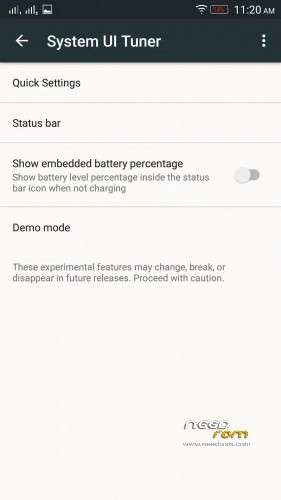

 Member Info
DESCRIPTION
[LENOVO K3Note/K-50/K5a40/A7000Plus, Official Marshmallow [DM] by Maximum™- SE] by NiGeL™(Akashi)
DISCLAIMER: Rooting your phone and using custom ROMS have risks, and if instructions aren't followed you can BRICK YOUR DEVICE. We are NOT responsible if your phone breaks, if world war occurs, or if your dog dies!!!!
Rom Features:
- Based on S422_V2 from SC Official marshmallow
- OatDex to Ultra Debloat
- Removed unnecessary Apps and debris
- Pre-Rooted (Thanks Chainfire fir rooting Marshmallow)
- Pre-Xposed Support
- Light Mode
- Zipalined
- Vacuuming Every Boot
- SElinux_DemonMode
- Fast Charging 2.0 (via SuperSaverMode While charging)
- Clear Motion
- Slow Motion Support
- 4k support
- Ram Optimized
- Battery Optimized
- System Tuner
- TOTAL BUGLESS ROM ( YOUR MUST KNOW HOW MARSHMALLOW IS)
Pre-Installed app for Daily use:
- L Speed Tweak App (Thanks Paget96)
- Latest Stable Greenify
- Xposed Installler App
- Root Explorer
- Slim for Facebook
**************************************************
HOW TO USE IT? (READ THIS!) (Basahin mo Baka mag tanong ka nanaman. Andali dali na nyan)
1. Download this zip file
2. Extract to INTERNAL MEMORY the TWRP folder (that is Backup)
3. Go to your TWRP recovery (TWRP 3.0.0.0 and Up recommended)
4. Go to Advance wipe Check Cache/System/Dalvik-Cache and slide to wipe
5. Back to TWRP and Click Wipe and slide to Wipe
6. Choose Restore and Choose this backup file and Restore and Reboot.
7. If you are k3 note user must flash that Patch modem.
8. Read this dont ever repeat my rules.
Other Tweaks:
After Setup your LSpeed Tweaks don't Reboot, must go Shutdown and turn on again your CP with Devil Mode.
Special Credits:
Nikko Angelo Q. Esteves
Maximum™ Dev. Team
Nameless Porting Team
Vibe UI Dev. Team
K3note Devs.
Paget96 for providing L Latest L-Speed
Service Center of Lenovo India
(I restore it and test its bugless so read my rules)
Babala wag umasa sa mga paasa
DON'T EVER REPEAT MY RULES ~ AKASHI
※Please make a backup of your device before installing or updating ROM
why you say is multilanguage.this has no german language ans without google acount can not progress.verdammte kake leute
How do I update? I downloaded the 20 MB file, rebooted as instructed, took me to Recovery screen, didn’t know what file to update, rebooted and then I got a message like ‘system failed to update..’. Anybody familiar with the issue?
I have the same problem…
Hi when I do the restore it ends up with some error 255. Any help please. Thanks
Try this.. After the normal wipes, go back to the main screen, click ‘Mount’, make sure ‘System’ and ‘Protect’ are UNCHECKED. Go back. Click Reboot -> Recovery and swipe. You should reboot to the recovery screen. Restore from there.
Hi am still getting this error. Please help
ExtractTarfork() Process ended with ERROR: 255 .
Stupid question but are you restoring it from your internal memory or external SD card? Make sure it is from your internal memory. The reason I’m saying this is that some people have resolved the issue using this method. Other than that, I have no idea about it except to redownload and try again.
But I m not facing a such type of issue.
Plzz clean all and then restore
Please Insert Direct Link or another link except "mega.nz" !!!!!!
Am restoring from internal memory since the start. And not good
How it can be a real Android version when no phones till now even Nexus are running 6.0.2?
Could anyone actually install and run this rom?
How do I update? I downloaded the 20 MB file, rebooted as instructed, took me to Recovery screen, didn’t know what file to update, rebooted and then I got a message like ‘system failed to update..’. Anybody familiar with the issue?
First restore ROM and then install modem
I installed and updated rom successfully, but then I get system update (20 mb size ), and downloaded it, it take my to recovery mode and nothing happens
Link google drive : https://drive.google.com/file/.....iew?usp=sharing