
- Title: Lenovo S860 (Stock by Bass Rockers)
- Listed: June, 2014
- Last modified: 06/19/2014 3:44 pm
- Version: 4.4.2
You must be logged for ROM download.
45671 total views, 2 today
40 Total favorites
 Member Info
DESCRIPTION
!!! WARNING !!!
THIS ROM AND RECOVERY IS ONLY FOR CHINESE VERSION OF PHONE WITH 1GB RAM !!!
NOT WORK WITH EUROPEAN VERSION WITH 2GB RAM !!!
Hi again
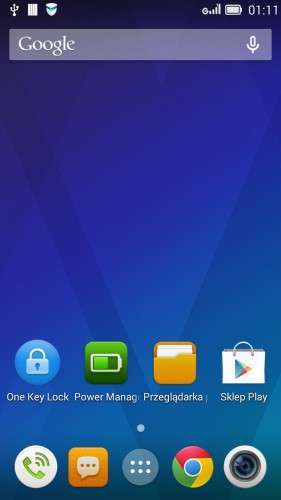
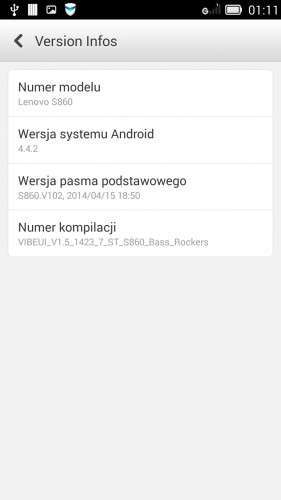
Today i make a Multilanguage rom for Lenovo S860 based on brand new DEV preview of 4.4.2 KitKat (S860_S904_VIBEUI_V1.5_1423_7_ST)
Ok what inside :
- remove all chinese stuff
- Chrome (replace Chinese version of Lenovo Browser)
- KitKat 4.4.2 gApps incl. Google Play Store
- Google Keyboards (default) – remove Baidu Input
- Google Now Launcher (Newest – default)
- 73 languages
Install TWRP Recovery using MTK Mobileuncle tools
Rom NOT ROOTED after flash Install UPDATE-SuperSU-v2.00.zip by Chainfire or use VROOT 1.7.7
Enjoy ;D
How to Install :
- First you must have root to install TWRP Recovery.
- For make root use Framaroot if you Have 4.2.2 JB or VROOT if you have 4.2.2 JB or 4.4.2 KitKat
Root using Framaroot
- place Framaroot into Phone Internal Memory
- Install app and run
- choose BARAHIR
- reboot and you have Root
Root using VROOT
- download and install VROOT install package
- run app
- connect phone to PC and choose USB Debugging
- wait to recognize phone (if you not have ADB Drivers install THIS app on PC)
- when Phone is connect in the app click ROOT
- install all app sending to the phone
- wait for auto reboot
- after reboot you have root
Installing TWRP Recovery
- Download TWRP Recovery rar package to you PC and unpack
- copy scatter.txt and recovery.img files to your phone internal memory
- download MTK MobileUncle apk and put into your phone internal memory
- install MTK MobileUncle on phone and run
- chose RECOVERY UPDATE
- chose recovery.img on the list and confirm OK to install
- wait a moment and here you go. You have TWRP Recovery for Lenovo S860
Install rom using TWRP Recovery
- Download rom to you PC
- Copy rom into your Phone Internal Memory (not unzip !!! copy ZIP file to you phone)
- turn off phone
- hold VOL+ & VOL- & POWER buttons until your see a TWRP Splash screen
- go to WIPE
- swipe to the right and wait to end process
- press back button twice and back to the main menu
- go to the INSTALL
- scroll down and choose rom ZIP file
- swipe to the right and wait for end process
- done you have installed rom on your Lenovo S860
If you want install SuperUser by chainfire download UPDATE-SuperSU-v2.00, place to your Phone internal memory and flash like a rom or make root using VROOT after flash new rom.
※Please make a backup of your device before installing or updating ROM
hello i need multilanguage room for s860 eropian version with 2gb ram please help
can any one tell me how to modify room for additional language
cuz i check lenovo room here is no such as files which has language settings
language.xml defult.xml and hardware.xml
zameer_yus@yahoo.com
I can make rom without phone on my hand, i always test rom before upload sorry. When i have European version i make rom for tis model
Thank you for this ROM! After 3 months I finally have google play. But I cant root this ROM. VRoot and SuperSU is always failing. Debug mode is ON. I rooted my phone just before flashing and it worked.
Just root it with mobogenie via pc
E: Unable to mount /preload
How to fix call ID & SMS????? Thanks!
I have a Lenovo S860 was bricked because of flashing a wrong ROM.
The condition now is:
- It is dead. When Plug in USB the indication in the phone showing Red LED (like charging status). No Android logo display (only blank screen)
- Plug in to PC. The PC is able to detect the USB as "PreLoader USB VCOM"
What I have tried:
- Flash tool ver.5.1348.0.100 -> does not start transfering files
- Press Vol+ button then connect USB –> No response
- Press Vol+ and power button –> No Response
- Press Vol+, Vol- and Power Button –> No Reponse
- Press Vol-, Power button –> No Response
How can I unbrick it?
Use SP_Flash_Tool_v3.1328.0.183 this version always works.
and use official rom, phone gone ubrick.
step 1: Root using VROOT
step 2: Installing TWRP Recovery
step 3: Install rom using TWRP Recovery
vorks fine. I hope it's stable
What if TWRP cannot see the zip file?
What to do?
It works great thank you! i had a lond time shearching for root and rom! This one is great try it! I rooted my phone that had already VIBE_UI V2.0.
Thank you bassrockers. I've bought a device which came with 4.4.2 based Vibe UI (I guess the1.5) with a s**tload of apps. No matter what I did with it, battery got drained in less than a day and I could not get rid of Twitter which was shown to be responsible for extreme power consumption.
Your ROM is way faster than the stock one, hungarian language pack is much better as well.
I'm about to calibrate battery and give a feedback about the experience.
Thanks for the work you have done with the 4.4.2 for Lenovo S860 Chinese version. I have used that with success since 3. August 2014 with the Norwegian Language + some English (which is quite OK). During the first part of September it have showed up some chinese again, probably due to automatic update of components which is probably "part of the basic original ROM". The security application is now in chinese only. Since I have no knowledge of Chinese, is there any way to select at least "English" for this central application?