
- Title: Lenovo Vibe X2-AP
- Listed: June, 2015
- Last modified: 06/21/2015 9:10 pm
- Version: X2-AP ROW S130
You must be logged for ROM download.
50038 total views, 1 today
24 Total favorites
 Member Info
DESCRIPTION
Please use latest version of WinRAR or 7Zip
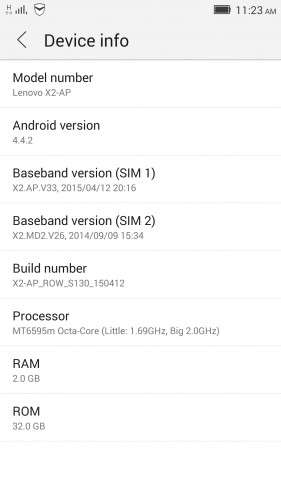
Official ROM Lenovo X2-AP Version: X2-AP_ROW_S130_150412 (KitKat 4.4.2)
Gapps include – No Rooted
Language support : EN/CN/AR/BG/CS/EL/ES/FR/HR/HU/RO/RU/SK/SL/SR/TH/TR/UK/VI/TW/IN
Installation:
1. Open flash_tool.exe from SP_Flash_Tool_v5.1512.00 folder
2. In Flashtool, select the MT6595_Android_scatter.txt from the target_bin folder. Wait file to be added into Flash Tool
3. Make sure “DA DL All with Checksum” is checked in Options -> Options -> Download OR YOUR PHONE WILL FAIL TO BOOT!
4. Turn off your phone.
5. Select "Firmware Upgrade" or "Download only", but do not use "Format All + Download", because you will lose your IMEI and MAC
6. Press Download
7. Connect your phone into the computer via USB data cable.
- install driver from Drivers folder, if needed (you may have to disable Windows Driver Signature Enforcement)
- The process will start and a red progress bar will appear after, yellow, grey and green circles is displayed, the phone is successfully flashed
8. Disconnect the USB cable from the phone and turn it on. It will take few minutes for the phone to boot for first time
※Please make a backup of your device before installing or updating ROM
tnx!
This is specially for you
tnxxxxx
Tks for your sharing… wait for months…!!!
Hello friends what indicated for x2-cu
X2-AP_ROW_S130 or X2-AP_ROW_S223
S130 is Kitkat 4.4.2,
S223 is Lollipop 5.0.2.
As seen on descriptions
why is this rom broken when i am trying to extract with winrar? pls confirm this or this will be a big problem for our phone.
Please use latest version of WinRAR or 7Zip
not work on my lenovo vibe x2-ap. my firmware version ROW_126 rooted status. but when download or upgrade mode to ROW_130 and ROW_223 not working, my device not detected on Sp_tool_flash. pleasee help me.
Can someone post a link with TWRP for this rom? I need it badly.
Thank you
Thanks.
Solved my problem.
First of all Many Many thanks for the Rom Legend eryen . I want to to revert back to 4.4.2 as my Vibe X2-AP has lots of bugs after upgrading to lollipop. I wanted to know that Should I need to backup nvram via TWRP(Even I dont know what is TWRP) or any other preruquistics other than the above flashing Instructions? Please reply me, and I am new to all this, so please don't mind my stupid question.
My Device is Lenovo Vibe X2-AP(INDIA), Not rooted. Just 20 days old. Will this flashing Void my warranty?
Nvram backup process is needed if only you will flash with format all option. That option wipes nvram partition.
CU and TO uses same scatter table, as EU and AP uses same scatter table.
If you are flashing cross platform, format all option is needed. Or flashtool will not download rom to device.
As you described. You will downgrade your AP device to AP kifkat, so nvram backup is not needed. Just dont select format all option. Use regular download option.
Do I need to go through the TWRP/ NVRAM process as you described it in lollipop? or just go through the instructions above (4.4.2)?
(I have lenovo vibe x2-cu version)
Thanks
My answer to dipenpatra explains it.
You are flashing AP rom to CU device. You need to backup nvram, and restore after installing rom.
After this process, your device will be converted to AP.
No need backup after that. Unless you want to convert back to CU.