
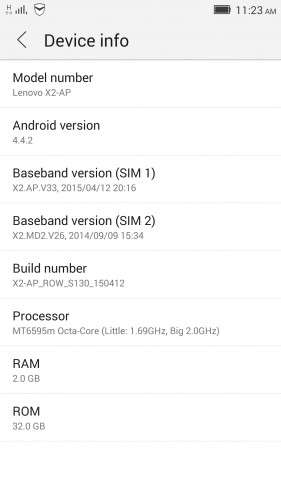
- Title: Lenovo Vibe X2-AP
- Listed: June, 2015
- Last modified: 06/21/2015 9:10 pm
- Version: X2-AP ROW S130
You must be logged for ROM download.
50039 total views, 2 today
24 Total favorites
 Member Info
DESCRIPTION
Please use latest version of WinRAR or 7Zip
Official ROM Lenovo X2-AP Version: X2-AP_ROW_S130_150412 (KitKat 4.4.2)
Gapps include – No Rooted
Language support : EN/CN/AR/BG/CS/EL/ES/FR/HR/HU/RO/RU/SK/SL/SR/TH/TR/UK/VI/TW/IN
Installation:
1. Open flash_tool.exe from SP_Flash_Tool_v5.1512.00 folder
2. In Flashtool, select the MT6595_Android_scatter.txt from the target_bin folder. Wait file to be added into Flash Tool
3. Make sure “DA DL All with Checksum” is checked in Options -> Options -> Download OR YOUR PHONE WILL FAIL TO BOOT!
4. Turn off your phone.
5. Select "Firmware Upgrade" or "Download only", but do not use "Format All + Download", because you will lose your IMEI and MAC
6. Press Download
7. Connect your phone into the computer via USB data cable.
- install driver from Drivers folder, if needed (you may have to disable Windows Driver Signature Enforcement)
- The process will start and a red progress bar will appear after, yellow, grey and green circles is displayed, the phone is successfully flashed
8. Disconnect the USB cable from the phone and turn it on. It will take few minutes for the phone to boot for first time
※Please make a backup of your device before installing or updating ROM
please re upload this rom
please re upload this rom
Please use latest versionof winrar or 7zip. Older versions can not extract files because of not supported compression algotirm.
Hi.
I have downloaded everything and understood each step of the process. But at the last step, when I power off my mobile phone, and connect the usb, The phone powers up and shows the battery charging logo. I also tried to press the volume buttoms when connecting the usb cable to the mobile. Please Help
Many thanks
Please install lenovo usb drivers. Flashtool requires them to access device.
Hello eryen
Thanks for the Rom. but i am facing some problems in Rom.
1. when ever i connect my phone with Lpy. lpy don't show the MTP then i do the process 2-3 times to connect phone.
2. Data tranfer Rate very very slow between lpy and phone.
3. Data Connection speed also slow.
4. Hot Spot can not detect by Lpy.
The lenovo usb drivers is not working on my Laptop, huhu please help -_-
dear there are two kinds of vibe x2 one is dual sim and the other is single sim wht is this rom suitable for ???? please tell me
Where to find MT6595_Android_scatter.txt ? Cant find this .
All seems good till Step No.5 and after clicking DOWNLOAD nothing happens… Please help??
(source)http://forum.xda-developers.co.....36#post61755436
Try this:
-Open Windows Device Manager
-Plug your phone into your computer while it's on
-Power off your phone while it's plugged in
-See if you notice a device appear called something like "MediaTek USB VCom" or maybe "MediaTek Preloader Device"
-If there is a little orange exclamation symbol by it, quickly right click on it! Then, proceed to install the MediaTek USB Vcom Drivers to that device by selecting to manually search computer for the MediaTek USB VCom Drivers.
(other post)First you need this: MTK USB COM Driver SDK
Then follow this guide: For Windows XP, Vista and Windows 7 Based Operating systems to install it properly.
Or this guide of you are with: Windows 8, 8.1 or Windows 10
This links for USB COM Drive and how to install guide are provided by @Yoshi_Guy who posted it on previous posts, so if it works hit his "thanks" button.
Good luck.
Another helpful post while i was flashing this rom:
(source)http://forum.xda-developers.co.....-t2897967/page5
Once downloaded i opened sp flash tool 5.1436 (see UGOCAT post well above).
In option menu you have to tick, in DOWNLOAD : DA DL ALL WITH CHECKSUM (don't know why but everybody says to do it)
Then i choose FIRMWARE UPGRADE. Then i load MT6595_Android_scatter.txt found in the folder : Lenovo-vibe-x2-cu\X2-CU_USR_ST1443_5.5.1_1410241921_MP11V1.9
I click on DOWNLOAD.
My phone is closed (and before i have enabled the developper options and checked USB DEBUGGING, and when i shut it i haven't tick the quick boot option : i wonder if this is only required if you update instead of upgrading firmware but i don't understand russian so i haven't took the risk not doing this).