
- Title: unbrick meizu m2 note
- Listed: October, 2015
- Last modified: 10/16/2015 11:14 pm
- Version: Flyme OS 4.5.4I
You must be logged for ROM download.
51859 total views, 3 today
26 Total favorites
OFFICIAL
 Member Info
DESCRIPTION
※Please make a backup of your device before installing or updating ROM
not support
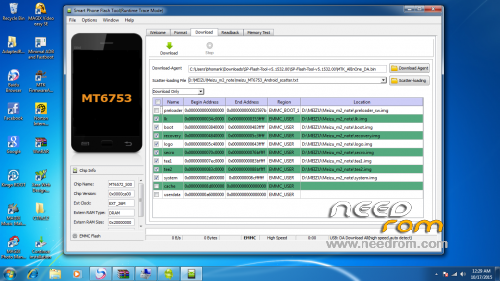
Hi guys !! Finally I have raised my meizu m2 note, I've gotten following this tutorial to unlock the bootloader (it is in Chinese , use google translator ) http://reameizu.com/how-to-anl.....r-meizu-m2-note after using the same SP Flash Tool the previous tutorial, flash the smartphone with the original rom find this link http://dumpemmc.blogspot.com.e.....ote-for-sp.html After flashing you must retrieve the IMEI , you can do it from the engineer mode by entering the phone * # * #3646633# * # *, go to Conectivity- > CDS Information- > Radio Information- > Phone 1 edit the AT+ command like so AT+ EGMR=1,7,"xxxxxxxxxxx" where " xxxxxxxxxxx " must put your IMEI , be sure to leave a space between AT+ and EGMR or get a message like this "this command is not allowed in UserBuild " and do the same for Phone 2 Good luck!!
Remember, format the smartphone with sp flash tool before flash the rom like here https://www.youtube.com/watch?.....v=dDKv9AeFgCo
Thank you! Congratulation! Unbrick my Meizu M2 note
Have you used the driver's in the MTK Phone Driver folder?, Are you sure you have followed step by step the tutorial http://reameizu.com/how-to-anl.....r-meizu-m2-note?, I had no problem
please my sp didnt recognis the m2 meizu scater file keeps sayin the load scatter file is invalid on sp v5.1
Download unlock_tool from https://mega.nz/#!zA4zQT4B!c8W.....1a_ToRLNBSLCXT8 and follow steps from next tutorial http://forum.xda-developers.co.....loader-t3429843, then using the same SP Flash Tool from previous unlock_tool download this rom https://drive.google.com/file/.....ef=2&pli=1 and flash your Meizu M2 Note using this scatter file.
In the folder of unlock_tool you'll find the drivers for Meizu M2 Note, use these drivers.
Regards and good luck!!!
I opened the unlocked bootloader as described. I threw the phone with downloading FlashTool Flyme 4.5.3A ROM https://mega.nz/#!2d4kwjar!4u5.....2fcbvhı-r3yoqy address. açıldı.telefo phone's serial number changed. I print the collective. but even though it is not connected to the network SIM card is inserted. Can not find any network. Details on the photo. What is the solution?
Mmmm… Dear friend, I think that Serial Number have not any to view. My Serial Number is diferent now and my phone is working well. Are you sure that IMEI you have used is yours? Have yo added the IMEI for Phone 1 and Phone 2? Have you tried both SIM slots? if yes, try to flash with this rom https://drive.google.com/file/.....ef=2&pli=1
Let's go, you can do it ;D
yes IME intact. I also added two now. I tried both slots. I tried this ROM. but the result is the same. serial number is the same 0123456789ABCDEF
Well, I'm lost now, my serial number is the same as you but my phone works well, maybe you should try another rom
Ah !, one more thing, I had to activate the device in the client area of my service provider. Maybe that's the problem
Contact your service provider, maybe you can help
Sorry my English
Maybe they can help you
I flashed this but now my Flyme OS is flyme version:mt6753-user and I can't install any update. It also crashes all the time and get into reboot mode
Hi pppp!!!
Try to flash again and try with both firmwares
https://drive.google.com/file/.....ef=2&pli=1
https://mega.nz/#!2d4kwjar!4u5.....2fcbvhı-r3yoqy
Good luck!!
Hi, if I have firmware A, what I do? The version I not work? help plz
Well, this is for unbrick meizu m2 note, but, I had 4.5A version and now I have 4.5C version and my smartphone is working well, I think that this will work for you too.
Regards.
If you want, try to flash with any of these firmware
https://drive.google.com/file/.....ef=2&pli=1
https://mega.nz/#!2d4kwjar!4u5.....2fcbvhı-r3yoqy
Mega file was deleted. You could re-upload, please.
Sorry, mega file was A version, try google drive file