
- Title: MIUI 7
- Listed: April, 2016
- Last modified: 04/05/2016 2:10 pm
- Version: 4.4.2
You must be logged for ROM download.
13576 total views, 1 today
 Member Info
DESCRIPTION
Update 23.05.16 MIUIv7v4.4.2_ZTE_Nubia_Z7_Max_6.5.20
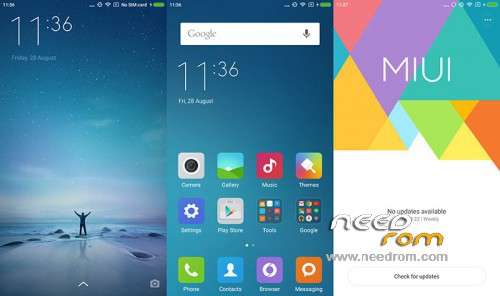
Ported ROM MIUI 7 for ZTE Nubia Z7 Max
Installation, quick manual
Brief instructions on how to install MIUI for Nubia Z7 max.
1.Loaded the phone into Recovery-TWRP, the phone is off hold Vol+ and PWR. Making a Backup for rollback if you do not like the firmware or something goes wrong. Go to "Backups", put a tick from the top to the bottom to the modem and make a swipe to perform.
2. Go to "Cleanup" and do the cleanup.
For a new installation of MIUI you need to do a clean-all sections except ( internal and external memory card.)
To update the version of MIUI you can just Clean Dalvik and Cache.
3. Go to "Install", select the firmware file and put it. After that reboot phone and enjoy MIUI.
※Please make a backup of your device before installing or updating ROM
Great! Fastest rom ever! Everything works perfect.
Thankyou
hi,
storage space is unified or partitioned?a screenshot would be nice…thanks
Here it is
Is this the official port from MIUI site or is this a custom one built from MIUI source?
Can someone please share a print screen of systeminfo? Thanks
The version stated in this post is 6.4.1 according to the zip file while the MIUI ported version is, Version: 6.4.2
So is this custom or the version before?
The version of this rom is Miui 7 v6.4.1 Beta based o Android 4.4.2
It has the older problem with Youtube where video cannot play, so you have to use a root explorer app and go to /system directory, open build.prop file, find the line where there is:
ro.build.version.release=4.4.2 and change it to
ro.build.version.release=5.0
Than save it.
Restart the device and now youtube video works perfect.
With this change the device cannot find future ota update and you have to update it manually.
Ciao, vedo dalla bandiera che sei italiano e quindi posso riuscire a spiegarmi meglio.
La modifica che descrivi provo a farla ma, quando cerco di salvare il file corretto, mi dice che non è possibile salvare la variazione per questo file. Come posso risolvere il problema?
Grazie in anticipo.
New version is out from the room author / source but the files are on pan Baidu. Anyone gotten OTA notification?
[Version 6.4.8]
1. Synchronization MIUI latest source
2. The problem repair abnormal wake
Another New version out from bhflower, Nubia Z7 max_MIUI7 6.4.15

ROM presentation
[This week recommended]
SMS notification of new card, support tickets, bank payments, credit card bills and other 10 categories of messages scene
【system】
Optimization mute and do not interrupt logic to achieve both compatible and at the same time open
Repair memory leaks cause problems Caton
【SMS】
SMS notification of new card, support tickets, bank payments, credit card bills and other 10 categories of messages scene
[Gallery]
Repair album list page does not display the name of the album
[Millet] Wallet
Optimization show the cashier payment optimization
Expand the default optimization millet wallet Home
Optimization manually change your credit card bill payment status
Optimization of two-dimensional code scanning to show pop open payment optimization
After repairing credit card repayment date not remind
Repair In some cases, the wrong problem millet account password recovery
Repair English version, add card does not support flash back problems cause the software
Fix some cases, cashier flash back problems
Goodmorning to all, I have 2 questions for you.
I installed MIUI V7 6.4.22 and does it work correctly but, for Youtube problem, when I open the build.prop file and change the value like written above, system tell me that is impossible to save the variation.
Second, my internal storage is limited to only 2.64 GB of total space.
How I can resolve it and use the total space of internal memory????
Thank you very much.