
- Title: MIUI-8 Ver. 6.9.1
- Listed: September, 2016
- Last modified: 09/05/2016 1:11 pm
- Version: 5.0.2
You must be logged for ROM download.
16004 total views, 3 today
2 Total favorites
 Member Info

DESCRIPTION

1. Go to Security app > Permissions > Autostart > Enable the perticular app which you want to be autostart.
2. Go to Security app > Battery > App battery saver > (click on pertucular app which u don't him to be sleep & keep running in background) > choose "No restrictions"
New – Slide down to exit fullscreen preview
New – On/off switch for screenshot sounds
New – Call recording in the form of folders and separate with ordinary recording display, which make recording list page more clean.
Lockscreen, Status Bar, Notification Bar
Fix – Notification shade issues in Second space
Fix – Status bar wasn't working properly with third party themes in some cases
Gallery
New – Slide down to exit fullscreen preview
New – Turn off screenshot sound in screenshot settings
Weather
Fix – Icon wasn't displayed properly
Changelog in 6.8.25
New – Redesigned Clock
New – A pop-up will appear when an app is launching another app
New – Calendar can get info about flights and train tickets from the messages automatically
New – Current week is numbered in the "Week" view in Calendar
New – Adjusting call volume
Settings
Optimization – Scan Wi-Fi network's QR code and tap "Result" to view the password
Permissions Manager
New – A pop-up will appear when an app is launching another app
Calendar
New – Calendar can get info about flights and train tickets from the messages automatically
New – Current week is numbered in the "Week" view
Clock / Calculator
New – Redesigned Clock
Optimization – Colored backgrounds for Alarm
FOR DOWNLOAD:
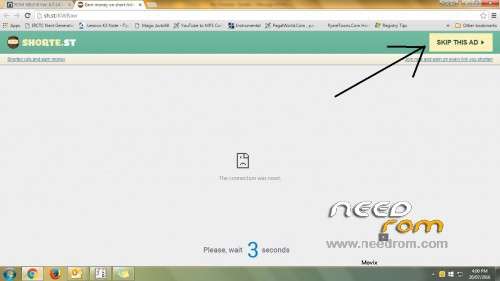
Click on link which come up after 5 secound in right top corner. (See image under all scrn shoot)
※Please make a backup of your device before installing or updating ROM
Please provide volte support rom…..
VOLTE is not supported pls use jio jion app….i m using too
hat are the bugs here? Is this better than Greeshan release v6.9.1 ?
Greeshan’s has bugs because he couldn’t test it himself. This ROM is much more stable.
Thanks Akajam,,,,
Dear Atirek i can't say abt other rom bcoz negative review can hurt their developer.
O.K. Thanks..
Is rom me jiojoin use kar sakte hai?
haan bilkul kr skte ho…
Hi, many thanks for this version.
I have translated into Spanish to share with more users. With your permission.
ok
@Pushpit
Tried Bro not working. Please give solution
This is So Complicated ! Can any one put a video explaining all this !! :/
psl follow again steps as the file is updated
Hi , pushpit Bhai, ..
I am a long user of greeshan MIUI since MIUI7. I believe that every ROM have some bugs if it is official or not.. So we should adjust it with developer overcome the problem. I like his dedication..
But recently I see that their Jio net app is FC.. I try it many times and wipe all and flash angain… It's not work…
So, now I am gonna try ur ROM…. U r a indin… So I think ur ROM will allow to use Jio….
Thank you pushpit ji….
No FC on Google playstore read more… And jio net appp…
Thank you pushpit bhaiii…
But chines app store is inbuild… Theme is not work.. I replace it with given link. But not work..
Now I am replace theme manager with greenshan sirs theme… It worked perfectly.
Thank you pushpit sir, thank u greenshan sir…
Wlcm Bro rajeeshbaby9… & thanks for your valuable feedback. Jio sim is working good.
In this rom jio tv is not working. plz fix that
what problem u facing FC or anything
@rajeeshbabay9 can you post greeshan’s theme manger please….
Go to http://greeshan.ucoz.com. You’ll find the ROMs as well as the patches. But I believe he’s stopped porting Miui for K3 Note cos he sold off his mobile. So the most recent ROMs were ” not tested”. He wrote that himself.
https://mega.nz/#!bVNWlahT
Extract and follow pushpit Bhai's guidelines..
https://mega.nz/#!nddiCJrJ!Lyn.....DcQlf7u8jiYMoTs
Dear rajeeshbaby9, thx for your support……..