
- Title: MIUI-8 Ver. 6.9.1
- Listed: September, 2016
- Last modified: 09/05/2016 1:11 pm
- Version: 5.0.2
You must be logged for ROM download.
16002 total views, 1 today
2 Total favorites
 Member Info

DESCRIPTION

1. Go to Security app > Permissions > Autostart > Enable the perticular app which you want to be autostart.
2. Go to Security app > Battery > App battery saver > (click on pertucular app which u don't him to be sleep & keep running in background) > choose "No restrictions"
New – Slide down to exit fullscreen preview
New – On/off switch for screenshot sounds
New – Call recording in the form of folders and separate with ordinary recording display, which make recording list page more clean.
Lockscreen, Status Bar, Notification Bar
Fix – Notification shade issues in Second space
Fix – Status bar wasn't working properly with third party themes in some cases
Gallery
New – Slide down to exit fullscreen preview
New – Turn off screenshot sound in screenshot settings
Weather
Fix – Icon wasn't displayed properly
Changelog in 6.8.25
New – Redesigned Clock
New – A pop-up will appear when an app is launching another app
New – Calendar can get info about flights and train tickets from the messages automatically
New – Current week is numbered in the "Week" view in Calendar
New – Adjusting call volume
Settings
Optimization – Scan Wi-Fi network's QR code and tap "Result" to view the password
Permissions Manager
New – A pop-up will appear when an app is launching another app
Calendar
New – Calendar can get info about flights and train tickets from the messages automatically
New – Current week is numbered in the "Week" view
Clock / Calculator
New – Redesigned Clock
Optimization – Colored backgrounds for Alarm
FOR DOWNLOAD:
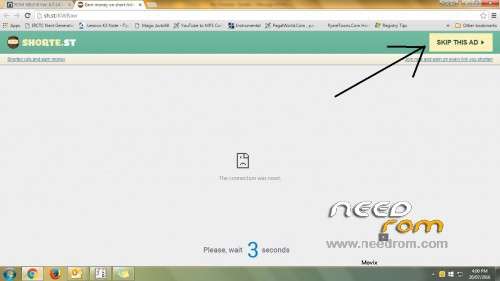
Click on link which come up after 5 secound in right top corner. (See image under all scrn shoot)
※Please make a backup of your device before installing or updating ROM
@rajeeshbaby9 password brother? Zip file is password protected.. thanks a lot
password : greeshan

Thanks pushpit… Now its working perfectly. Appreciated! Thanks again
Its showing "unable to connect jio tv try again later " with full access on jio speed
Thanks a lot
MIUI8_thememanager_by_greeshan
Password: greeshan

Thanks rajeeshbaby9!
Slovak language please
theme auto changing gto default.. what to do? And sound is too low, any fix?
BTW i m using fixed theme centre..
@Atirek to fix low sound, you can flash maxxaudio.
Guyz I'm thinking to install this rom on my phone,
I'm currently on MIUI 7 Global stable rom,
So yea i just wanna know what's working & what's not working please tell me I'll appreciate it.