
- Title: MIUI LEGEND_ROM_S4_LEGEND_PSENSOR FIX_camera_patch_SDCARD PATCH_vold.fstab change_all apps on sd card
- Listed: January, 2014
- Last modified: 01/16/2014 3:24 pm
- Version: MIUI V5
You must be logged for ROM download.
38529 total views, 2 today
1 Total favorites
 Member Info
DESCRIPTION
For 3G network, i've found a temporary fix that really improves connection and internet speed. I've seen improvements on my internet with Internet Speed Test. Apparently it improves 3G internet data speed too.
Maybe you should try out and leave your feedback, please.
"I have just fixed why some apps work only with WiFi but not on 3G. ICS apparently automatically added Proxy-settings to your APN, in my case Vodafone (NL). This is not necesarry to even make use of mobile internet, and it also prevents some apps from accessing the internet. I removed the Proxy-settings et voila, it works perfectly again!
Fix: Settings -> Press 'Mobile Network' (not Off-On!) -> Names accespoints -> Click your provider -> Remove 'Proxy' and 'Port'" (Font: http://forum.xda-developers.com/showthread.php?t=1601681)
U CAN GO TO MOBILE UNCLE TOOLS, SELECT MOBILE DATA SERVICE PREFERRED AND THEN SELECT MOBILE DATA SERVICE PREFERED (ALLOW MOBILE DATA TRANSMISSION AT FULL SPEED) – THAT'S IT! 3G CONNECTION AT FULL SPEED!!!
________________________
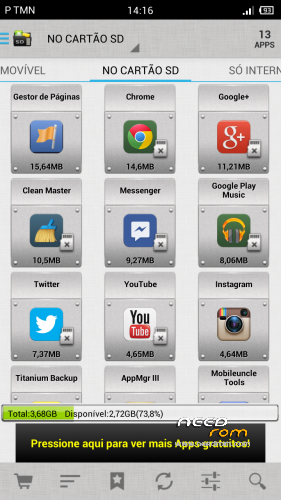
NEW UPDATE#1 – VOLD.FSTAB change. ALL APPS ON SD CARD NOW!!!
Just install zip file on cwm or extract vold.fstab file that it is on system/etc…. just extract it and replace on your system. With ES explorer or other check for system/etc/vold.fstab file and replace it.
JUST RATE THIS ROM!
________________________
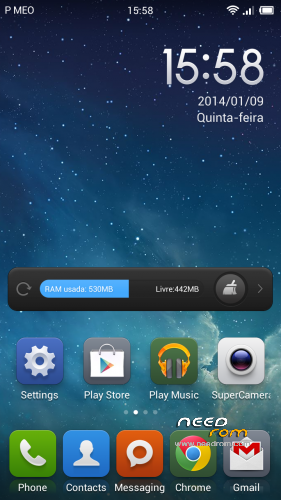
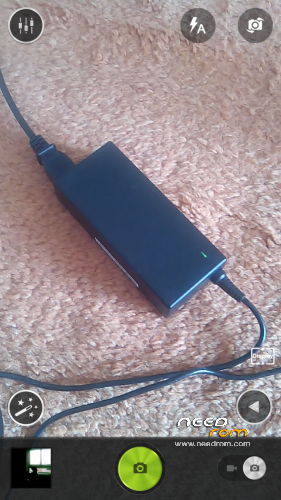
This is a sleepersdevil xiomi rom port update, with some new camera libs (real 13 megapixels) with rear and front camera working well and with new apk pre-installed to fix network name (SPN) (MiuiSpnConfig.apk) and with lenovo supercamera.apk installed too.
Rom Installation (Same procedure as sleepersdevil)
(From sleepersdevil great work) : "This is a CWM based ROM not a SP Flash ROM
WARNING!!! ALWAYS BACKUP YOUR CURRENT ROM FIRST BEFORE YOU FLASH THIS!
Step 1 : Unlock your SIM CARD first on your previous rom (that's really important)
Step 2: Download the custom ROM to your external SD Card
Step 3 : Shutdown your handheld.
Step 4 : Go to CWM Recovery mode ( Volume Up + Power )
Step 5 : Assuming that you already BACKED UP your ROM, then go Wipe Data/Factory Reset, Wipe Cache Partition, Wipe Dalvik Cache
Step 6 : Install Zip from SD Card > choose ZIP from SD Card > select the ROM"
STEP 7: Go to recovery again and wipe cache
STEP 8: assuming that you have port your own boot.img to this rom, you can now reboot and everything must work well with a nice camera though
Warning – You have to port your own boot.img from your rom and install on this one to fix sim card recognition.
This rom has already the modem.img update from sleeperdevil rom.
Thnx to sleepersdevil and his great rom. This is only a patch to fix some things like camera issues (Now Real 13 megapixels)
※Please make a backup of your device before installing or updating ROM
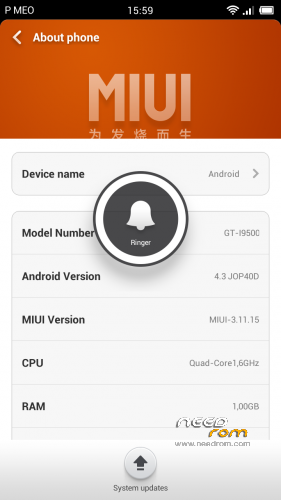
miui version is 3.11.15?
No no, it's a mistake. I forget to change it in build.prop. It is 3.2.26
No love for SP FLASH TOOL version?!. please
Sorry man, no… no love
Ok i have change the lib file for sensor and now? do you know any app for calibration?
if i go to mobileuncle psensor i get fail again
My psensor fails too on mobile uncle tools, but using it normally, making some calls it works well, nothing hangs… What seems to be the problem with yours?
That's weird… Have you google proximity sensor calibration apk? U should find something
Are those updates 1-3 included in ROM, if i download it now ??
YEs, all the updates are there… I have separate some files, because there is some people with some issues. Maybe they should format the system and install the rom again. Thie changes are mine and i can say to you if you follow the guideline your phone will work well. Camera, psensor, 3G…
no!! nothing there i have try to port the proximity apk from stock rom but without luck..
i will try later to reinstall the rom.
cause is my only issue and it is the warst think :/
exept the issue the rom is just awesome
Why do you say theres nothing in the rom?! The only think that isn't is the proximity sensor calibrator apk… Because in my phone i don't have that problem!!!!
problematic on 3G
signal is steady but slow internrt
Hei man,
Have tryed to do the patch on 3G issue that i mention earlier? Maybe you should try
U CAN GO TO MOBILE UNCLE TOOLS, SELECT MOBILE DATA SERVICE PREFERRED AND THEN SELECT MOBILE DATA SERVICE PREFERED (ALLOW MOBILE DATA TRANSMISSION AT FULL SPEED) – THAT'S IT! 3G CONNECTION AT FULL SPEED!!!
i meen that i have found nothing on google about psensor and calibration apk that works
Ok. I gonna do a little research about that and then i'll keep in touch.
my camera problem is solved now, but a new problem occurs.
the accelerometer is kind of inverted for camera and games. if i takes picture, i need to rotate it 180. any solution to this problem?
tried to recalibrate, but failed. or maybe the calibration apps is useless
Well, that's new…. Have you installed all camera libs?
I've download 3 times and flashing using cwm 10 times, but always stuck on MIUI boot logo. either use my own boot img or use the default boot img for my default rom.
that's why I need a FLASH TOOL Version my friend: D
i need your love for SP FLASH TOOL Version
(sorry if my english languange not good, i use google translate)
Have you unlocked your SIM card first?