
- Title: MLAIS MX69T Pro
- Listed: January, 2014
- Last modified: 03/04/2014 2:46 am
- Version: ROM Android 4.2.2
You must be logged for ROM download.
23942 total views, 4 today
 Member Info
DESCRIPTION
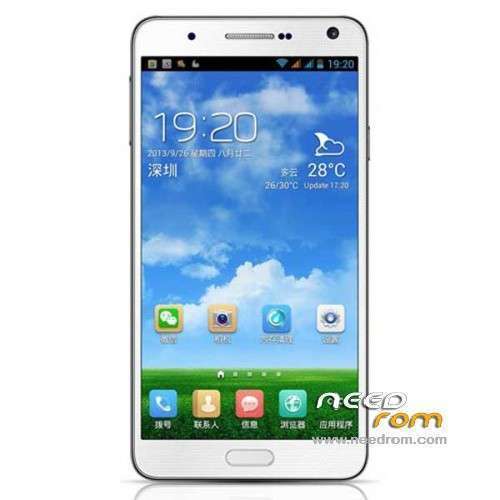
ROM Mobile Mlais MX69T Pro – ROM Android 4.2.2
Update ROM Mlais MX69T Pro version : MX69T_PRO_S135GC_A1_20140228_v02_MTK6592_FHD_EN_16P128_COM_WP_NFC
—————————————————————————————————————————————-
Update ROM Mlais MX69T Pro version : MX69T_PRO_S135G_A1_20140225_v02_MTK6592_FHD_EN_16P128_COM_WP_NFC
—————————————————————————————————————————————-
Update ROM Mlais MX69T Pro version : MX69T_PRO_S135G_A1_20140218_v02_MTK6592_FHD_EN_16P128_COM_WP_NFC
—————————————————————————————————————————————-
Update ROM Mlais MX69T Pro version : MX69T_PRO_S135G_A1_20140210_v02_MTK6592_FHD_EN_16P128_COM_WP
—————————————————————————————————————————————-
Update ROM Mlais MX69T Pro version : MX69T_S135G_A1_20140114
—————————————————————————————————————————————-
ROM Mlais MX69T Pro version : MX69T_S135G_A1_20140108
Gapps include – Rooted
Language support : Multi Lang
Install ROM :
- Unpack FlashTools, and Click on Flash_tool.exe
- Select a the MT6592_Android_scatter_emmc.txt in ROM
- Wait file to be added into Flash Tool
- choose Option->USB Model,click USB Model
–> Choose Option->DA DownLoad All->Speed->High Speed, click High Speed
- Turn off your phone, remove the battery.
- "Press F9 (hit Download button)" OR " if upgrade ROM Firmware->Upgrade "
- and connect your phone into the computer via USB data cable.
- The process will start and a red progress bar will appear after color purple, yellow.
- And green circles display
- Finish !
- You can now safely disconnect your phone and turn it on.
※Please make a backup of your device before installing or updating ROM
Note, latest update 25-FEB, is not stock. It has China CWM and is rooted.
my sim card dont work .. it find no network .. how can i fix?
nice rom but has a bug
the camera flasher won,t work well
almost no light
Chuck.x, is your IMEI okay? when you pull down notificaion bar there will be text Wrong IMEI or something like that. I had that problem, and I fix it with this: http://www.pandawillforum.com:.....after-upgrading
PS your phone has to be rooted!
Rhx for ur help. Restore worked well.
I tried using the mile tool from that website, I guess I’m using it wrong. It didn’t fix anything . I flashed the whole phone through mtk flash tool. I have little or no signal. It was fine untili flashed it!
I can use the help Guys!!!!!!!!
I have the same problem as mayiandjay. Soon as I connect the phone it shows in the device manager that the phone is recognized and after a sec it disappear and repeating this process for ever. So USB sound on, USB sound off etc.
I have already rooted the phone and used usbdeview to uninstall the MediaTek Preloader, but no success keeping the phone connected to the PC. I have also tried a different computer, but getting the same problem. Anyone managed to solve it? Or have any idea why it comes?
You need to get the usb vcom drivers and install them, replacing the old drivers. You will have to time it right so when it is connected, you install them. There is only a short window, as I am sure you know from what you are describing above. But once you begin to install it will not disconnect, do not worry about that. I would suggest getting the drivers from the Mlais website as that is where I found them. You have to go to the forum, make an account, and find the right page. It will take some searching, and I would suggest using google translate to look around, as it is all in chinese. Best of luck
wich usb cable u use? .. i used the stock usb cable and it also dissconnect from pc then i used a normal micro usb cable like galaxy s4 usb cable and so the connection stayed.
How to repair the phone (also for H9008)
first i flashed the actual mlais mx69T pro Rom .. then the IMEI was wrong .. so i used this discription:
http://www.pandawillforum.com:.....after-upgrading
to get an IMEI.bak .. after that i downloaded mobileuncle tool from play store (only download from play store pls, dont use mobileuncle tool from this site) and restored the IMEI.bak file.. after that everything worked well .. if u still got an problem pls send me a PM i will try to help
@Leo.Thompson: Thank you for tips. I just gave it a shot and pressed the download button in the flash program while it connect/disconnect and some how the driver stayed in me device manager. I quess it is all normal. The upgrade wen good.
Thank you again for your help.
Hello,This rоm is there installed Bulgarian language.
Or how to install?