
- Title: MMC reformat 4×2 Lollipop
- Listed: June, 2015
- Last modified: 06/05/2015 4:55 pm
- Version: Lollipop
You must be logged for ROM download.
24092 total views, 3 today
12 Total favorites
 Member Info
DESCRIPTION
WARNING only for custom recovery, only for unlocked bootloader !!!
WARNING only for LOLLIPOP
WARNING after reformat not posible to mount internal sd card to PC, USE MTP mode connection instead
WARNING after reformat dont erase internal SDCARD !!!! DONT FORMAT INTERNAL SDCARD OVER WINDOWS DIALOG!!!
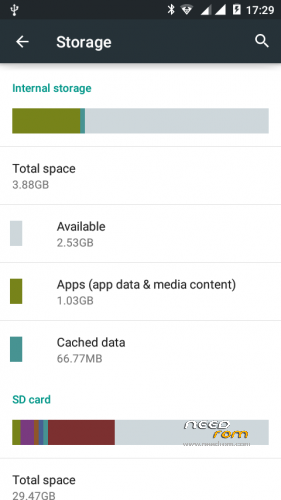
THIS VERISON 3.88GB for DATA and 2.16GB for internal SDCARD !!!
WARNING PLEASE BACKUP FIRST !!!!!
WARNING all data on internal SDCARD 4GB size – LOST IN THIS PROCCESS !!!!! Please backup your data from internal sdcard.
Please read !!!!
1. First go to custom recovery and backup you firmware
2. Run reformat script – after script end (auto reboot to recovery) and you need run format.zip from sd card (this file auto create in sd card by reformat script)
3. Ok now restore your backup, and reboot device
4. Check memmory settings
WARNING if after reformat gsm not work, restart phone over remove battery and insert back.
And please always create backup.
※Please make a backup of your device before installing or updating ROM
i Pref link2sd script it's mush easyer but thanks for hard wok
Thank you brutal4028 for this hard work and much support for this phone
Working very nice with Official ROM Doogee Voyage2 DG310 version: DOOGEE-VOYAGER2_DG310-Android5.0-V40-20151223 – SM619B_W_DG_A26_L_V40_S1223 – 5.0 LRX21M and no problems seems.
Thank you brutal4028 for this nice and clean work…
Tutorial:
Put the zip file on your external SDcard and install it
Hi for all, sorry for my bad english
I have a problem with my doogee
I returned the phone to system default settings with system sd format, but forgot that I had a reformated memory(added 4 gb for apps)
It-s possible to reanimate my device?
Used AOSP V3
excuse me someone can help me since I do not know how to perform the procedure I have the original recovery and android lollipop
discúlpeme alguien puede ayudarme ya que no sé cómo realizar el procedimiento Tengo la recuperación original y la piruleta Android
hey i wants ios rom for doogee dg310