
- Title: MMC reformat 4×2 Lollipop
- Listed: June, 2015
- Last modified: 06/05/2015 4:55 pm
- Version: Lollipop
You must be logged for ROM download.
24091 total views, 2 today
12 Total favorites
 Member Info
DESCRIPTION
WARNING only for custom recovery, only for unlocked bootloader !!!
WARNING only for LOLLIPOP
WARNING after reformat not posible to mount internal sd card to PC, USE MTP mode connection instead
WARNING after reformat dont erase internal SDCARD !!!! DONT FORMAT INTERNAL SDCARD OVER WINDOWS DIALOG!!!
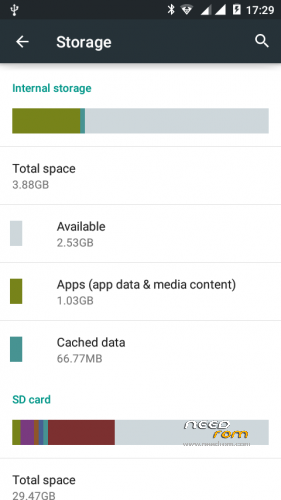
THIS VERISON 3.88GB for DATA and 2.16GB for internal SDCARD !!!
WARNING PLEASE BACKUP FIRST !!!!!
WARNING all data on internal SDCARD 4GB size – LOST IN THIS PROCCESS !!!!! Please backup your data from internal sdcard.
Please read !!!!
1. First go to custom recovery and backup you firmware
2. Run reformat script – after script end (auto reboot to recovery) and you need run format.zip from sd card (this file auto create in sd card by reformat script)
3. Ok now restore your backup, and reboot device
4. Check memmory settings
WARNING if after reformat gsm not work, restart phone over remove battery and insert back.
And please always create backup.
※Please make a backup of your device before installing or updating ROM
Thank you…
great job….thank you !!!
I want to restore the old partition
help me pls
Flash again the rom
se mebrickeo el telefono, cumplia todos los requisitos, y hice los pasos como eran
I'm currently unable to install this, after apliying the cnreformat4-5 file the format.zip scrip file doesn't appear and I have to re-flash to fix it. This is what I did:
1. Installed a brand new 32GB card and flashed the phone with AOSP v3.0.1 ROM (and all the updates)
2. Copied cnreformat4-5 to internal storage (sdcard 0)
3. Aplied it in recovery mode and it completed and auto-rebooted to recovery.
4. In recovery I go to "install zip>choose zip from sdcard 1" and there is no format.zip file and if I try to open sdcard 0 appears the message "E: Can't mount /storage/sdcard0"
I've tried 3 times and the same happens every time. Can anyone help me or has someone found a solution?
I also tried this just in case and it didn't work:
In fact format.zip is not created.
My solution (using AOSP 3, from here):
1. Go to recovery, backup. You really need to backup using recovery or phone will not boot and you'll need to reflash.
2. Install 4×2 reformat (you can download it from here). Phone will reboot to recovery when script is finished.
3. Now, do not run format.zip that was created. Run Reformat 6Gb (download here). Phone will reboot again to recovery.
4. Now you need to run format.zip that was created with first script. After it finishes, got to backup/restore in recovery and restore the backup you made previously.
Finally! After many tries I could format my internal storage which became corrupted in a failed install of this file. I had to flash the official ROM, then AOSP 3.0.1 and then I was able to format.
Hi,
does anybody know if this will work on the samsung s4 Mini of my wife?
or is there another version for samsung that you know of?
thank you!
Hello everyone, sorry about my bad english , I am writing to see if anyone can help me. I have a DG310 which I had it installed AOSP V3.0.1 and CWM recovery carliv mod. I use the reformat MMC 4×2 and I did the backup system , but I forgot to save it on the computer , nor save on the external sd . After my big mistake ( I had already used the script and gave the format.zip ) The phone will restarted.
I have tried many times to reinstall the AOSP version v3 , original Lollipop , KitKat , gave form to System Cache, Dalvik , I tried without any success to install through recovery or by FlashTools and nothing remains bricked the phone .
I have tried many times to reinstall the AOSP version v3 , original Lollipop , KitKat , gave form to System Cache, Dalvik , I tried without any success to install through recovery or by FlashTools and nothing remains bricked the phone .
I wonder if there is some way to reformat the internal memory to make it in the original way, or if someone has a backup AOSP , or have any suggestions or ideas to retrieve my phone . would be eternally grateful
Worked for me like a charm! Thank you brutal4028 for your efforts!
Hmmz,
- installed AOSP 3.0,
- Installed update to 3.1.0,
- started up phone to check if droid was working
- Went into recovery, made a backup
- installed the mmc-reformat,
- installed created format.zip
- rebooted (after confirming question to root the device)
- and the screen went blank, no no doogee logo showing.
Any ideas?
lol, forgot to restore the created backup….
*started reading his "how to read instructions" manual
Hello, if some other day you want to go back and put everything as they was how can you do that?