
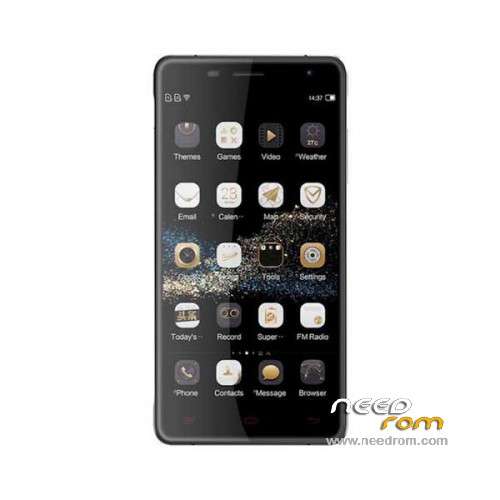
- Title: Oukitel K4000 Pro
- Listed: January, 2016
- Last modified: 06/03/2016 1:12 am
- Version: ROM Android 5.1
You must be logged for ROM download.
27445 total views, 4 today
25 Total favorites
 Member Info
DESCRIPTION
ROM Mobile Oukitel K4000 Pro – ROM Android 5.1
ONLY MT6735M
Update Official ROM Oukitel K4000 Pro version: OUKITEL_K4000_PRO_V9.0_20160526 – t89n-ts-t96-33pgu-hd-128g16g – full_hct6735m_35gu_l-user 5.1 LMY47D
—————————————————————————————————————————————————————————–
Update Official ROM Oukitel K4000 Pro version: OUKITEL_K4000_PRO_V6.0_20160201 – t89n-ts-t96-33pgu-hd-128g16g – full_hct6735m_35gu_l-user 5.1 LMY47D
—————————————————————————————————————————————————————————–
Official ROM Oukitel K4000 Pro version: OUKITEL_K4000_PRO_V4.0_20160106 – t89n-ts-t96-33pgu-hd-128g16g – full_hct6735m_35gu_l-user 5.1 LMY47D
Gapps include – No Rooted
Language support: Multilang
Install ROM:
Install with SP MDT:
1). Turn off the smartphone. Cable is not connected to the computer.
2). Remove the battery and insert it again
3). Connect your phone to a computer cable. The operating system detects a new device
4). Disconnect the cable from the computer.
5). Run SPMultiPortFlashDownloadProject.exe
6). Choose File> Open File Agent download and specify the file MTK_AllInOneDA.bin (it is in the folder SP_MDT).
7). Click Scatter File and select the MT6735M_Android_scatter.txt file (it's in the folder with the rom).
8). Click "Start all".
9). Connect your phone to a computer cable. The program should see and blink. If the phone is not detected, then unplug it from the computer,
remove and insert the battery (if the battery is removable) and reconnect it to the computer.
10). After (OK) click Stop and disable any phone.
11). Completed.
※Please make a backup of your device before installing or updating ROM
So whaat is new in verion 9??
and why can't I see it in OTA updates? because I rooted?
http://forum.concord.com.tr/sh.....hread.php?tid=9
i found a cm 12.1 rom for the K4000 pro
and flashed it on the k4000 with trwp recovery
rom works fine only camera has no focus but works good enough
xposed frame work allso installed and works
no other problems found
but you must flash root no root out of the box
http://www.movilesdualsim.com/.....mdsteam.135747/
hey thanks for that link, i have been using that image for the past two weeks. found a few issues.
gms is only working, Im unable too force anything other than gsm as in the engineermode the option is greyed out.
most videos won't playback properly, usually pops up with an error but will play the audio in the background. tried with multiple vidoe players installed.
and the cameras don't autofocus also that have a very pink tint too them.
im prettty new too android (im more comfortable with redhat linux…) so im unable too invest time into fixing these issues. anyone that has any ideas feel free too email me at,
root.user@hushmail*com
or via pm here. english only please. i'll be ordering a k6000 pro soon as they seem better supported with cyanogenmod. thanks!
should i flash 3 times continously below
Oukitel K4000 Pro
Oukitel K4000 Pro – Update V6.0
Oukitel K4000 Pro – Update V9.0
can i flash Oukitel K4000 Pro – Update V9.0 only ? im on v6.0_20160201 .. pls advise… thanks
Just v9 I guess. You already have v6. The first one is initial version. But no one posted what is fixed in the new version.
I can't download the v9, what gives?
Clicking the link gives me the login page.
The other download links are okay.
Is there a mode to bypass google account , because i don't remember my account and know even after flasshin it requires it.
Thank you in advance
Regards
i have lost my oukitel original rom? now What Should i do?
download v4.0 and install it according to instruction
i have a prolem: my windows 7 nor install driver from windows update… do you post the driver or name please? the pc will detect device as mt29xx and not install the driver because not detect it in windows update
ok, the problem is solved… i has not install sp mdt
hi, i have some problems with installation: do you post me an updated guide please? NOTE: i'm not expert in rom installation and this is my first installation. PS: my phone system not work because it briked for a bad use of lucky patcher. need install without android. HELP ME PLEASE
steps for solve you problem (testet from me): download install on the pc the mediatek drivers (includes in spmdt software in this guide) and disconnect phone from PC; download rom in this guide and install it with flash tool, set DA.bin (included in flashtool package) and scatter file (included in rom) and click download; remove battery from the phone and iserit it again; connect phone to pc and attend the download. if the download not start press power botton and download start automatically. easy!