
- Title: P70-A USR S134 150729 16G ROW
- Listed: August, 2015
- Last modified: 08/23/2015 12:11 am
- Version: S134 150729
You must be logged for ROM download.
29133 total views, 1 today
12 Total favorites
OFFICIAL
 Member Info
DESCRIPTION
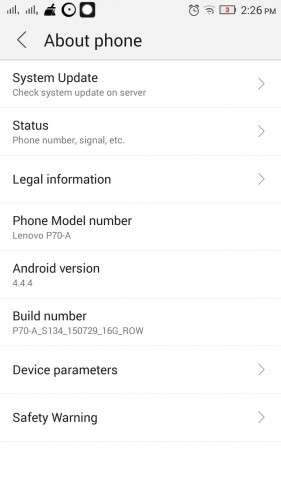
This is the latest official rom for Lenovo P70-A international version with 2GB ram
Use TWRP recovery to flash this rom
1- Copy the rom to your internal phone storage
2- Turn off your phone
3- Press on VOL+ & Power till you get a screen with 3 Options
4- Choose recovery using the VOL+ key and VOL- to confirm
5- Press install and choose the rom zip file to flash from your internal phone storage
6- Wipe Data + Cache
7- Enjoy 
Please visit this link for TWRP Recovery & Root
https://www.needrom.com/download/lenovo-p70-a-p70-t-twrp-update/
※Please make a backup of your device before installing or updating ROM
thanks for your rom!
You are welcome
Thanks a million! Two thumbs up! Official rom version is best for usability. Thanks again.
tthank you
Does it work on P70-T , chinese version ?
(I dont mind about the 3g/4g)
Hello Nek4d,
Have you tried on Lenovo 70-t? I have the same problem. I have a Lenovo P70-t with 2gb Ram and 16 gb bought in China, with WCDMA as 3g. But I want to use the Row version that is international.
hey, sir. Use both links? part1 and 2?
HI, can I use stock recovery for flashing this update (i want to downgrade from 5.1 stock ota update)
I just tried to flash with stock recovery and dind't succeed. If I flash TWRP can I flash back stock recovery later.
I have managet to get in stock recovery (pass "no command" scren) and when I try to update from sd card file P70-A_S134_150729_16G_ROW.zip i get this:
– Install /data/media/0/P70-A_S134_150729_16G_ROW.zip …
Opening update package…
Error: System property does not match
Installation aborted.
Andorid system recovery <3e>
P70-a_S138_151020_16G_L_ROW
Can someone pease help me with this
I'm having the same problem as you with the "No Command" screen.
Did you solved it out??
If yes can you tell me how please
thanks
You must download both part or only one part??
I only downloaded the first part and when I get in recovery mode the "No command" screen appears. Can you help please
You have to download booth parts and then open P70-A_S134_150729_16G_ROW.part1_.rar with win rar and extract it (it is actualy one zip file P70-A_S134_150729_16G_ROW.zip 1.2gb size that is splited in two parts)
Sorry for late reply, to bypass "No command" you have to press and hold power buton for about one second and then press vol+ (stil holdnig power). Afer that recowery menu apear. I tried to flash from sd card but i get error, tried to do a backup before that but it need 12gb free space to backup things (don't know what I have in that 12gb, I brought a phone 14 days ago and it is in stock state still).
Thank you for trying to help. I actually extracted the part 1 as you said and copied it to my phone but when I get in recovery mode it still gives me the "No Command" screen.
So I tried to press the power button 1 sec earlier and then press the VOL+ button while holding the power button, but still the "No Command" screen appears when I get into recovery mode.
I really don't know what to do now :/
Hello , is there any problem if i was setup this rom with SP flash tool ?
NOTE: don't try to format your phone by using SP Flash tool. used SP Flash tool to setup this rom only. in Download menu.