
- Title: SOLONE SL-SA5
- Listed: April, 2015
- Last modified: 04/04/2015 5:08 pm
- Version: ROM Android 4.4.2
You must be logged for ROM download.
15163 total views, 1 today
2 Total favorites

 Member Info
DESCRIPTION
ROM Mobile SOLONE SL-SA5 – ROM Android 4.4.2
ONLY MT6582
Official ROM SOLONE SL-SA5 version: SOLONE_SL-SA5_SW_10 – A3466_DA34661_SOLONE-SL-SA5_L105 – KOT49H
Gapps include – No Rooted
Language support: EN/CN/ES
ROM Install :
- Unpack FlashTools, and Click on Flash_tool.exe
- Select a the MT6582_Android_scatter.txt in ROM
- Wait file to be added into Flash Tool
- choose Option->USB Model,click USB Model
–> Choose Option->DA DownLoad All->Speed->High Speed, click High Speed
- Turn off your phone, remove the battery.
- "Press F9 (hit Download button)" OR " if upgrade ROM Firmware->Upgrade "
- and connect your phone into the computer via USB data cable.
- The process will start and a red progress bar will appear after color purple, yellow.
- And green circles display
- Finish !
- You can now safely disconnect your phone and turn it on.
※Please make a backup of your device before installing or updating ROM
Amigo, me sale error al querer cargar MT6582_Android_scatter.
Podras poner un manual mas explicito pls.
hola que tal como estas ya descargue los dos achivos y al poner la rom en el Flash_tool.exe
me aparese esto:
image uboot checksum failed
es estro lo que me aparese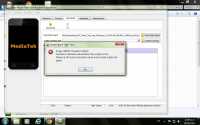
Hello, same problem as above. Please, any comment, tip or advice?
Thanks.
Hello, a few days ago i´ve left a note with a problem. Please, when i try to load the scatter file into Flashtools, it says "Image UBOOT checksum failed!" and can´t get forward… Any solution to this, please? I really apprecite any comment, tip or whatever help you can give me. Thanks a lot.
hi! dude
, look in the folder whit the name checksum.ini, and change the value 1 to 0 in checksum_switch
i hope in help you good look
respuesta para todos los que tienen el problema image uboot checksum failed
solamente tienen que ir hasta el archivo MT6582_Android_scatter.txt abrirlo con el editor de texto de windows y cambiarle en la linea que dice
CHECKSUM_SWITCH=1 y ponerle =0 con eso pude recuperar mi ladrillo de solone
suerte
ni siquiera existe ese comando dentro del scater
buen dia amigo para complementar la info el error se corrige en la zona que dice checksum.ini que tambien viene en la parte de la carpeta
listo…. ya lo cambie y funciono.. muchas gracias…