
- Title: STAR N3+
- Listed: April, 2014
- Last modified: 12/26/2014 4:45 pm
- Version: ROM Android 4.2.2
You must be logged for ROM download.
47815 total views, 8 today
8 Total favorites
 Member Info
DESCRIPTION
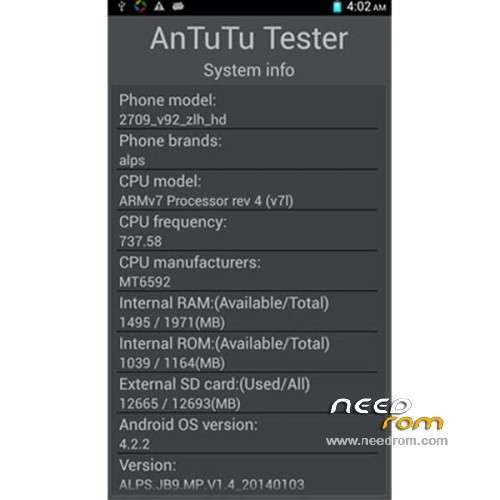
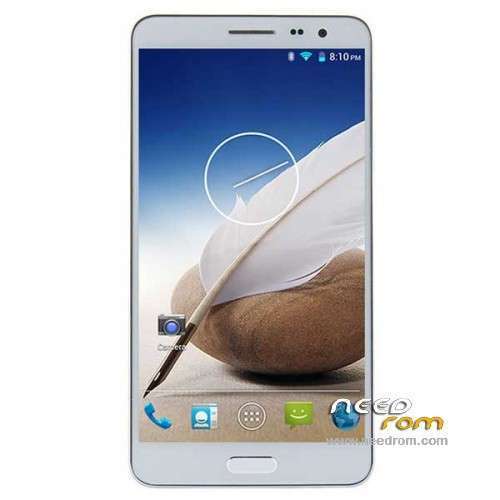
ROM Mobile STAR N3+ – ROM Android 4.2.2
ONLY MT6592
Update Official ROM STAR N3+ version : 2709_v92_zlh_hd_20140828
Changelog:
20140828 zhangchong
Upgrading memory (Jiali module)
20140828 zhangchong
Upgrading memory
20140703 zhangchong
Optimize camera ov8825_mipi_raw
Bluetooth, phone model, WIFI model change
20140611 ldd
Li Jia taken before and after care to select the module upgrade
———————————————————————————————————————————————-
Update Official ROM STAR N3+ version : 2709_v92_zlh_hd_20140605
Changelog:
20140605 ldd
Compatible with the latest Flash, CMK camera
20140527 ldd
TSF solve dynamic shading
Replace with new wallpaper
20140509 ldd
TSF solve dynamic shading
20140507 ldd
3G video call interface to solve the confusion (Hebrew)
———————————————————————————————————————————————-
Update Official ROM STAR N3+ version : 2709_v92_zlh_hd_20140404
———————————————————————————————————————————————-
Update Official ROM STAR N3+ version : 2709_v92_zlh_hd_20140225
———————————————————————————————————————————————-
Official ROM STAR N3+ version : 2709_v92_zlh_hd_20140103
Gapps include – No Rooted
Language support: Multilang
Install ROM :
- Unpack FlashTools, and Click on Flash_tool.exe
- Select a the MT6592_Android_scatter_emmc.txt in ROM
- Wait file to be added into Flash Tool
- choose Option->USB Model,click USB Model
–> Choose Option->DA DownLoad All->Speed->High Speed, click High Speed
- Turn off your phone, remove the battery.
- "Press F9 (hit Download button)" OR " if upgrade ROM Firmware->Upgrade "
- and connect your phone into the computer via USB data cable.
- The process will start and a red progress bar will appear after color purple, yellow.
- And green circles display
- Finish !
- You can now safely disconnect your phone and turn it on.
※Please make a backup of your device before installing or updating ROM
2709_v92_zlh_hd_20140404
this is a good rom! but it got hot faster in gaming (50deg). but it is the best of all others, and stable…
there are a lot of requests for KitKat I think, any news about it?
So guys… Flashed ROM STAR N3+ version : 2709_v92_zlh_hd_20140605 and Camera is gone…
EM: App not installed…
Please fix.
just install camera.apk or any other camera application?
please send camera fix……
HI,
after flashing from stock rom ( 2709_v92_zlh_hd_20140404 ) to latest rom you posted here ( 2709_v92_zlh_hd_20140605 ) my
camera stopped working. When try to turn on camera it said " Cant connect to the camera ".
I tried flash old verion i had already on my phone 04042014….. but camera dont work again.
Is there any procedure to get camera back ?
Also when flashing should "preloader" , "cashe" and "usrdata" be checked or not ? I read somewhere that when tose are checked will brick device so I didnt keep those checked when downloaded on phone ! So please tell me is there any fix for this ?
Please make an update with fixes!Tahnx
Hi all — I did the same usual – flashed 06/05 update from 04/04 and usual camera did not work–its not even usuable via camera apps from playstore -ie the framework for camera isn`t in the device afterflash.
Also a bit more info here for anyone who bricked their device like i did lol….
I did something in the Flashtools process that wiped and brick my device ie had it set on that setting instead of download in flashtools after many times trying to get flashtools to connect to phone and when it did it wiped it)
I flashed back to 04 04 rom using flashtool after being bricked ->
Pressing no buttons on phone- made sure flashtool was set to `download only` and press the `download` arrow and conected cable to phone–counted to 3- slipped out battery from phone and back immediately- and phone was being flashed with the correct rom – after this i used MTKdroid 2.5.3 tools and noticed my imei numbers set to nul-ZERO- The MTK tools would not root the phone- No worry,i used Vroot – Great works ! — Then The root button Gives temp root on device and you can change your imei number – great works!
Once alls done , after imei changed i went thru the process which wasn`t lit up earlier(before Vroot) of install superSU and then option `boot from phone` second option down flashes CWM to phone and `Viola` back to where it was before it crashed and all nice and clean n fresh
Once back up n running used system app uninstaller from playstore and removed vroot superuser Bingo !
I know some might find this useful
more info re above- i love playing about with devices and bricked my phone again after this and followed this process again and worked a treat !
Remember – you play with your own device at your own risk
imei is invalid pleaze help !
Imei invalid->Use `Vroot` to root device then you can change imei via `mtkdroid tools2.5.3` – first- choose `root`button in mtkdroid tools after Vroot- it gives temp root in mtktools and then you can change imei numbers – press ok and press power button on phone and reboot- then your imei `s will be corrected
Sometimes – you might have to install SuperSu(chainfire) via playstore(happened to me once) and in settings-> build into system - which then asks to remove other superuser from Vroot – allow and retry above ^^^
I will do a video soon – no doubt i`ll brick it again -Note, 4.4 roms hammer the ram so still searching for a 4.4 that doesnt use up over half the ram straight off before it gets chance to take up even more- all 4.4 roms so far are just not upto it yet !